







Question: Create a web page Create a web page named compassGame.html that displays E (for east), S (for south), N (for north), and W (for west)
Create a web page
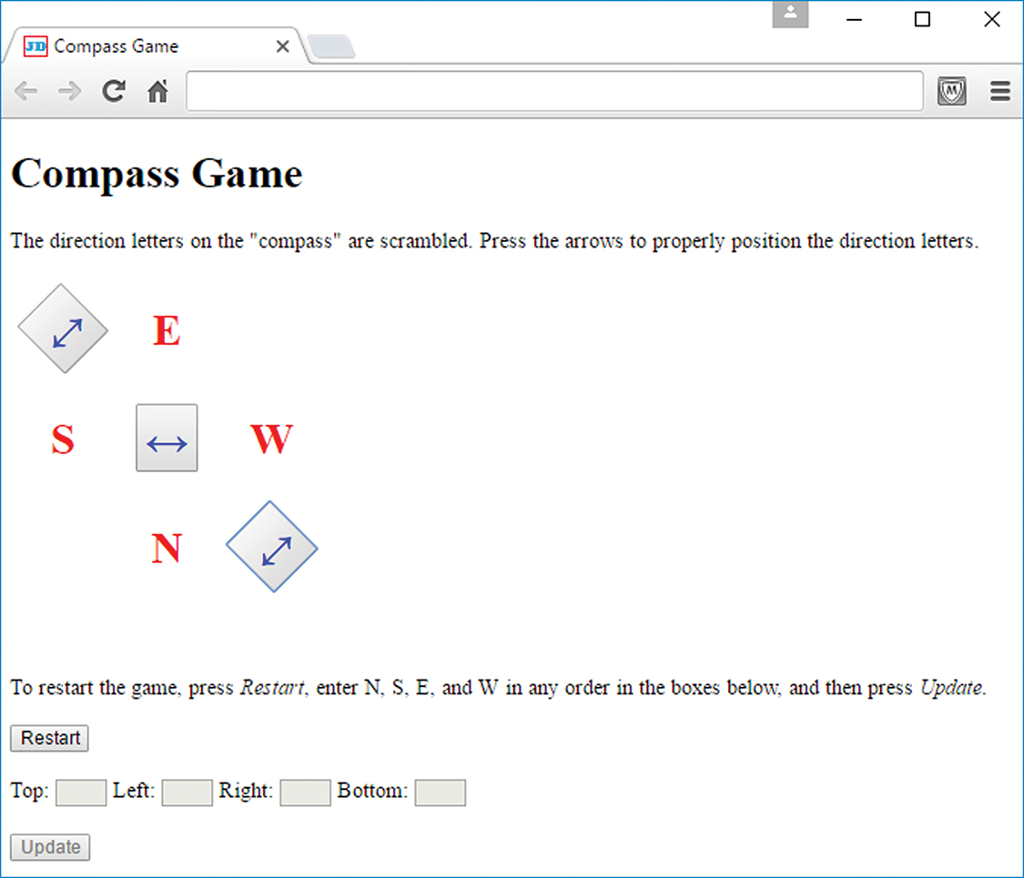
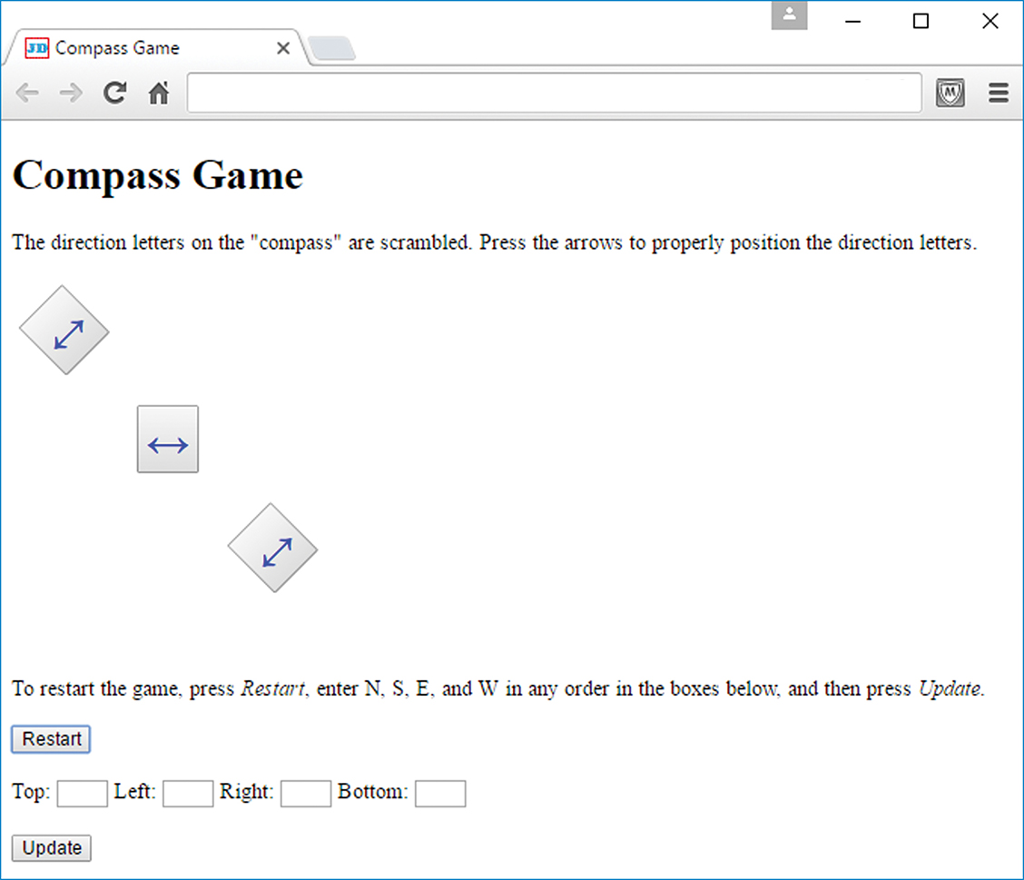
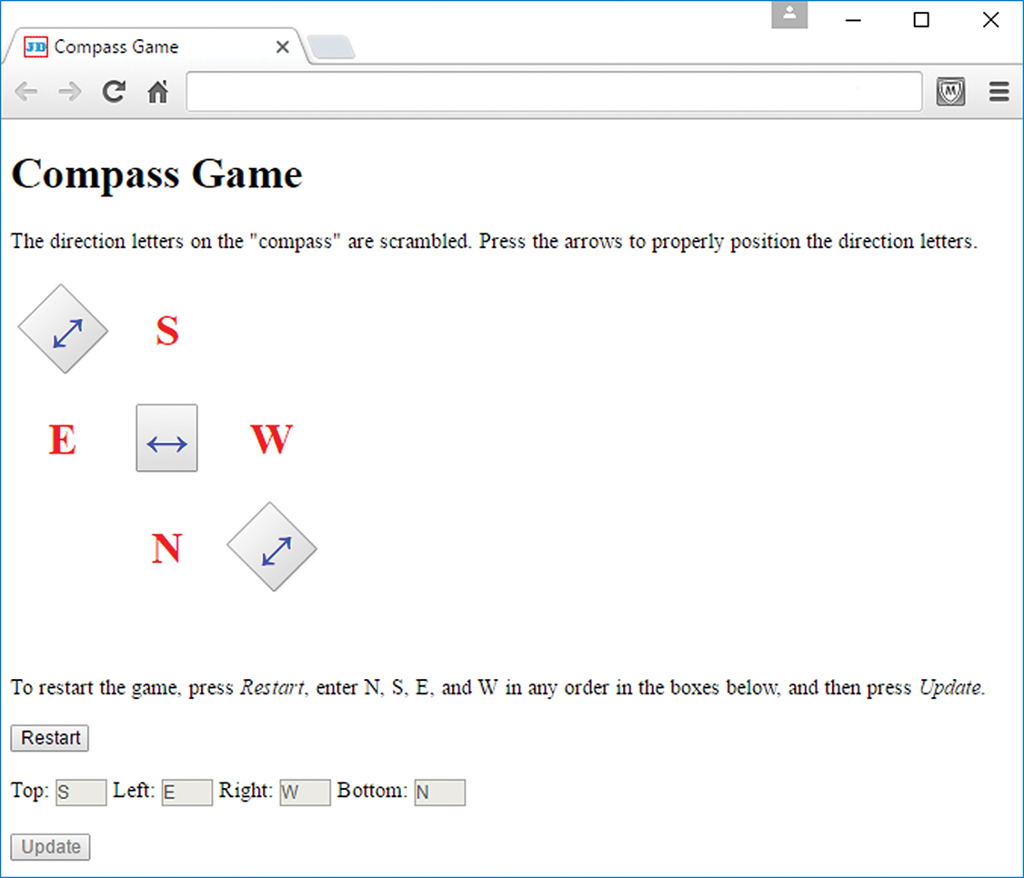
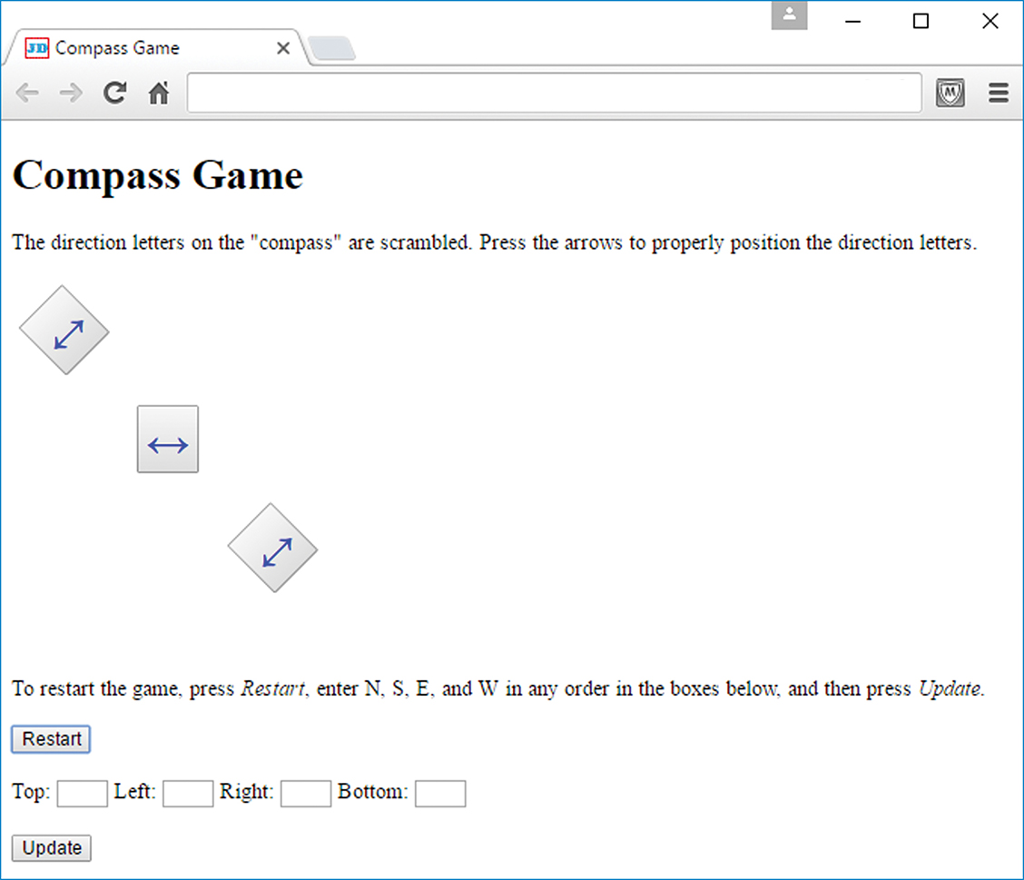
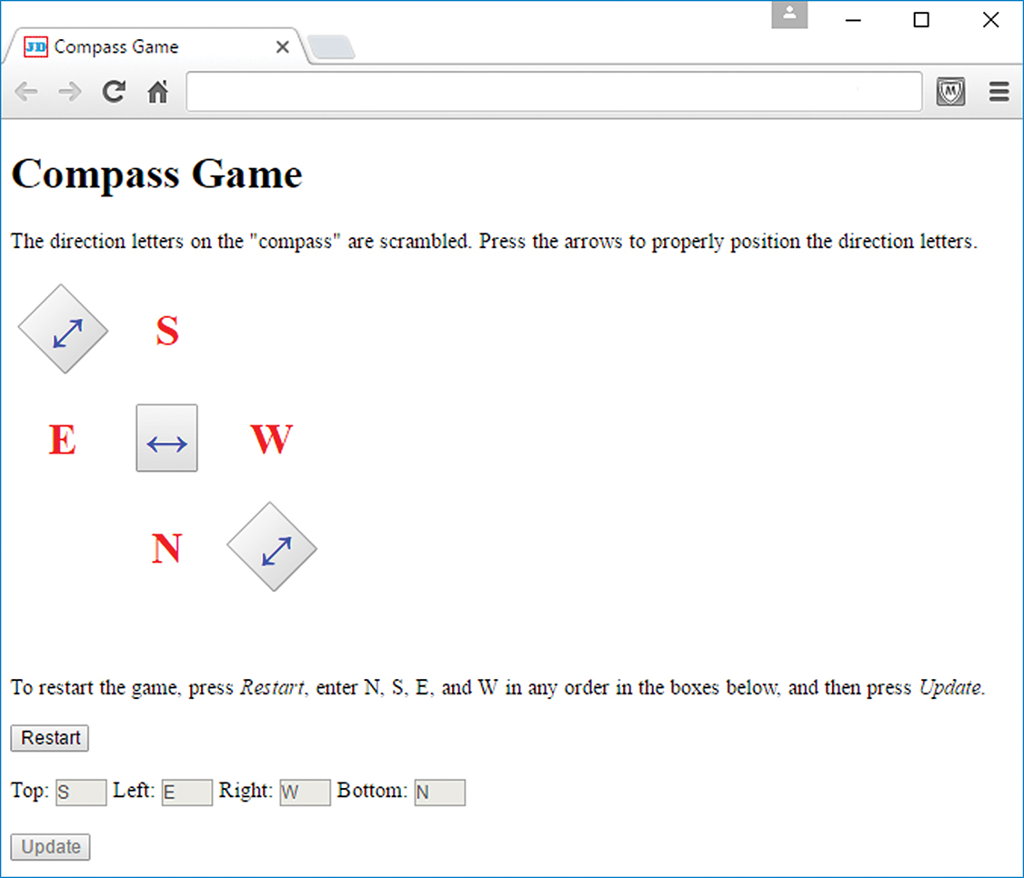
Create a web page named compassGame.html that displays E (for east), S (for south), N (for north), and W (for west) as shown in the sample sessions first screenshot, and asks the user to rearrange the four directions so they are positioned correctly for a compass. In the sample session, note how the three bidirectional arrows swap the direction letters. Initially, the text controls and the Update button are disabled. When the user clicks the Restart button, the four direction letters are erased, and the text controls and Update button are activated. When the user clicks the Update button, the text control values are copied to the direction letters, and the text controls and Update button are disabled.
Note:
To achieve the proper layout for the direction letters and bidirectional arrows, use the CSS display property with table values. And for the table rows and cells, use CSS child selector rules, not class selector rules.
The text controls must be as narrow as possible and must hold a maximum of one character each. In the sample session, the text controls are not very narrow, but that is Chromes fault. Use code that specifies maximally narrow text controls.
In the sample sessions browser windows, in the second sentence, note that Restart and Update are italicized.
Provide code that displays a warning message on browsers that have JavaScript disabled. The warning message should not display on browsers that have JavaScript enabled.
To rotate the top-left and bottom-right arrow buttons, use the following class selector with the transform property:
.diagonal {transform: rotate(-45deg);}
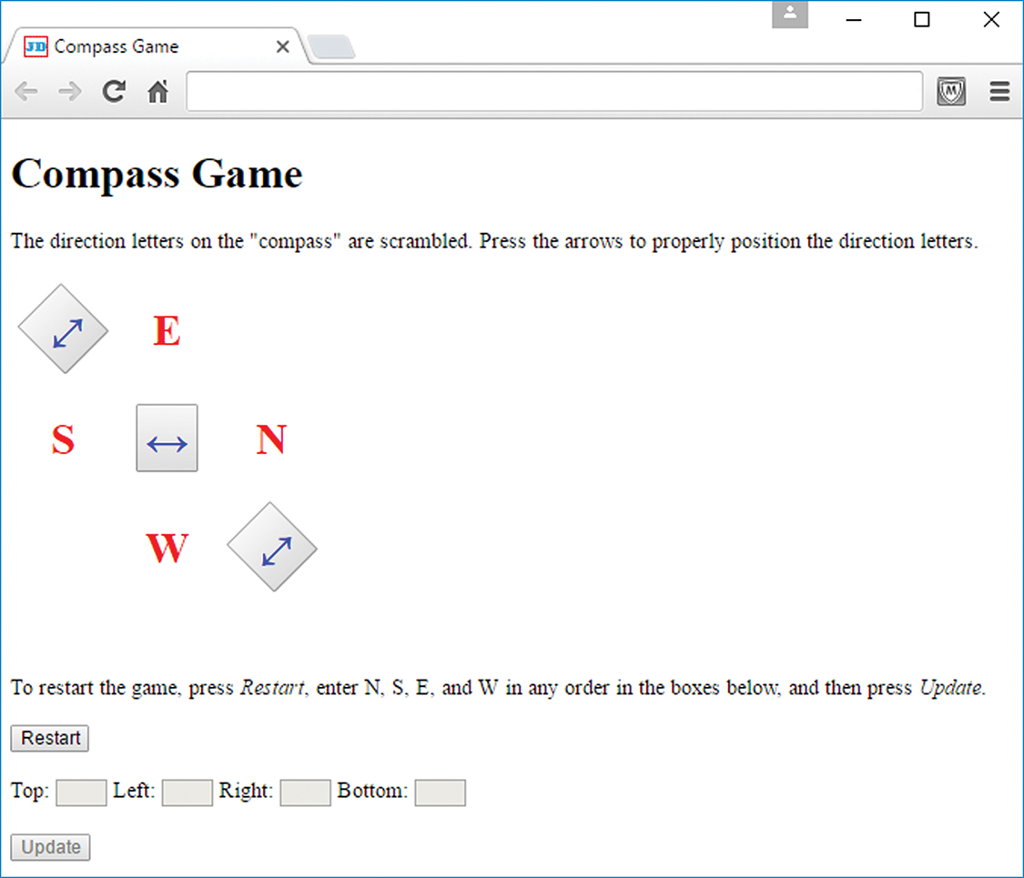
After pressing the bottom-right arrow:
After pressing the Restart button:
After entering S, E, W, and N in the text controls and pressing the Update button:
Show transcribed image text
named compassGame.html that displays E (for east), S (for south), N (for north), and W (for west) as shown in the sample sessions first screenshot, and asks the user to rearrange the four directions so they are positioned correctly for a compass. In the sample session, note how the three bidirectional arrows swap the direction letters. Initially, the text controls and the Update button are disabled. When the user clicks the Restart button, the four direction letters are erased, and the text controls and Update button are activated. When the user clicks the Update button, the text control values are copied to the direction letters, and the text controls and Update button are disabled.
Note:
To achieve the proper layout for the direction letters and bidirectional arrows, use the CSS display property with table values. And for the table rows and cells, use CSS child selector rules, not class selector rules.
The text controls must be as narrow as possible and must hold a maximum of one character each. In the sample session, the text controls are not very narrow, but that is Chromes fault. Use code that specifies maximally narrow text controls.
In the sample sessions browser windows, in the second sentence, note that Restart and Update are italicized.
Provide code that displays a warning message on browsers that have JavaScript disabled. The warning message should not display on browsers that have JavaScript enabled.
To rotate the top-left and bottom-right arrow buttons, use the following class selector with the transform property:
.diagonal {transform: rotate(-45deg);}
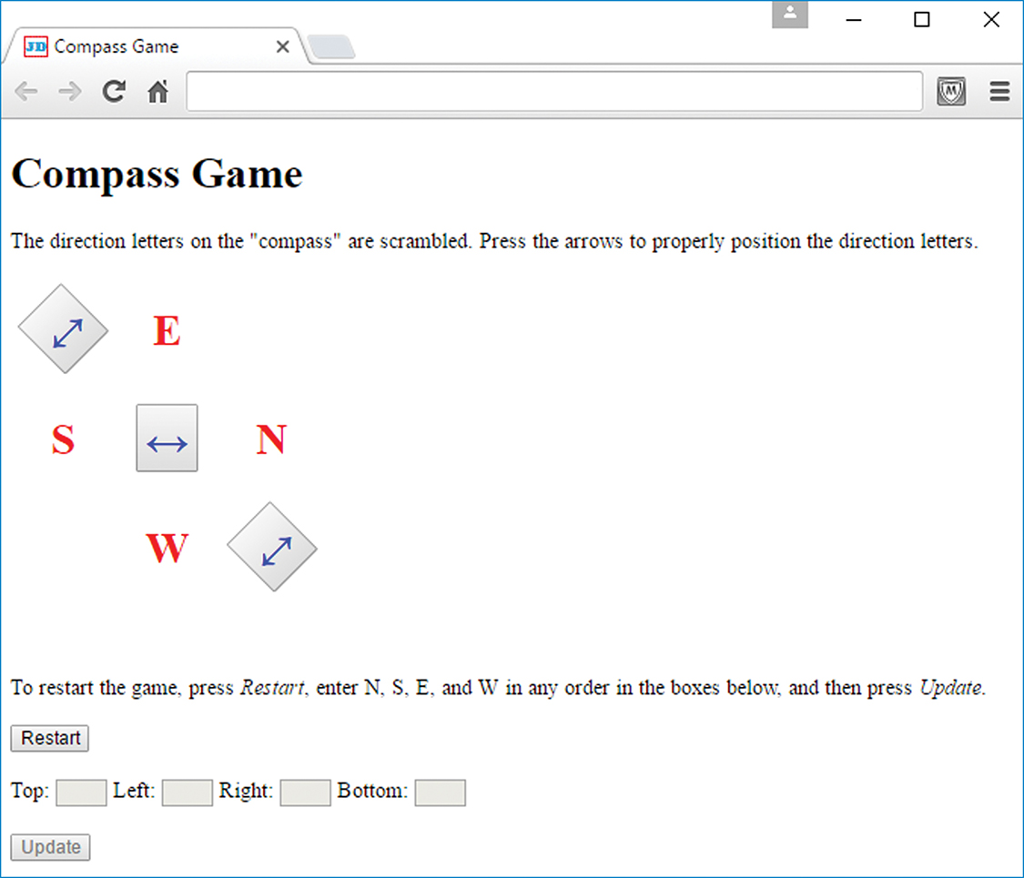
After pressing the bottom-right arrow:
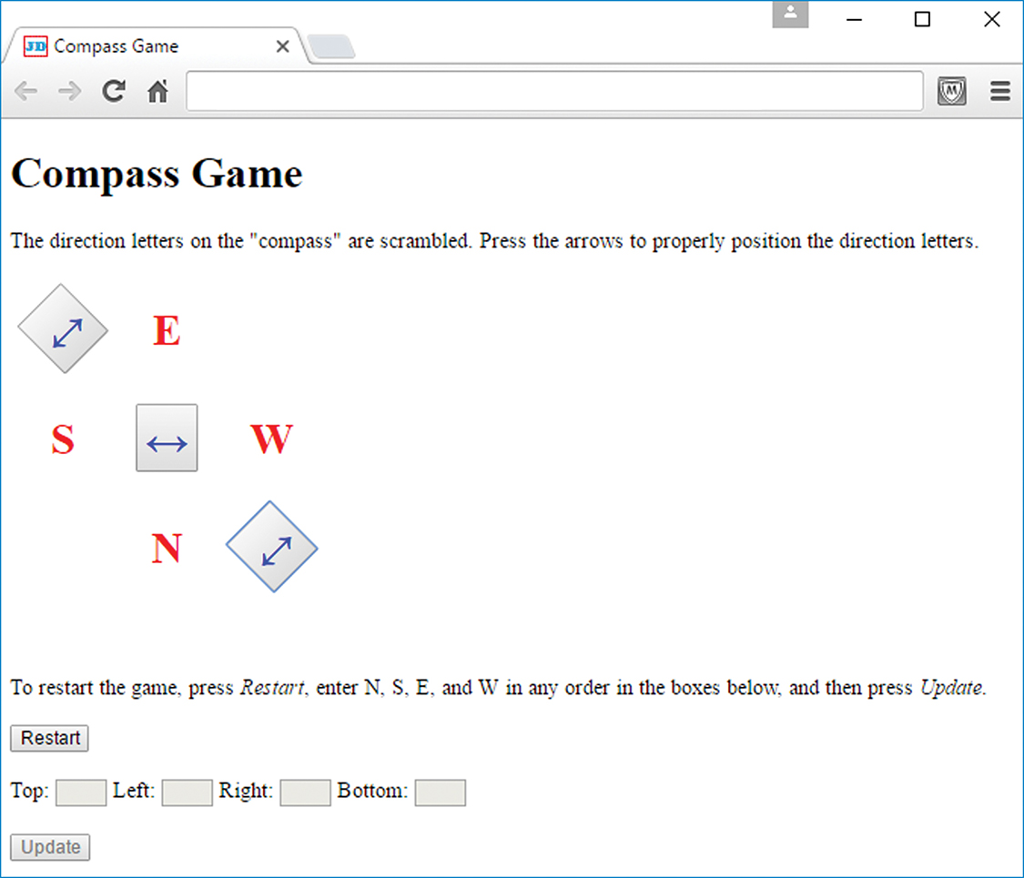
After pressing the Restart button:
After entering S, E, W, and N in the text controls and pressing the Update button:
Show transcribed image text
Compass Game Compass Game The direction letters on the "compass" are scrambled. Press the arrows to properly position the direction letters To restart the game, press Restart, enter N, S. E, and W in any order in the boxes below and then press Update. Restart Top: | i ] Update Left: [ Right: Bottom: Compass Game Compass Game The direction letters on the "compass" are scrambled. Press the arrows to properly position the direction letters To restart the game, press Restart, enter N, S. E, and W in any order in the boxes below, and then press Update. Restart Top ighi: Boom Update Compass Game AC Compass Game The direction letters on the "compass" are scrambled. Press the arrows to properly position the direction letters. To restart the game, press Restart, enter N, S. E, and W in any order in the boxes below and then press Update. Restart Update Compass Game Compass Game The direction letters on the "compass" are scrambled. Press the arrows to properly position the direction letters. To restart the game, press Restart, enter N, S. E, and W in any order in the boxes below, and then press Update. Restart Left E Right: W Bottom: N Update Compass Game Compass Game The direction letters on the "compass" are scrambled. Press the arrows to properly position the direction letters To restart the game, press Restart, enter N, S. E, and W in any order in the boxes below, and then press Update. Restart Top ighi: Boom Update Compass Game Compass Game The direction letters on the "compass" are scrambled. Press the arrows to properly position the direction letters To restart the game, press Restart, enter N, S. E, and W in any order in the boxes below and then press Update. Restart Top: | i ] Update Left: [ Right: Bottom: Compass Game Compass Game The direction letters on the "compass" are scrambled. Press the arrows to properly position the direction letters To restart the game, press Restart, enter N, S. E, and W in any order in the boxes below, and then press Update. Restart Top ighi: Boom Update Compass Game AC Compass Game The direction letters on the "compass" are scrambled. Press the arrows to properly position the direction letters. To restart the game, press Restart, enter N, S. E, and W in any order in the boxes below and then press Update. Restart Update Compass Game Compass Game The direction letters on the "compass" are scrambled. Press the arrows to properly position the direction letters. To restart the game, press Restart, enter N, S. E, and W in any order in the boxes below, and then press Update. Restart Left E Right: W Bottom: N Update Compass Game Compass Game The direction letters on the "compass" are scrambled. Press the arrows to properly position the direction letters To restart the game, press Restart, enter N, S. E, and W in any order in the boxes below, and then press Update. Restart Top ighi: Boom Update
Step by Step Solution
There are 3 Steps involved in it

Get step-by-step solutions from verified subject matter experts
 Study Help