





Question: Create a Web page with a form for calculating the cost of a computer. The resulting page is shown below. 1. Code the form inside
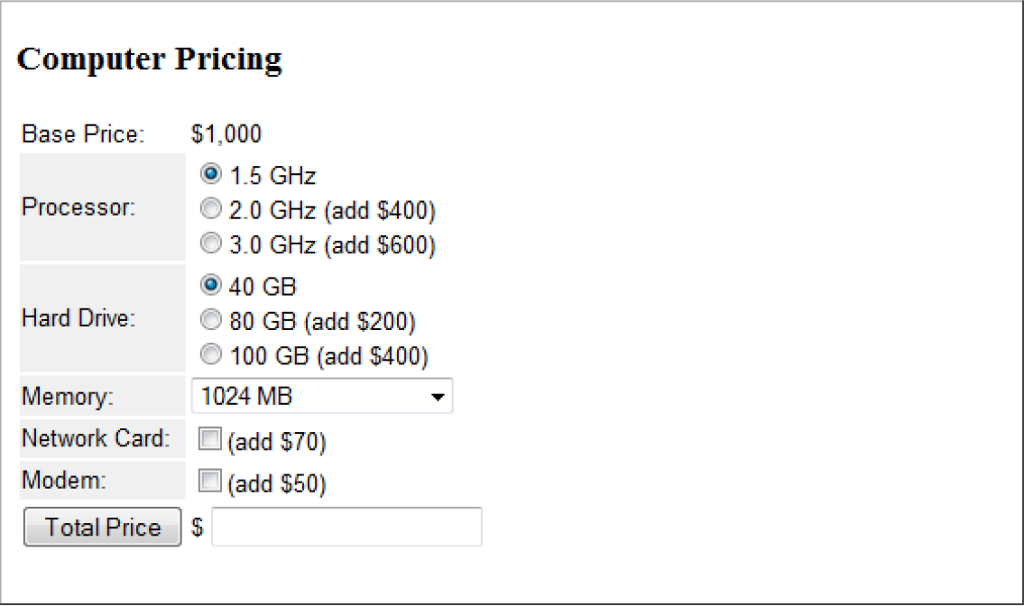
Create a Web page with a form for calculating the cost of a computer. The resulting page is shown below. Create a Web page with a form for calculating the cost of

1. Code the form inside a borderless table with two columns in order to align labels and fields. Table cells are styled with Arial 10pt text. The background color of the first column is #F0F0F0. 2. The form is surrounded by a

tag; neither an action nor a method attribute is required since this form is not being transmitted to the server for processing. 3. The "Base Price" value of $1,000 does not appear in a form field; it is simply displayed in the table cell. 4. Make sure you id, name, and value all of the fields: The ids of the processor radio buttons are Processor1, Processor2, and Processor3; the name of all processor radio buttons is Processor to force a mutually exclusive choice. These buttons have the following labels and values: 1.5 GHz "0" 2.0 GHz (add $400) "400" 3.0 GHz (add $600) "600" The ids of the hard drive radio buttons are HardDrive1, HardDrive2, and HardDrive3; the name of all hard drive radio buttons is HardDrive to force a mutually exclusive choice. These buttons have the following labels and values: 40 GB "0" 80 GB (add $200) "200" 100 GB (add $400) "400" The id of the memory drop-down list is Memory;

Step by Step Solution

There are 3 Steps involved in it

1 Expert Approved Answer
Step: 1 Unlock blur-text-image

Question Has Been Solved by an Expert!

Get step-by-step solutions from verified subject matter experts

Step: 2 Unlock
Step: 3 Unlock

Students Have Also Explored These Related Databases Questions!