





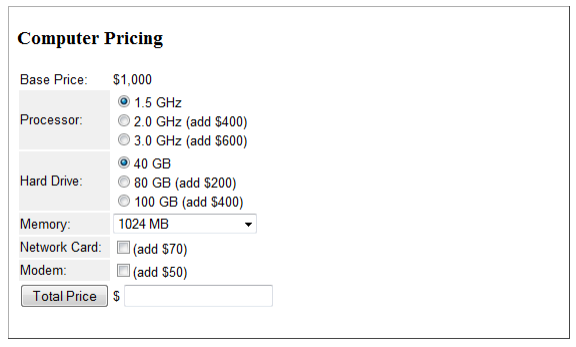
Question: Creating and Submitting a Form Create a Web page with a form for calculating the cost of a computer. The resulting page is shown below.
Creating and Submitting a Form

Create a Web page with a form for calculating the cost of a computer. The resulting page is shown below.

Creating and Submitting a Form Create a Web page with a form

1. Code the form inside a borderless table with two columns in order to align labels and fields. Table cells are styled with Arial 10pt text. The background color of the first column is #F0F0F0.

2. The form is surrounded by a

tag; neither an action nor a method attribute is required since this form is not being transmitted to the server for processing.

3. The "Base Price" value of $1,000 does not appear in a form field; it is simply displayed in the table cell.

4. Make sure you id, name, and value all of the fields:

The ids of the processor radio buttons are Processor1, Processor2, and Processor3; the name of all processor radio buttons is Processor to force a mutually exclusive choice. These buttons have the following labels and values:

1.5 GHz "0"

2.0 GHz (add $400) "400"

3.0 GHz (add $600) "600"

The ids of the hard drive radio buttons are HardDrive1, HardDrive2, and HardDrive3; the name of all hard drive radio buttons is HardDrive to force a mutually exclusive choice. These buttons have the following labels and values:

40 GB "0"

80 GB (add $200) "200"

100 GB (add $400) "400"

The id of the memory drop-down list is Memory;

tags have the following labels and values:

1024 MB "0"

2048 MB (add $300) "300"

4096 MB (add $500) "500"

8192 MB (add $700) "700"

The id of the network card checkbox is NetworkCard; it has a value of "70".

The id of the modem checkbox is Modem; it has a value of "50".

The id of the total price textbox is TotalPrice.

The "Total Price" button is a general-purpose button; it is not a submit button since form information is not being sent to a server for processing.

5. Save the document

Script Processing

1. Add a JavaScript event handler to the "Total Price" button in order to call on a processing script to calculate the total amount of the computer:

2. Enter the following JavaScript code to your page. Place this code inside the section of your page. This script accesses the values entered on the form and calculates the total price of the computer, placing the resulting value in the "Total Price" field.

for calculating the cost of a computer. The resulting page is shown

Computer Pricing Base Price: $1,000 Processor: 2.0 GHz (add $400) Hard Drive: 80 GB (add $200) 1.5 GHz 3.0 GHz (add $600) 40 GB 100 GB (add $400) 1024 MB Memory Network Card: Modem: (add $70) (add $50) Total Price $

Step by Step Solution

There are 3 Steps involved in it

1 Expert Approved Answer
Step: 1 Unlock blur-text-image

Question Has Been Solved by an Expert!

Get step-by-step solutions from verified subject matter experts

Step: 2 Unlock
Step: 3 Unlock

Students Have Also Explored These Related Databases Questions!