







Question: Create a Windows form Application similar to the one given below; Change the text property of the form to Circle .Create a separate class named
Create a Windows form Application similar to the one given below; Change the text property of the form to “Circle”.Create a separate class named “ComputeAreaCircumference”consisting of two functions float ComputeArea(float radius) & float ComputeCircumference(float radius).When the user enters the radius of the circle in the textbox and presses the compute button the functions are called which computes area and circumference of the circle ,and displays them in two labels.
Area of the Circle=Πr2
Circumference of a Circle: 2Πr
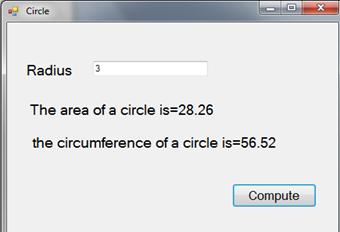
Circle Radius 3 The area of a circle is=28.26 the circumference of a circle is=56.52 0 Compute X
Step by Step Solution
3.51 Rating (151 Votes )
There are 3 Steps involved in it
Solution ComputeAreaAndCircumFerencecs using System using SystemCollectionsGeneric using SystemLinq ... View full answer

Get step-by-step solutions from verified subject matter experts
 Study Help