







Question: Create a Windows Form Application which consists of a label, picture box, one check box and an exit button. On the click of the picture
Create a Windows Form Application which consists of a label, picture box, one check box and an exit button. On the click of the picture box the image changes.
int imageNum = 0;
// change image whenever PictureBox clicked
void picBox_Click(object sender, EventArgs e )
{
imageNum = ( imageNum + 1 ) % 3;
// imageNum from 0 to 2 create Image object from file, display in PictureBox
picBox.Image = Image.FromFile( “C:\\Programfiles\\Projects\\” + "\\images\\image" + imageNum + ".bmp" );
}
void visCheckBox_CheckedChanged(object sender, EventArgs e)
{
pictBox.Visible = ! visCheckBox.Checked;
}
void exitButton_Click(object sender, EventArgs e)
{
this.Close();
}
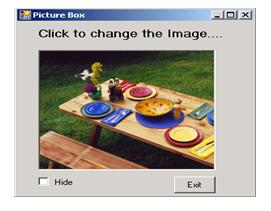
Picture Box Click to change the image.... Hide Exit Ox
Step by Step Solution
3.53 Rating (160 Votes )
There are 3 Steps involved in it
Solution Code using System using SystemCollectionsGeneric using SystemComponentModel using SystemDat... View full answer

Get step-by-step solutions from verified subject matter experts
 Study Help