







Question: Create an amortization table in MS-Excel in the format shown below: LOAN ANALYSIS: Prepared by Kent Saunders Principal $10,000.00 Annual interest 10.00% Term (years)! 10
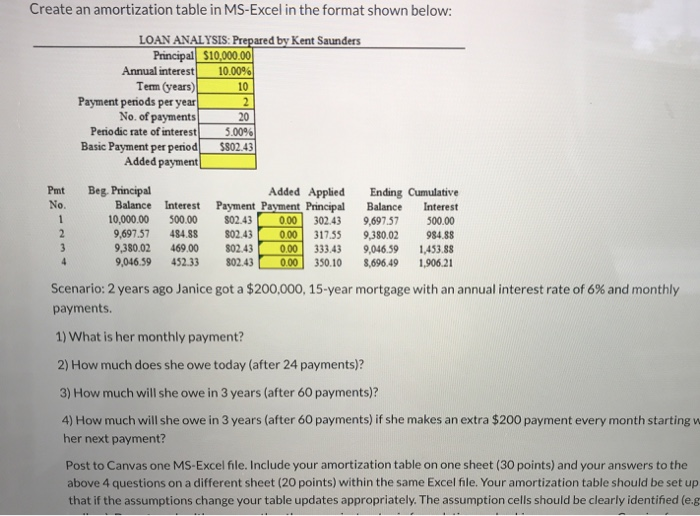
Create an amortization table in MS-Excel in the format shown below: LOAN ANALYSIS: Prepared by Kent Saunders Principal $10,000.00 Annual interest 10.00% Term (years)! 10 Payment periods per year 2 No. of payments 20 Periodic rate of interest 5.00% Basic Payment per period $802.43 Added payment | Pmt No Beg. Principal Added Applied Balance Interest Payment Payment Principal 10,000.00 500.00 802.43 0.00 302.43 9,697.57 484.88 802.43 0.00 317.55 9,380.02 469.00 802.43 0.00 333.43 9,046.59 452.33 802.43 0.00 350.10 Ending Cumulative Balance Interest 9,697.57 500.00 9,380.02 984.88 9,046,59 1,453.88 8,696.49 1,906.21 2 3 4 Scenario: 2 years ago Janice got a $200,000, 15-year mortgage with an annual interest rate of 6% and monthly payments. 1) What is her monthly payment? 2) How much does she owe today (after 24 payments)? 3) How much will she owe in 3 years (after 60 payments)? 4) How much will she owe in 3 years (after 60 payments) if she makes an extra $200 payment every month starting w her next payment? Post to Canvas one MS-Excel file. Include your amortization table on one sheet (30 points) and your answers to the above 4 questions on a different sheet (20 points) within the same Excel file. Your amortization table should be set up that if the assumptions change your table updates appropriately. The assumption cells should be clearly identified (e.g
Step by Step Solution
There are 3 Steps involved in it

Get step-by-step solutions from verified subject matter experts
 Study Help