







Question: Create an amortization table in MS-Excel in the format shown below: 10 LOAN ANALYSIS: Prepared by Kent Saunders Principal $10,000.00 Annual interest | 10.00% Term
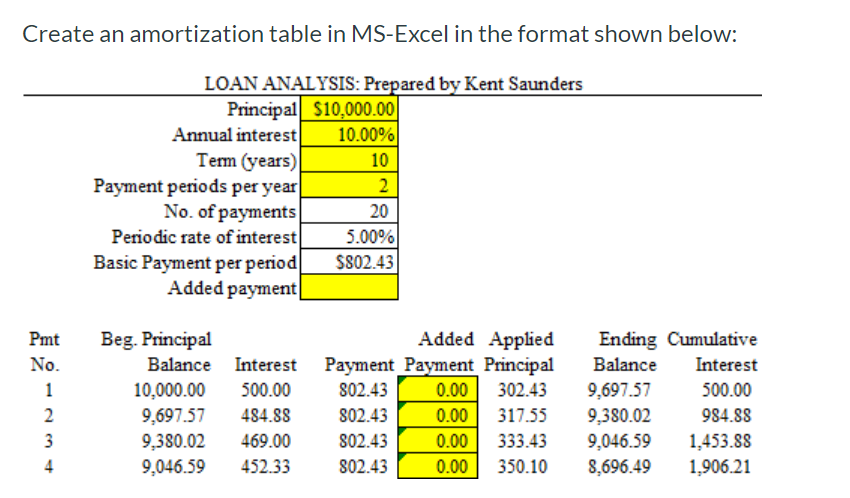
Create an amortization table in MS-Excel in the format shown below: 10 LOAN ANALYSIS: Prepared by Kent Saunders Principal $10,000.00 Annual interest | 10.00% Term (years) Payment periods per year No. of payments Periodic rate of interest 5.00% Basic Payment per period $802.43 Added payment 20 Pmt No. Beg. Principal Balance Interest 10,000.00 500.00 9,697.57 484.88 9,380.02469.00 9,046,59452.33 Added Applied Ending Cumulative Payment Payment Principal Balance Interest 802.43 0.00 302.43 9,697.57 500.00 802.43 0.00 317.55 9,380.02 984.88 802.43 0.00 333.43 9,046.59 1,453.88 802.43 350.108,696.49 1,906.21 Create an amortization table in MS-Excel in the format shown below: 10 LOAN ANALYSIS: Prepared by Kent Saunders Principal $10,000.00 Annual interest | 10.00% Term (years) Payment periods per year No. of payments Periodic rate of interest 5.00% Basic Payment per period $802.43 Added payment 20 Pmt No. Beg. Principal Balance Interest 10,000.00 500.00 9,697.57 484.88 9,380.02469.00 9,046,59452.33 Added Applied Ending Cumulative Payment Payment Principal Balance Interest 802.43 0.00 302.43 9,697.57 500.00 802.43 0.00 317.55 9,380.02 984.88 802.43 0.00 333.43 9,046.59 1,453.88 802.43 350.108,696.49 1,906.21
Step by Step Solution
There are 3 Steps involved in it

Get step-by-step solutions from verified subject matter experts
 Study Help