







Question: First Activity Number Sub Add *The main activity Add adds one from the number displayed Sub - subtracts one from the number displayed The
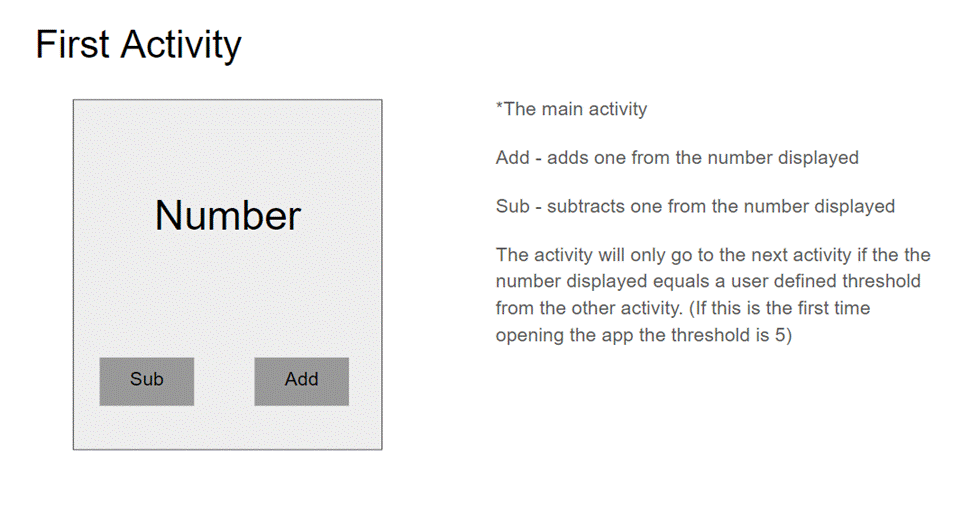

First Activity Number Sub Add *The main activity Add adds one from the number displayed Sub - subtracts one from the number displayed The activity will only go to the next activity if the the number displayed equals a user defined threshold from the other activity. (If this is the first time opening the app the threshold is 5) Second Activity Edit Text Set Edit Text - accepts a user defined number. This should be populated with the current threshold. Set - when this button is clicked it start the first activity and delivers the user defined number from the edittext to the activity. The activity will only go to the next activity when the user clicks the set button. And the First activity will only go back to this activity when the number equals the specified in the edittext.
Step by Step Solution
3.32 Rating (155 Votes )
There are 3 Steps involved in it
Code MainActivityjava package commyappdemo import androidxappcompatappAppCompatActivity import androidcontentIntent import androidosBundle import androidviewView import androidwidgetButton import andr... View full answer

Get step-by-step solutions from verified subject matter experts
 Study Help