







Question: Create an ERD Diagram. Lab 1 Lab Resources: Creating Entity Relationship Diagrams using Draw.io Using the four tables below (Sales, Products, Customer, Order) and Draw
Create an ERD Diagram.
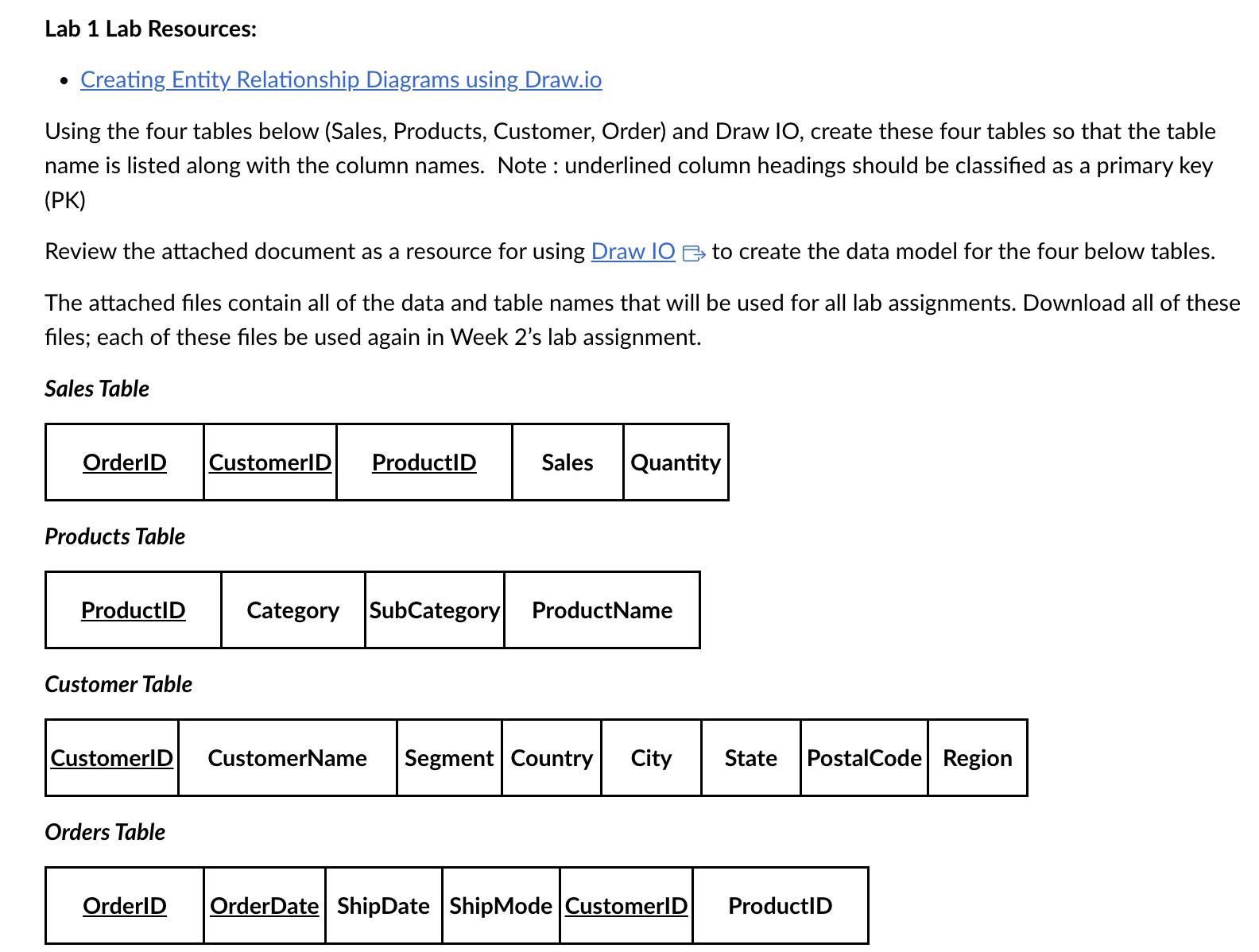
Lab 1 Lab Resources: Creating Entity Relationship Diagrams using Draw.io Using the four tables below (Sales, Products, Customer, Order) and Draw IO, create these four tables so that the table name is listed along with the column names. Note: underlined column headings should be classified as a primary key (PK) Review the attached document as a resource for using Draw IO to create the data model for the four below tables. The attached files contain all of the data and table names that will be used for all lab assignments. Download all of these files; each of these files be used again in Week 2's lab assignment. Sales Table OrderID |CustomerID ProductID Sales Quantity Products Table ProductID Category SubCategory ProductName Customer Table |CustomerID Orders Table CustomerName Segment Country City State PostalCode Region OrderID OrderDate ShipDate Ship Mode CustomerID ProductID
Step by Step Solution
There are 3 Steps involved in it

Get step-by-step solutions from verified subject matter experts
 Study Help