







Question: Create an Excel function that first checks the String Length [function: = len(i)] of the elements of a column array. Then checks the Charater Types
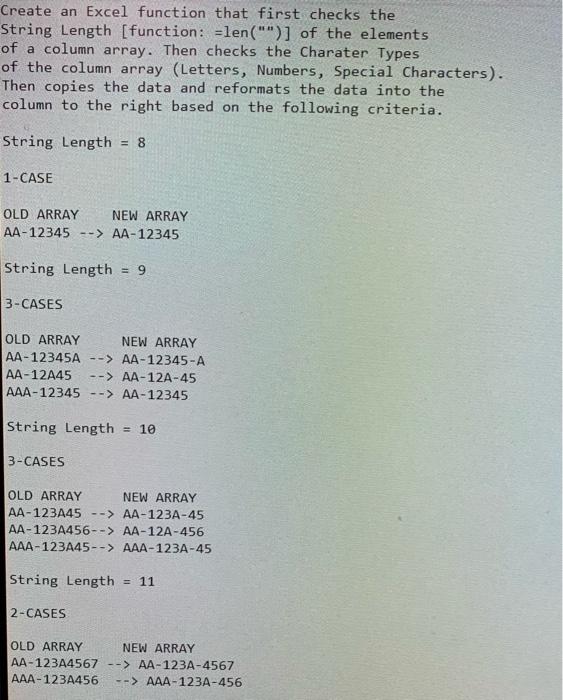
Create an Excel function that first checks the String Length [function: = len("i")] of the elements of a column array. Then checks the Charater Types of the column array (Letters, Numbers, Special Characters). Then copies the data and reformats the data into the column to the right based on the following criteria. String Length =8 1-CASE OLD ARRAY NEW ARRAY AA12345AA12345 String Length =9 3-CASES OLD ARRAY NEW ARRAY AA 12345AAA12345A AA12A45AA12A45 AAA12345 AA 12345 String Length =10 3-CASES OLD ARRAY NEW ARRAY AA123A45AA123A45 AA123A456AA12A456 AAA 123A45 AAA 123A45 String Length =11 2-CASES OLD ARRAY NEW ARRAY AA-123A4567 AA-123A-4567 AAA-123A456 AAA-123A-456
Step by Step Solution
There are 3 Steps involved in it

Get step-by-step solutions from verified subject matter experts
 Study Help