





Question: Create an Excel spreadsheet that will generate random numbers based on the following probability distributions. You can keep the answers to (a), (b), (c), (d)
Create an Excel spreadsheet that will generate

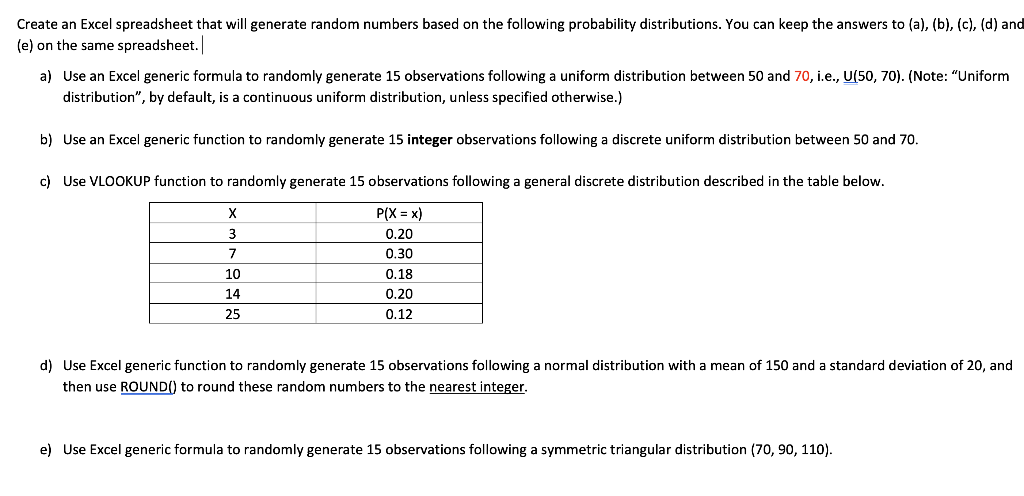
Create an Excel spreadsheet that will generate random numbers based on the following probability distributions. You can keep the answers to (a), (b), (c), (d) and (e) on the same spreadsheet. a) Use an Excel generic formula to randomly generate 15 observations following a uniform distribution between 50 and 70, i.e., U(50, 70). (Note: "Uniform distribution", by default, is a continuous uniform distribution, unless specified otherwise.) b) Use an Excel generic function to randomly generate 15 integer observations following a discrete uniform distribution between 50 and 70. c) Use VLOOKUP function to randomly generate 15 observations following a general discrete distribution described in the table below. 3 7 10 14 25 P(X = x) 0.20 0.30 0.18 0.20 0.12 d) Use Excel generic function to randomly generate 15 observations following a normal distribution with a mean of 150 and a standard deviation of 20, and then use ROUND() to round these random numbers to the nearest integer. e) Use Excel generic formula to randomly generate 15 observations following a symmetric triangular distribution (70, 90, 110)

Step by Step Solution

There are 3 Steps involved in it

1 Expert Approved Answer
Step: 1 Unlock blur-text-image

Question Has Been Solved by an Expert!

Get step-by-step solutions from verified subject matter experts

Step: 2 Unlock
Step: 3 Unlock

Students Have Also Explored These Related General Management Questions!