







Question: Create an input file in notepad and save it to your final exam folder as input.txt containing the following data: 87848866778594609097635983897490929762100 Make sure
Create an input file in notepad and save it to your final exam folder as "input.txt" containing the following data:
87848866778594609097635983897490929762100
Make sure your program is clear with no syntactical errors, correctly uses I/O syntax, correctly uses branching and looping syntax, that it contains functions with correct parameters and return values, that it correctly uses arrays with appropriate data types, and that you provide useful comments throughout your program.
You must use basic elements of the programming language, use of include files, use of a working main function, declaration and use of data types. You must produce a program that will compile and execute without syntactical errors. You must use input and output mechanisms by processing an input file and saving the contents of the file into an array.You must create and initialize two arrays using the appropriate data type, one array for storing the input data from file, another array for the grade distribution count.You must be able to use looping mechanisms to access individual array elements and be able to retrieve their information to produce program output. You must use branching mechanisms to include if, else, or switch statements to solve the grade distribution problem.
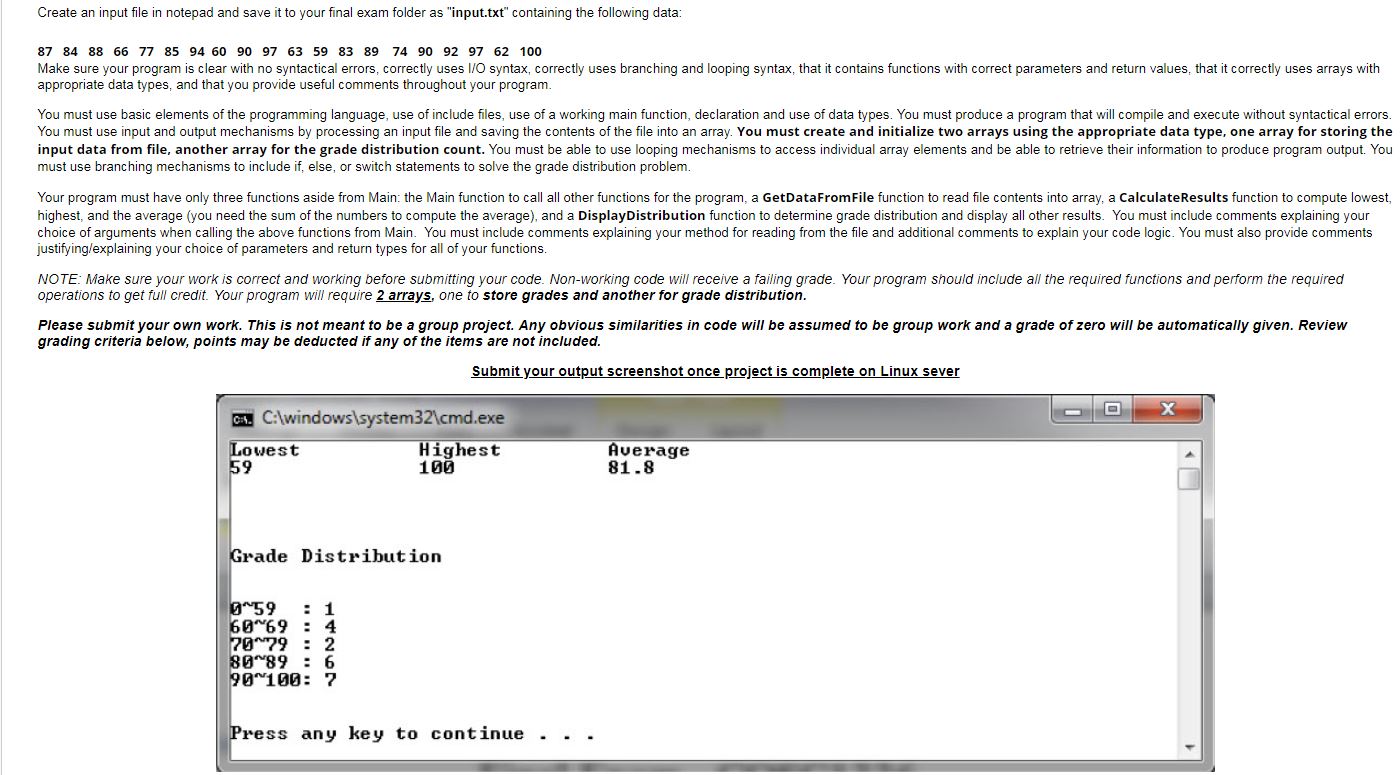
Your program must have only three functionsaside from Main: the Main function to call all other functions for the program, aGetDataFromFilefunction to read file contents into array, aCalculateResultsfunction to compute lowest, highest, and the average (you need the sum of the numbers to compute the average),and aDisplayDistributionfunction to determine grade distribution and display all other results.You must include comments explaining your choice of arguments when calling the above functions from Main.You must include comments explaining your method for reading from the file and additional comments to explain your code logic. You must also provide comments justifying/explaining your choice of parameters and return types for all of your functions.
\f
Step by Step Solution
There are 3 Steps involved in it

Get step-by-step solutions from verified subject matter experts
 Study Help