







Question: Create an Organizational Unit (OU) structure in a Domain Controller (DC) based on the image below. Also populate your OU structure with some PCs and
Create an Organizational Unit (OU) structure in a Domain Controller (DC) based on the image below.
Also populate your OU structure with some PCs and Users. Populate your OU structure with the Security Groups you plan to use as well (e.g. IT Groups managing the OUs, Helpdesk Group).
You can create each OU/PC/User individually in your script, or feed in via file(s). If feeding in, attach your input file(s) as well.
Submit your PowerShell script, any input file(s) used, and a screenshot showing your full OU structure in AD Users & Computers along with screenshots showing where your Security Groups are stored.
Set at least 1 User Account password via PowerShell securely (without typing them in interactively). This will involve inputting from a file.
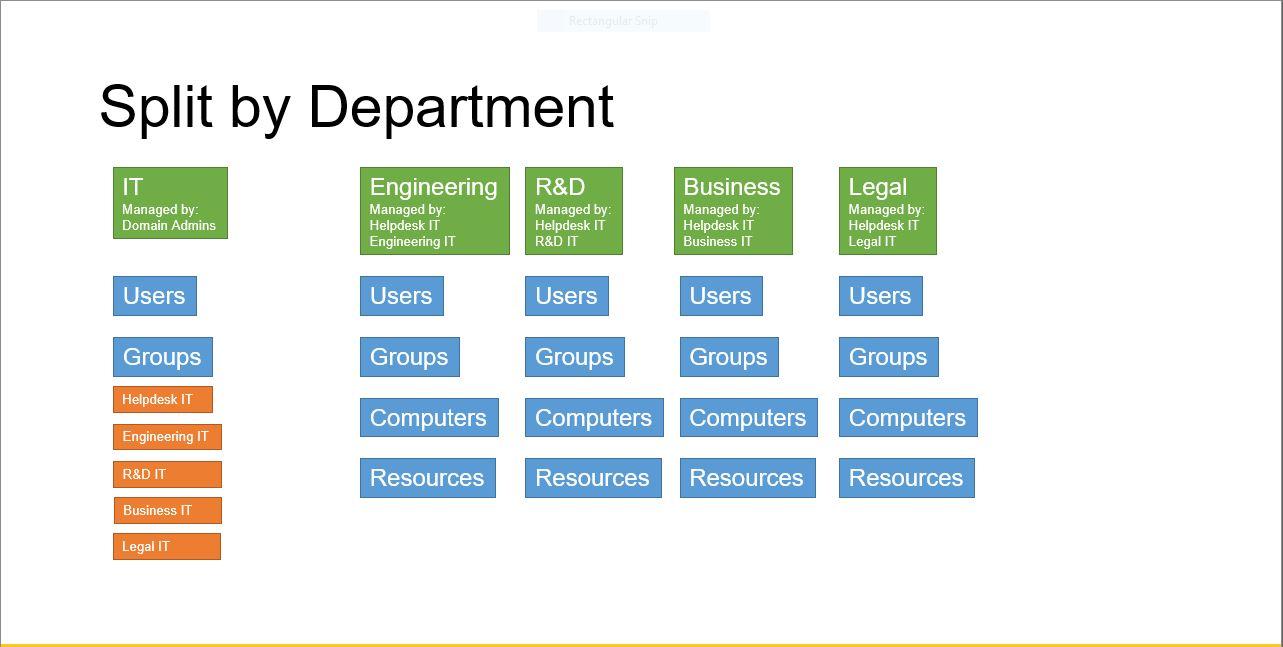
Split by Department Managed by Domain Admins Engineering Managed by Helpdesk IT Engineering IT R&D Managed by Helpdesk IT R&D IT Business Managed by: Helpdesk IT Business IT Legal Managed by: Helpdesk IT Legal IT Users Users Users Users Users Groups Groups Groups Groups Groups Helpdesk IT Computers Computers Computers Computers Engineering IT R&D IT Resources Resources Resources Resources Business IT Legal IT Split by Department Managed by Domain Admins Engineering Managed by Helpdesk IT Engineering IT R&D Managed by Helpdesk IT R&D IT Business Managed by: Helpdesk IT Business IT Legal Managed by: Helpdesk IT Legal IT Users Users Users Users Users Groups Groups Groups Groups Groups Helpdesk IT Computers Computers Computers Computers Engineering IT R&D IT Resources Resources Resources Resources Business IT Legal IT
Step by Step Solution
There are 3 Steps involved in it

Get step-by-step solutions from verified subject matter experts
 Study Help