







Question: Create Car Rent application using Flutter that meets the following requirements. Taski: Each Car is described by by ID, CarModel, CarColor, Year, Price and Image.
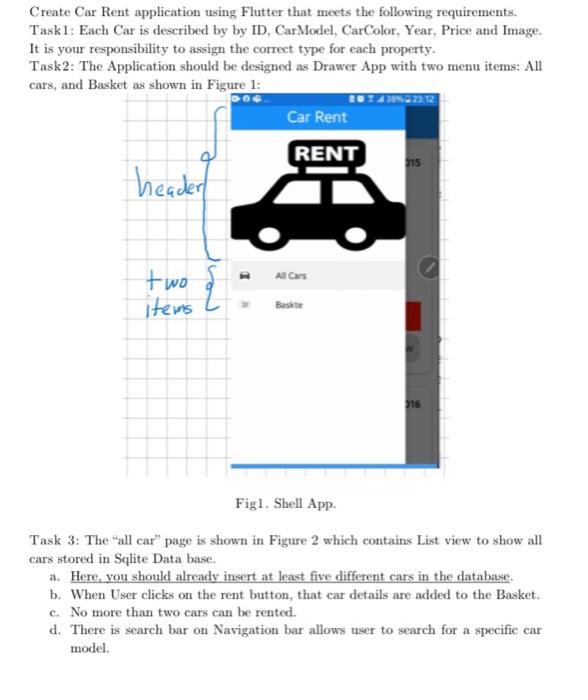
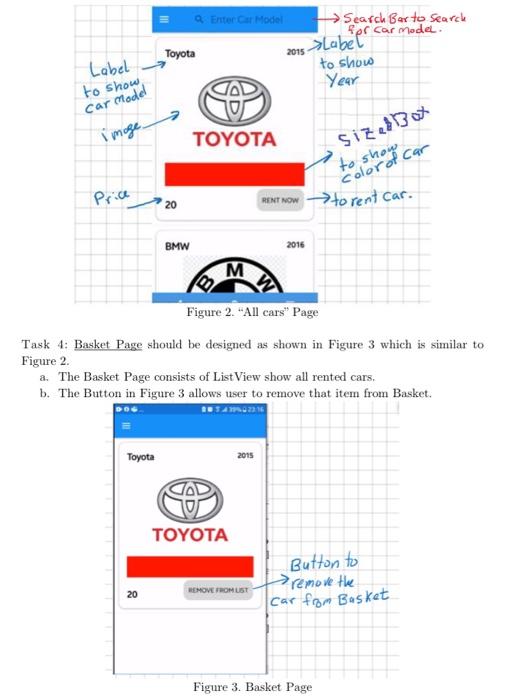
Create Car Rent application using Flutter that meets the following requirements. Taski: Each Car is described by by ID, CarModel, CarColor, Year, Price and Image. It is your responsibility to assign the correct type for each property. Task2: The Application should be designed as Drawer App with two menu items: All cars, and Basket as shown in Figure 1: Car Rent RENT 315 header two D All Cars { items 316 Figl. Shell App Task 3: The "all car" page is shown in Figure 2 which contains List view to show all cars stored in Sqlite Data base. a. Here, you should already insert at least five different cars in the database. b. When User clicks on the rent button, that car details are added to the Basket. c. No more than two cars can be rented. d. There is search bar on Navigation bar allows user to search for a specific car model. 2015 Labels Lobel to show Sosrot car Enter Car Model Search Barto search Per car model. Toyota to show Year TOYOTA Price 20 RENT NOW -> to rent car. Car Model image Sized Box BMW 2016 M Figure 2. "All cars" Page Task 4: Basket Page should be designed as shown in Figure 3 which is similar to Figure 2. a. The Basket Page consists of List View show all rented cars. b. The Button in Figure 3 allows user to remove that item from Basket. 216 Toyota 2015 V TOYOTA Button to remove the car from Basket 20 REMOVE FROM LIST Figure 3. Basket Page
Step by Step Solution
There are 3 Steps involved in it

Get step-by-step solutions from verified subject matter experts
 Study Help