







Question: create database AutoRentals go use AutoRentals go create table Customer (CID integer, CName varchar(20), Age integer, Resid_City varchar(20), BirthPlace varchar(20), Constraint PK_Customer Primary Key (CID))
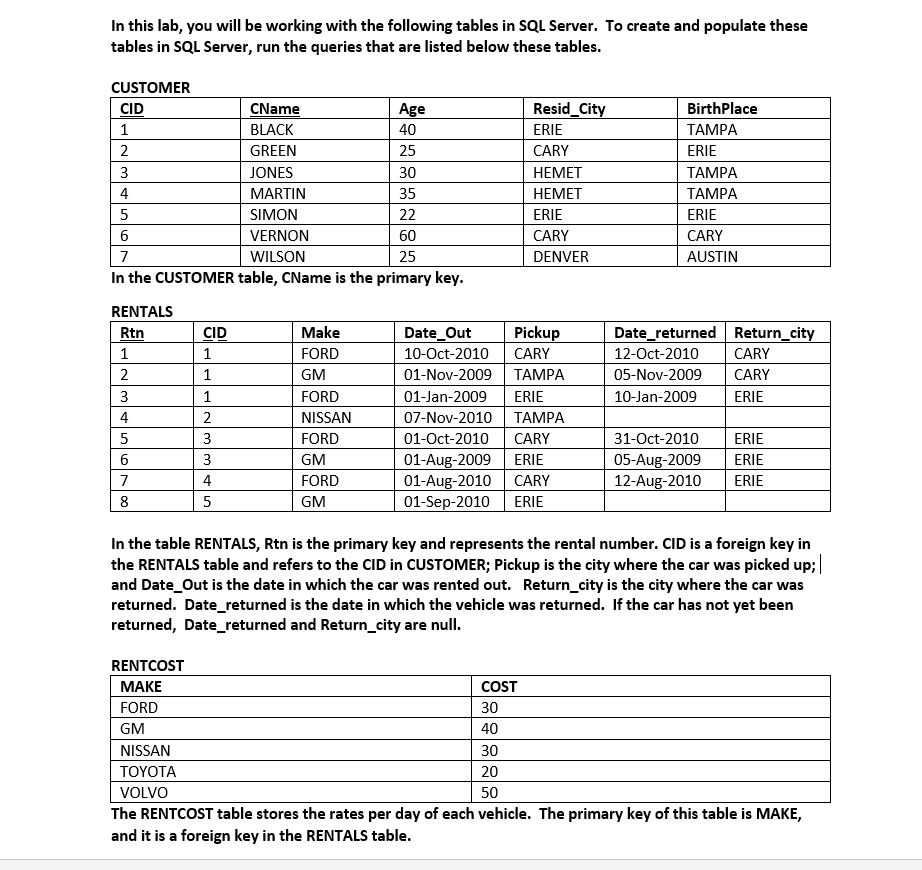
create database AutoRentals
go
use AutoRentals
go
create table Customer
(CID integer,
CName varchar(20),
Age integer,
Resid_City varchar(20),
BirthPlace varchar(20),
Constraint PK_Customer Primary Key (CID))
insert Customer
select 1, 'Black', 40, 'Erie', 'Tampa'
insert Customer
select 2, 'Green', 25, 'Cary', 'Erie'
insert Customer
select 3, 'Jones', 30, 'Hemet', 'Tampa'
insert Customer
select 4, 'Martin', 35, 'Hemet', 'Tampa'
insert Customer
select 5, 'Simon', 22, 'Erie', 'Erie'
insert Customer
select 6, 'Vernon', 60, 'Cary', 'Cary'
insert Customer
select 7, 'Wilson', 25, 'Denver', 'Austin'
create table Rentcost
(Make varchar(20),
Cost float,
constraint PK_Rentcost Primary Key (Make))
insert Rentcost
select 'Ford', 30
insert Rentcost
select 'GM', 40
insert Rentcost
select 'Nissan', 30
insert Rentcost
select 'Toyota', 20
insert Rentcost
select 'Volvo', 50
Create table Rentals
(Rtn integer,
CID integer,
Make varchar(20),
Date_Out smalldatetime,
Pickup varchar(20),
Date_returned smalldatetime,
Return_city varchar(20),
Constraint PK_Rentals Primary Key (Rtn),
Constraint FK_CustomerRentals Foreign Key (CID) References Customer,
Constraint FK_RentCostRentals Foreign Key (Make) References Rentcost)
insert Rentals
select 1, 1, 'Ford', '10/10/2010', 'Cary', '10/12/2010', 'Cary'
insert Rentals
select 2, 1, 'GM', '11/1/2009', 'Tampa', '11/5/2009', 'Cary'
insert Rentals
select 3, 1, 'Ford', '1/1/2009', 'Erie', '1/10/2009', 'Erie'
insert Rentals
select 4, 2, 'Nissan', '11/7/2010', 'Tampa', null, null
insert Rentals
select 5, 3, 'Ford', '10/1/2010', 'Cary', '10/31/2010', 'Erie'
insert Rentals
select 6, 3, 'GM', '8/1/2009', 'Erie', '8/5/2009', 'Erie'
insert Rentals
select 7, 4, 'Ford', '8/1/2010', 'Cary', '8/12/2010', 'Erie'
insert Rentals
select 8, 5, 'GM', '9/1/2010', 'Erie', null, null
Deliverables:
Write queries that will satisfy the following requirements. To receive credit for this assignment, all queries must be executed in SQL Server and be displayed appropriately. For each question:
TYPE the SQL query below the instructions.
Take a screenshot of your query that was executed in SQL server. Be sure to capture the query as well as the results in your screen shot.
Paste the screenshot below the typed query.
The first question has been done for you.
1. execute a query that will return the name and age of all customers.
You should have 7 rows in your result:
Answer:
select CName, Age
from customer
2. execute a query that will display the name and resid_city of all customers that were born in Tampa.
You should have 3 rows in your result:
3.execute a query that will show the customer id and name of customers between the ages of 25 (inclusive) and 40 (inclusive). Order your results by Cname in descending order. Display the CName column with the heading "Customer Name" note the capitalizing and the space between words. (Note that you will need to use a column alias for this using the keyword "AS.")
Your output should look like this:
4. execute a query that will list any customers whose names begin with the letter "G".
Your query should return 1 row like this:
5. execute a query that will display a unique list of all the automobile Makes that have ever been rented. Order your results by Make.
You should have 3 rows in your result set.
6. execute a query that will display all of the customers who have ever rented an automobile. Include the customer name, make, pickup location in your results. Order your list in ascending order by pickup.
Your results should include 8 rows:
7. execute a query that will return the names of customers who rented a Ford or GM.
You should have 4 rows in your result set.
8. execute a query that will display the customer names, ages, makes, and daily cost of each automobile that they rented. Order your results by cost.
You should have 8 rows in your answer:
9. execute a query that will return the unique list of birth places of everyone who has ever rented a Ford.
You should have one row in your result: Tampa
10. execute a query that will return the Names and ages of customers who have rented any automobile during 2009. Make sure that each customer is listed only once in your output.
You should have two rows in your result set:
11. execute a query that will determine the total number of days that Black rented a GM on November 1, 2009.
You should have one cell: 4
12. execute a query that will determine the total cost of the automobile rented by Black on November 1, 2009.
You should have one cell: 160
13. execute a query that will determine the Total cost of all the automobiles that have ever been rented.
You should have one cell: 1880
14. execute a query that will determine the average number of days that automobiles are rented. Show your result broken out by makes. Do not include an automobile if it has not yet been returned.
You should have two rows: Ford and GM with average days rented 13 and 4, respectively
15. execute a query that will determine the average age of customers broken out by the city in which they reside. Note: Make sure that the average age is not truncated to an integer.
You should have 4 rows: Cary, Denver, Erie, and Hemet with average ages of 42.5, 25, 31, and 32.5
16. execute a query that will show a list of customers who reside in the same city in which they were born.
You should have 2 rows: Simon and Vern
17. Using a left outer join, execute a query that will display a unique list of the makes of automobiles that have never been rented.
You should have 2 rows: Toyota and Volvo
18. Using a Type I query, display a unique list of the makes of automobiles that have never been rented.
You should have 2 rows: Toyota and Volvo
19. Using a right outer join, execute a query that will display a unique list of customers who have never rented an automobile.
You should have two rows: Vernon and Wilson
20. Using a Type II query, display a unique list of customers who have never rented an automobile.
You should have two rows: Vernon and Wilson
21. execute a query that will display a list of the customers who picked up their rental from the same city in which they reside.
You should have 2 rows: Black and Simon
22. execute a query that will display a list of customers who have not returned their rentals.
You should have 2 rows: Green and Simon
23. Using a Type I query, show all of the names and ages of customers who have rented an automobile and returned it to Erie. Sort your results in ascending order by customer name.
You should have three rows: Black, Jones, Martin.
24. Using a Type II query, show all of the customers who rented an automobile and picked it up in Cary.
You should have three rows: Black, Jones, and Martin
25. execute a single query that will display all of the information in the Customer, Rentals, and Rentcost tables in a single resultset. Be sure to display each field only once in your output. Order your results in ascending order by Customer.CID and Rentcost.Make .
You should have 12 rows and 12 columns in your result.
In this lab, you will be working with the following tables in SQL Server. To create and populate these tables in SQL Server, run the queries that are listed below these tables CUSTOMER CName BLACK GREEN JONES MARTIN SIMON VERNON WILSON Resid Cit ERIE CARY HEMET HEMET ERIE CARY DENVER BirthPlace TAMPA ERIE TAMPA TAMPA ERIE CARY AUSTIN CID 40 25 30 35 4 6 60 25 In the CUSTOMER table, CName is the primary key RENTALS Make FORD GM FORD NISSAN FORD GM FORD GM Date returnedReturn cit 12-Oct-2010 CARY 05-Nov-2009 CARY 10-Jan-2009 Rtn CID Date Out 10-Oct-2010 CARY 01-Nov-2009TAMPA 01-Jan-2009ERIE 07-Nov-2010TAMPA 01-Oct-2010 CARY 01-Aug-2009ERIE 01-Aug-2010 CARY 01-Sep-2010ERIE ERIE 4 31-Oct-2010 05-Aug-2009 ERIE 12-Aug-201O ERIE ERIE 6 4 8 In the table RENTALS, Rtn is the primary key and represents the rental number. CID is a foreign key in the RENTALS table and refers to the CID in CUSTOMER; Pickup is the city where the car was picked up; and Date_ Out is the date in which the car was rented out. Return_city is the city where the car was returned. Date_returned is the date in which the vehicle was returned. If the car has not yet been returned, Date returned and Return_city are null RENTCOST MAKE FORD GM NISSAN TOYOTA VOLVO COST 30 40 30 20 50 The RENTCOST table stores the rates per day of each vehicle. The primary key of this table is MAKE, and it is a foreign key in the RENTALS table
Step by Step Solution
There are 3 Steps involved in it

Get step-by-step solutions from verified subject matter experts
 Study Help