







Question: Create Database : Records Create Table Emp ManagerNo Commission EName Job (Not Null) (Not Null) HireDate (Not Null) EmpNo (Not Null, unique) Salary (Not Null,
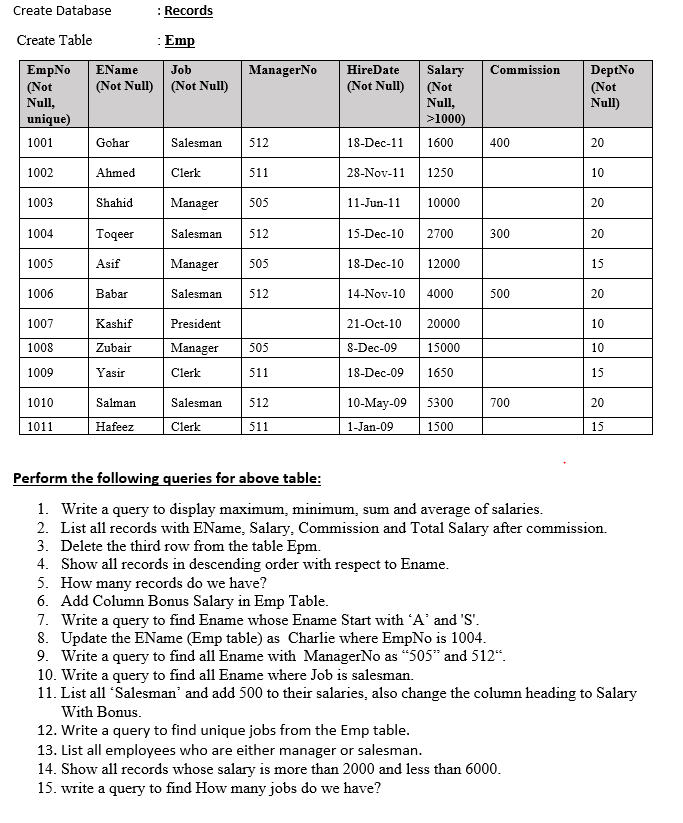
Create Database : Records Create Table Emp ManagerNo Commission EName Job (Not Null) (Not Null) HireDate (Not Null) EmpNo (Not Null, unique) Salary (Not Null, >1000) DeptNo (Not Null) 1001 Gohar Salesman 512 18-Dec-11 1600 400 20 1002 Ahmed Clerk 511 28-Nov-11 1250 10 1003 Shahid Manager 505 11-Jun-11 10000 20 1004 Toqeer Salesman 512 15-Dec-10 2700 300 20 1005 Asif Manager 505 18-Dec-10 12000 15 1006 Babar Salesman 512 14-Nov-10 4000 500 20 1007 Kashif President 20000 10 21-Oct-10 8-Dec-09 1008 Zubair Manager 505 15000 10 1009 Yasir Clerk 511 19-Dec-09 165 1650 15 1010 Salman Salesman 512 700 20 10-May-09 5300 1-Jan-09 1500 1011 Hafeez Clerk 511 15 Perform the following queries for above table: 1. Write a query to display maximum, minimum, sum and average of salaries. 2. List all records with EName, Salary, Commission and Total Salary after commission. 3. Delete the third row from the table Epm. 4. Show all records in descending order with respect to Ename. 5. How many records do we have? 6. Add Column Bonus Salary in Emp Table. 7. Write a query to find Ename whose Ename Start with 'A' and 'S'. 8. Update the EName (Emp table) as Charlie where EmpNo is 1004. 9. Write a query to find all Ename with Manager No as "505" and 512". 10. Write a query to find all Ename where Job is salesman. 11. List all Salesman' and add 500 to their salaries, also change the column heading to Salary With Bonus. 12. Write a query to find unique jobs from the Emp table. 13. List all employees who are either manager or salesman. 14. Show all records whose salary is more than 2000 and less than 6000. 15. write a query to find How many jobs do we have
Step by Step Solution
There are 3 Steps involved in it

Get step-by-step solutions from verified subject matter experts
 Study Help