







Question: create matrices manually or randomly per instructions. You may need the following commands for Part C. The command rand (n) generates an n x
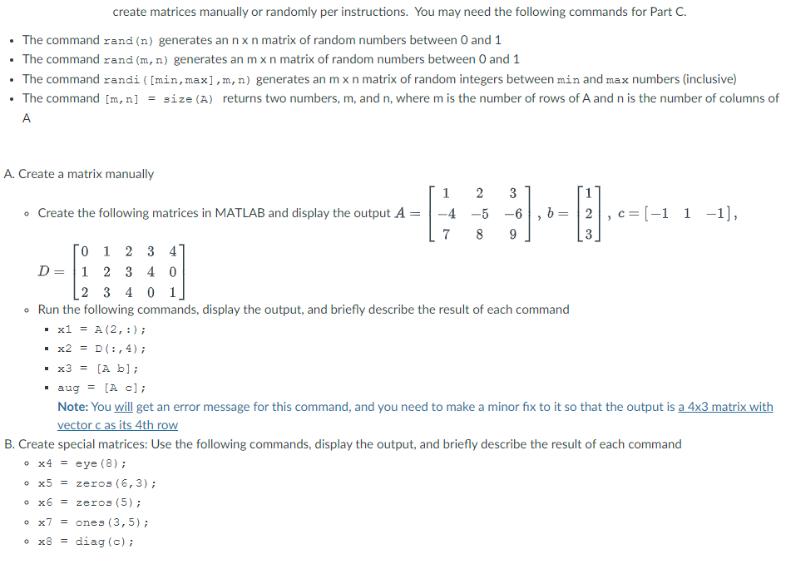
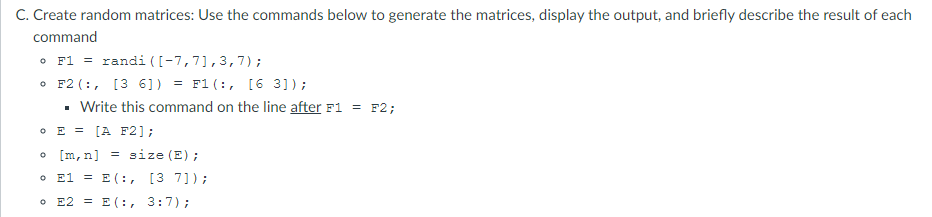
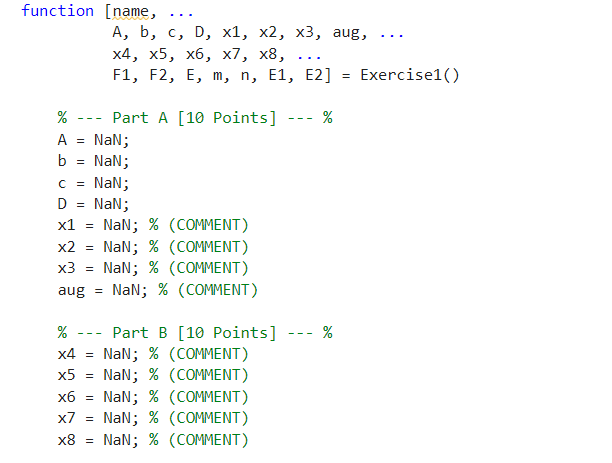
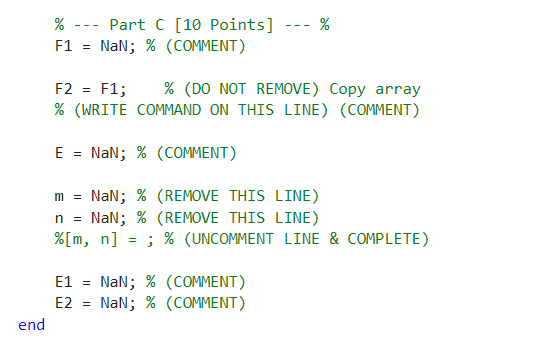
create matrices manually or randomly per instructions. You may need the following commands for Part C. The command rand (n) generates an n x n matrix of random numbers between 0 and 1 The command rand (m, n) generates an m x n matrix of random numbers between 0 and 1 The command randi ([min, max], m, n) generates an m x n matrix of random integers between min and max numbers (inclusive) The command [m, n] = size (A) returns two numbers, m, and n, where m is the number of rows of A and n is the number of columns of A A. Create a matrix manually Create the following matrices in MATLAB and display the output A = D [0 1 2 3 4 1 2 3 40 x5 = zeros (6,3); x6 = zeros (5); 1 3 -4 -5 -6 7 x7 = ones (3,5); x8 = diag (c) ; = 2 3 4 0 1 Run the following commands, display the output, and briefly describe the result of each command x1 = A (2, :); x2 = D(:, 4); x3 = (A b]; aug = [A c]; Note: You will get an error message for this command, and you need to make a minor fix to it so that the output is a 4x3 matrix with vector c as its 4th row B. Create special matrices: Use the following commands, display the output, and briefly describe the result of each command x4 = eye (8) ; C =[-1 1 -1], C. Create random matrices: Use the commands below to generate the matrices, display the output, and briefly describe the result of each command o F1 = randi ([-7,71,3,7); o F2 (:, [36]) = F1 (:, [6 3]); Write this command on the line after F1 o E = [A F2]; o 0 E1 = E(, o E2 E (:, 3:7); [m,n] = size (E); [37]); F2; function [name, % A = NaN; b = NaN; c = NaN; D = NaN; x1 = NaN; % (COMMENT) x2 NaN; % (COMMENT) x3 NaN; % (COMMENT) aug = NaN; % (COMMENT) = A, b, c, D, x1, x2, x3, aug, x4, x5, x6, x7, x8, F1, F2, E, m, n, E1, E2] = Part A [10 Points] % Part B [10 Points] x4 = NaN; % (COMMENT) x5 = NaN; % (COMMENT) x6 = NaN; % (COMMENT) x7 = NaN; % (COMMENT) x8 = NaN; % (COMMENT) % % = Exercise1() end % Part C [10 Points] % F1 = NaN; % (COMMENT) --- F2 = F1; % (DO NOT REMOVE) Copy array % (WRITE COMMAND ON THIS LINE) (COMMENT) E = NaN; % (COMMENT) m = NaN; % (REMOVE THIS LINE) n = NaN; % (REMOVE THIS LINE) %[m, n] = ; % (UNCOMMENT LINE & COMPLETE) E1 = NaN; % (COMMENT) E2 NaN; % (COMMENT) =
Step by Step Solution
There are 3 Steps involved in it

Get step-by-step solutions from verified subject matter experts
 Study Help