







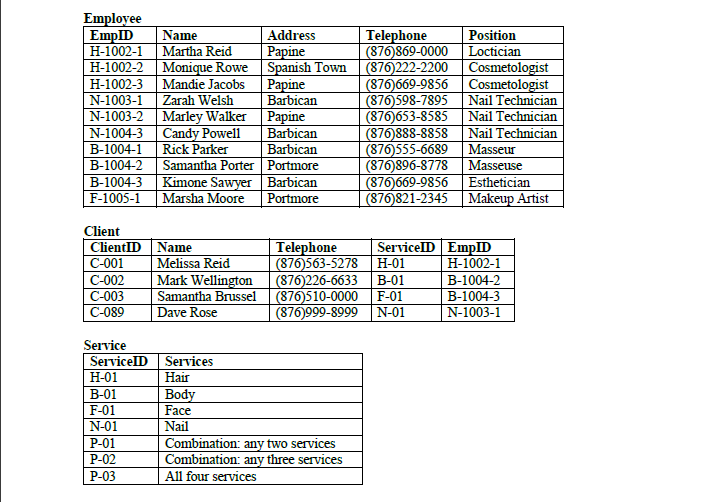
Question: Create queries to: (display all fields) a. Show all clients that are in the Client table (save the query as client query) b. Show all
Create queries to: (display all fields) a. Show all clients that are in the Client table (save the query as client query) b. Show all employees that are in the Employee table who has a client in the Client table (save the query as employee client query) c. Show all services that are currently being offered to clients in the Client table (save the query as client service query) d. Show all employees living in Barbican (save the query as Barbican query) e. Show all employees living in Papine OR Cosmetologist (save the query as Papine OR Cosmetologist query) f. Show all employees living in Barbican AND Nail Technician (save the query as Barbican AND Technician query) g. Show all ID numbers that start with H- (query should be based on Employee table and be called ID Numbers for Hairdressers) 9. Create Columnar forms for all tables (all fields are to be included, forms should be called Clients, Employee and Services respectively). 10. Set the Sunken Special Effect format on all the data fields in the Client form. 11. Disable the ServiceID and EmployeeID field in Client form. 12. Create a Tabular report based on the Barbican AND Technician query. Sort the report by the EmpID in ascending order. All fields from query are to be included in report and report should have same name as query 13. Add your full name and ID number as a Page Footer in the report (bottom left, below the date)
Step by Step Solution
There are 3 Steps involved in it

Get step-by-step solutions from verified subject matter experts
 Study Help