







Question: Create SQL query for the following question using Sally's Pet Store 1. Which employee sold the most quantity of items in March? NEED ASAP! Please
Create SQL query for the following question using Sally's Pet Store
1. Which employee sold the most quantity of items in March?
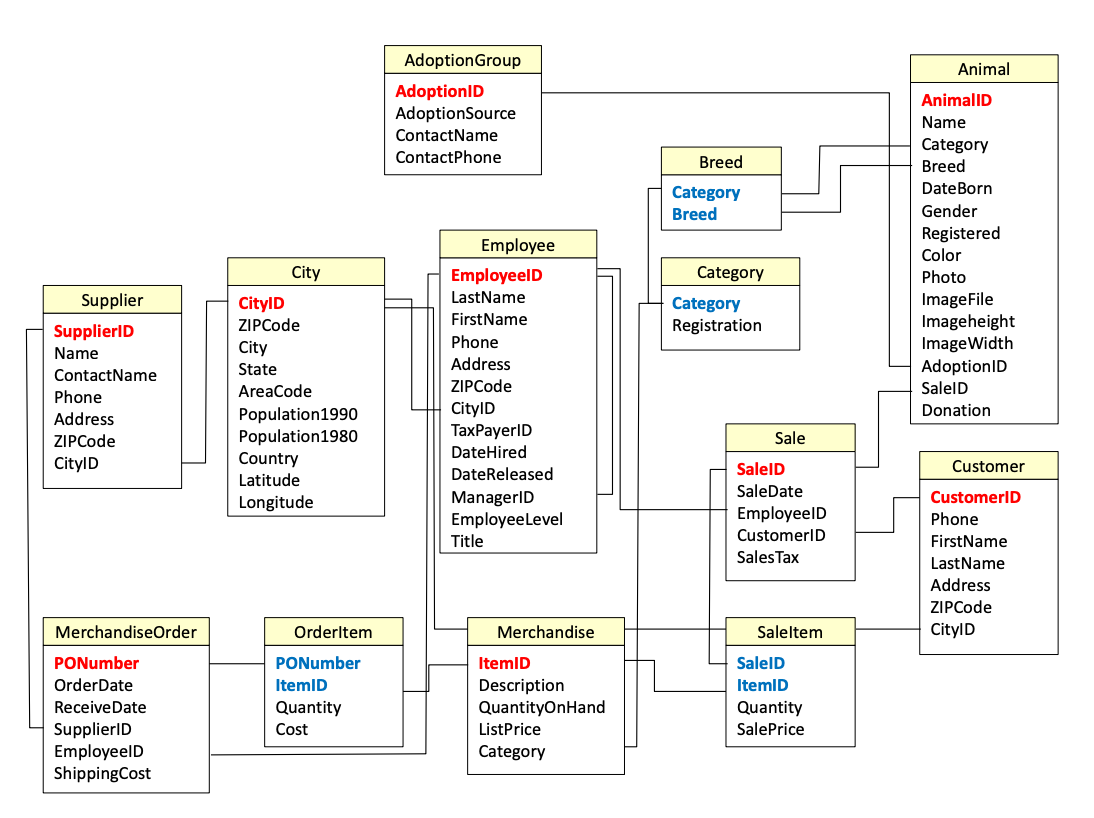
NEED ASAP! Please help
\begin{tabular}{|l|} \hline \multicolumn{1}{|c|}{ AdoptionGroup } \\ \hline AdoptionID \\ AdoptionSource \\ ContactName \\ ContactPhone \\ \hline \end{tabular} \begin{tabular}{|l|} \hline \multicolumn{1}{|c|}{ Supplier } \\ \hline SupplierID \\ Name \\ ContactName \\ Phone \\ Address \\ ZIPCode \\ CityID \\ \hline \end{tabular} \begin{tabular}{|l|} \hline \multicolumn{1}{|c|}{ City } \\ \hline CitylD \\ ZIPCode \\ City \\ State \\ AreaCode \\ Population1990 \\ Population1980 \\ Country \\ Latitude \\ Longitude \\ \hline \end{tabular} \begin{tabular}{|l|} \hline \multicolumn{1}{|c|}{ Employee } \\ \hline EmployeelD \\ LastName \\ FirstName \\ Phone \\ Address \\ ZIPCode \\ CityID \\ TaxPayerID \\ DateHired \\ DateReleased \\ ManagerID \\ EmployeeLevel \\ Title \\ \hline \end{tabular} \begin{tabular}{|l|} \hline \multicolumn{1}{|c|}{ Animal } \\ \hline AnimalID \\ Name \\ Category \\ Breed \\ DateBorn \\ Gender \\ Registered \\ Color \\ Photo \\ ImageFile \\ Imageheight \\ ImageWidth \\ AdoptionID \\ SaleID \\ Donation \\ \hline \end{tabular} \begin{tabular}{|l|} \hline MerchandiseOrder \\ \hline PONumber \\ OrderDate \\ ReceiveDate \\ SupplierID \\ EmployeelD \\ ShippingCost \\ \hline \end{tabular} \begin{tabular}{|l|} \hline \multicolumn{1}{|c|}{ Orderltem } \\ \hline PONumber \\ ItemID \\ Quantity \\ Cost \\ \hline \end{tabular} \begin{tabular}{|l|} \hline \multicolumn{1}{|c|}{ AdoptionGroup } \\ \hline AdoptionID \\ AdoptionSource \\ ContactName \\ ContactPhone \\ \hline \end{tabular} \begin{tabular}{|l|} \hline \multicolumn{1}{|c|}{ Supplier } \\ \hline SupplierID \\ Name \\ ContactName \\ Phone \\ Address \\ ZIPCode \\ CityID \\ \hline \end{tabular} \begin{tabular}{|l|} \hline \multicolumn{1}{|c|}{ City } \\ \hline CitylD \\ ZIPCode \\ City \\ State \\ AreaCode \\ Population1990 \\ Population1980 \\ Country \\ Latitude \\ Longitude \\ \hline \end{tabular} \begin{tabular}{|l|} \hline \multicolumn{1}{|c|}{ Employee } \\ \hline EmployeelD \\ LastName \\ FirstName \\ Phone \\ Address \\ ZIPCode \\ CityID \\ TaxPayerID \\ DateHired \\ DateReleased \\ ManagerID \\ EmployeeLevel \\ Title \\ \hline \end{tabular} \begin{tabular}{|l|} \hline \multicolumn{1}{|c|}{ Animal } \\ \hline AnimalID \\ Name \\ Category \\ Breed \\ DateBorn \\ Gender \\ Registered \\ Color \\ Photo \\ ImageFile \\ Imageheight \\ ImageWidth \\ AdoptionID \\ SaleID \\ Donation \\ \hline \end{tabular} \begin{tabular}{|l|} \hline MerchandiseOrder \\ \hline PONumber \\ OrderDate \\ ReceiveDate \\ SupplierID \\ EmployeelD \\ ShippingCost \\ \hline \end{tabular} \begin{tabular}{|l|} \hline \multicolumn{1}{|c|}{ Orderltem } \\ \hline PONumber \\ ItemID \\ Quantity \\ Cost \\ \hline \end{tabular}
Step by Step Solution
There are 3 Steps involved in it

Get step-by-step solutions from verified subject matter experts
 Study Help