







Question: CREAT..E TABLE course_section_copy SELECT * FROM course_sections; Writ..e update statements to creat..e a table for the upcoming Fall 2023 semester. All the courses and sections
CREAT..E TABLE course_section_copy
SELECT *
FROM course_sections;
Writ..e update statements to creat..e a table for the upcoming Fall 2023 semester. All the courses and sections offered in Fall 2021 are being offered again in Fall 2023. However, all the courses and sections have been changed from online to face-to-face delivery. All the face-to-face delivery courses will take place in the same locations, as they did in Fall 2021 and the online courses will take place in Hornbake, Room Number: 103.
- Table to Refer
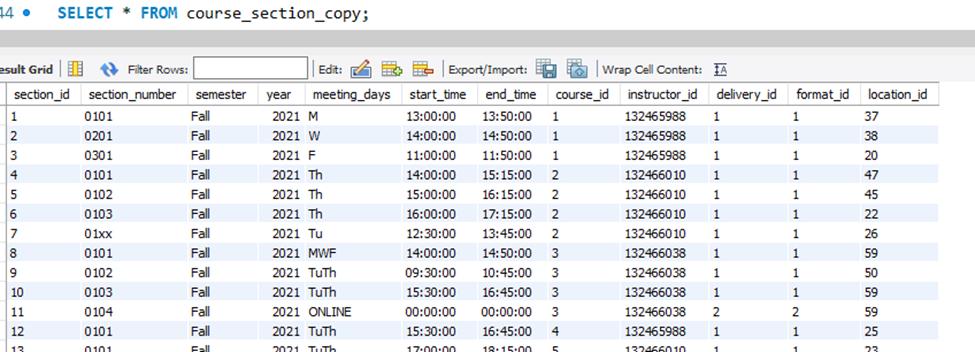
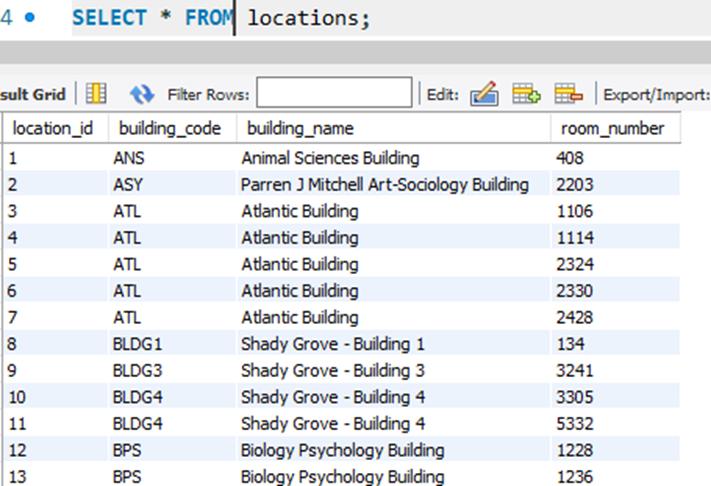
Then, write a SELECT query that shown in the picture below:
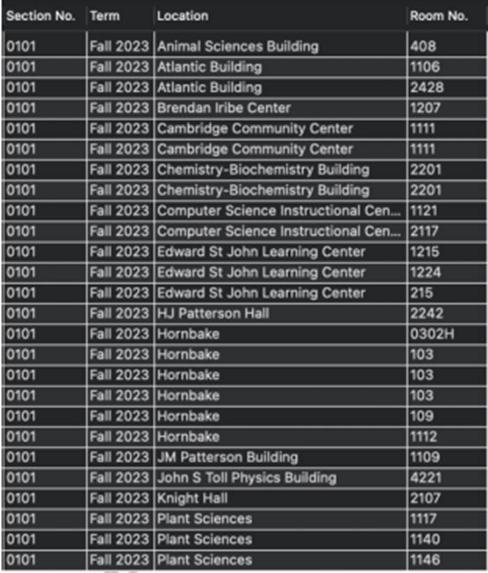
14. SELECT FROM course_section_copy; esult Grid Filter Rows: Edit: section_id section number semester year meeting_days 0101 2021 M 0201 2021 W 2021 F 0301 2021 Th 2021 Th 2021 Th 2021 Tu 2021 MWF 2021 TuTh 2021 TuTh 2021 ONLINE 2021 TuTh 2021 TUTh 1 2 3 4 5 6 7 8 9 10 11 12 13 0101 0102 0103 01xx 0101 0102 0103 0104 0101 0101 Fall Fall Fall Fall Fall Fall Fall Fall Fall Fall Fall Fall Fall Export/Import: Wrap Cell Content: A start_time end_time course_id instructor_id 13:00:00 14:00:00 1 13:50:00 1 14:50:00 1 11:50:00 1 1 132465988 132465988 132465988 132466010 1 11:00:00 1 14:00:00 132466010 1 132466010 132466010 1 1 15:15:00 2 15:00:00 16:15:00 2 16:00:00 17:15:00 2 12:30:00 13:45:00 2 14:00:00 14:50:00 3 09:30:00 10:45:00 3 15:30:00 16:45:00 3 00:00:00 00:00:00 3 15:30:00 16:45:00 4 18:15:00 5 1 1 132466038 1 132466038 132466038 132466038 132465988 137466010 2 1 17:00:00 1 delivery_id format_id location_id 1 1 1 1 1 1 1 1 1 1 2 1 1 37 38 20 47 45 22 26 59 50 59 59 25 23
Step by Step Solution
3.40 Rating (150 Votes )
There are 3 Steps involved in it

Get step-by-step solutions from verified subject matter experts
 Study Help