







Question: Create the child data flow diagram for Process 4, DELETE COMPUTER. The following table sum- marizes input, process, and output. Describe each process and
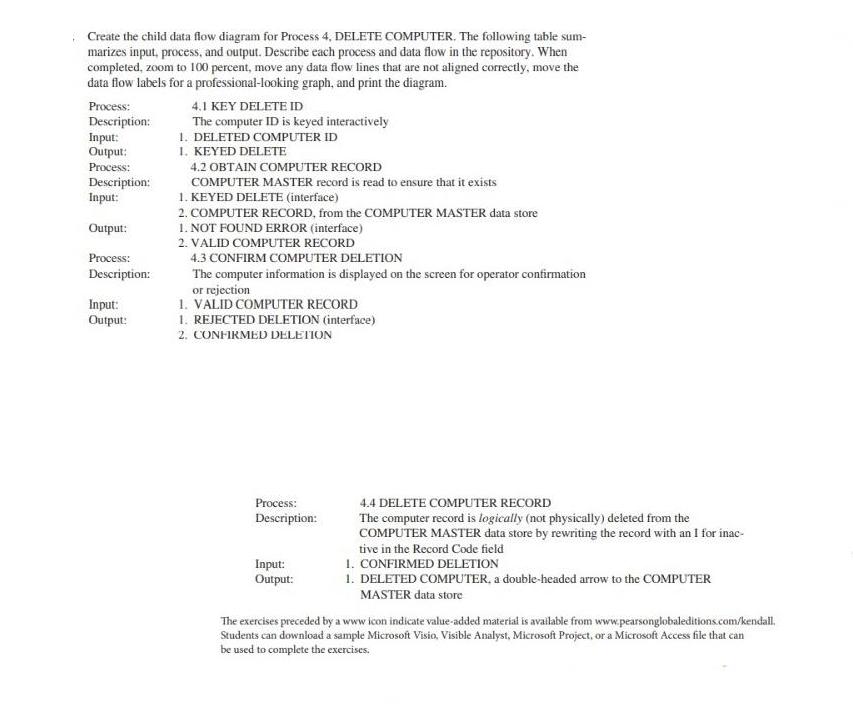
Create the child data flow diagram for Process 4, DELETE COMPUTER. The following table sum- marizes input, process, and output. Describe each process and data flow in the repository. When completed, zoom to 100 percent, move any data flow lines that are not aligned correctly, move the data flow labels for a professional-looking graph, and print the diagram. Process: Description: Input: Output: Process: Description: Input: Output: Process: Description: Input: Output: 4.1 KEY DELETE ID The computer ID is keyed interactively 1. DELETED COMPUTER ID 1. KEYED DELETE 4.2 OBTAIN COMPUTER RECORD COMPUTER MASTER record is read to ensure that it exists 1. KEYED DELETE (interface) 2. COMPUTER RECORD, from the COMPUTER MASTER data store 1. NOT FOUND ERROR (interface) 2. VALID COMPUTER RECORD 4.3 CONFIRM COMPUTER DELETION The computer information is displayed on the screen for operator confirmation or rejection 1. VALID COMPUTER RECORD 1. REJECTED DELETION (interface) 2. CONFIRMED DELETION Process: Description: Input: Output: 4.4 DELETE COMPUTER RECORD The computer record is logically (not physically) deleted from the COMPUTER MASTER data store by rewriting the record with an I for inac- tive in the Record Code field 1. CONFIRMED DELETION 1. DELETED COMPUTER, a double-headed arrow to the COMPUTER MASTER data store The exercises preceded by a www icon indicate value-added material is available from www.pearsonglobaleditions.com/kendall. Students can download a sample Microsoft Visio, Visible Analyst, Microsoft Project, or a Microsoft Access file that can be used to complete the exercises.
Step by Step Solution
There are 3 Steps involved in it

Get step-by-step solutions from verified subject matter experts
 Study Help