







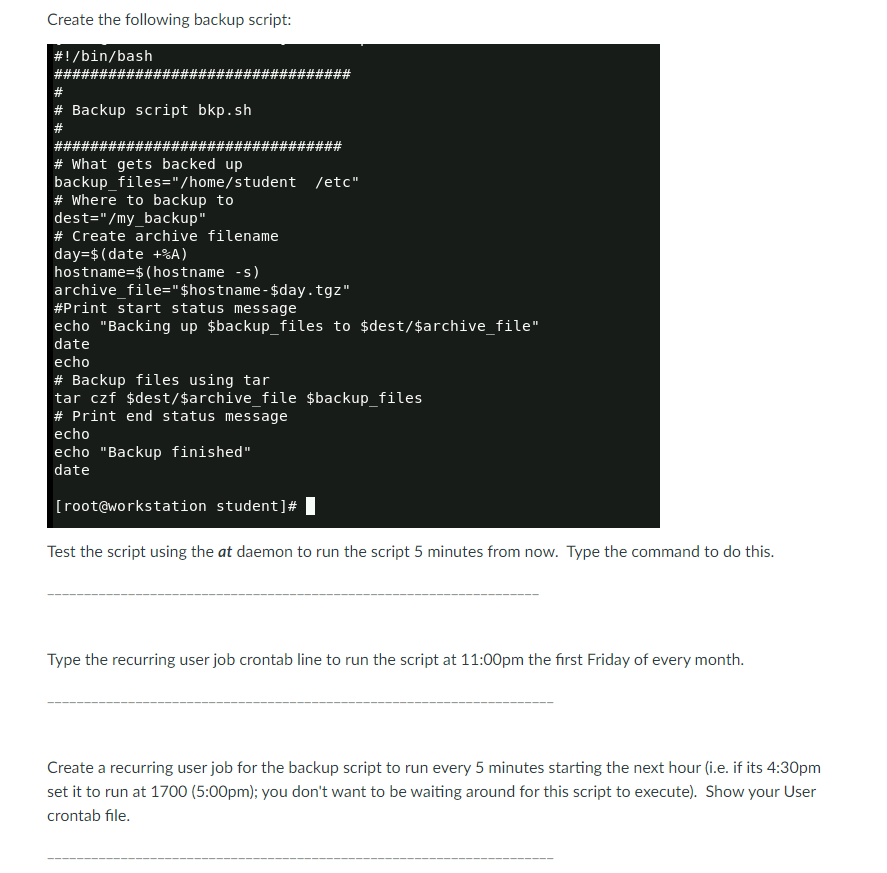
Question: Create the following backup script: # ! / bin / bash ################################# # # Backup script bkp . sh # ################################ # What gets backed
Create the following backup script:
#binbash
#################################
#
# Backup script
bkpsh
#
################################
# What gets backed up
backupfileshomestudent etc
# Where to backup to
destmybackup"
# Create archive filename
day $ date
hostname $ hostname s
archive file$hostname$day.tgz
#Print start status message
echo "Backing up $backupfiles to $dest$archivefile"
date
echo
# Backup files using tar
tar czf $dest$archive file $backupfiles
# Print end status message
echo
echo "Backup finished"
date
root@workstation student#
Test the script using the at daemon to run the script minutes from now. Type the command to do this.
Type the recurring user job crontab line to run the script at :pm the first Friday of every month.
Create a recurring user job for the backup script to run every minutes starting the next hour ie if its :pm
set it to run at :pm; you don't want to be waiting around for this script to execute Show your User
crontab file.
Step by Step Solution
There are 3 Steps involved in it
1 Expert Approved Answer
Step: 1 Unlock

Question Has Been Solved by an Expert!
Get step-by-step solutions from verified subject matter experts
Step: 2 Unlock
Step: 3 Unlock
 Study Help