



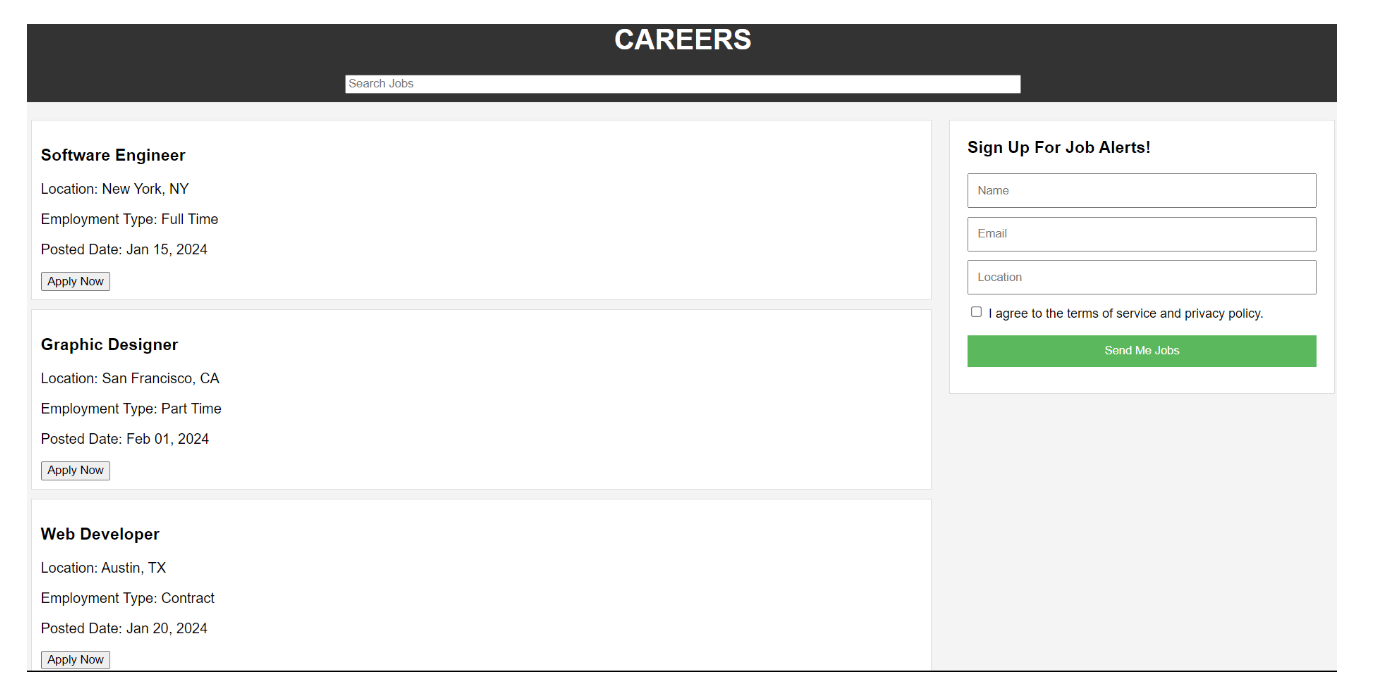
Question: Create the following question? The result looks like the table shown below. Thank you!! Create an Array of Job Listings 1 . Create an array
Create the following question? The result looks like the table shown below. Thank you!!
Create an Array of Job Listings
Create an array of job listing objects with the following properties: title, type, location, and postedDate. You can create sample job listings objects.
Populate the Job Listings
Write a JavaScript function to populate the job listings on the webpage when the page loads use the 'DOMContentLoaded' event
Append the job listings to an HTML container in your webpage.
Validate All Inputs
Write a JavaScript function to validate all inputs of the subscription form, including checking whether the checkbox was checked or not.
o Ensure that the email input is in a valid email format.
o Ensure that the checkbox is checked.
o Display an alert if any of the validations fail.
o Prevent the form from submitting if any of the validations fail.
Clear Input Fields of the Subscription Form
Write a JavaScript function to clear the input fields of the subscription form after a successful subscription or when the form is reset.
Handle Subscription
Write a JavaScript function to handle the subscription.
Simulate form submission by using template literals to display an alert message with the subscription details In actual implementation, you would send this data to the server
Implement Job Search Filtering
Write a JavaScript function that handles job search filtering as the user types into the input search bar in the header.
Add an event listener to the search input field to trigger the filtering function on input changes. DO NOT ADD A BUTTON!!!.
Test Your Implementation
Open the HTML file in a web browser.
Verify that job listings are displayed on the initial load.
Test form input validation for all fields, including the checkbox.
Test the subscription functionality.
HTML CODE:
Careers Page
Step by Step Solution
There are 3 Steps involved in it
1 Expert Approved Answer
Step: 1 Unlock

Question Has Been Solved by an Expert!
Get step-by-step solutions from verified subject matter experts
Step: 2 Unlock
Step: 3 Unlock