







Question: Creating an HTML project with a table and form elements using html , css and javascript. 1 . Create an HTML file named index.html 2
Creating an HTML project with a table and form elements using html css and javascript.
Create an HTML file named index.html
Define the basic HTML structure in your html file.
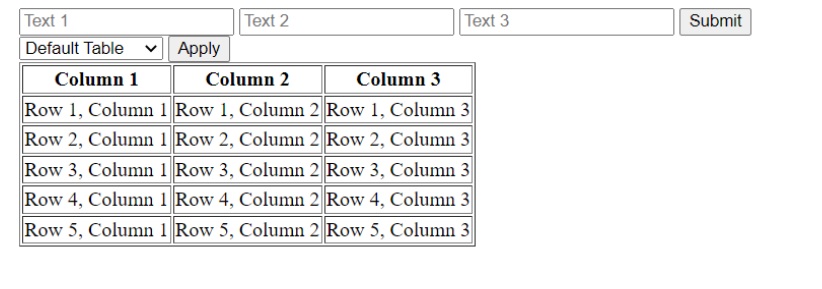
Create a form element with text fields and a submit button.
Create a dropdown menu with a list of bootstrap styles of tables.
Create an apply button.
Create a table with columns and rows.
Assign unique id attributes to each element.
Styling the table with Bootstrap.
Add links to the Bootstrap CSS file.
Modify the table element to use Bootstrap table classes.
Add CSS classes to the form elements.
After second step, your project may look as the second picture:
Step by Step Solution
There are 3 Steps involved in it
1 Expert Approved Answer
Step: 1 Unlock

Question Has Been Solved by an Expert!
Get step-by-step solutions from verified subject matter experts
Step: 2 Unlock
Step: 3 Unlock
 Study Help