







Question: Creating the Initial Table for the Volunteer Database Part 1 Refer to the document with sample data for normalization in the resources. Clean up the
Creating the Initial Table for the Volunteer Database
Part 1
Refer to the document with sample data for normalization in the resources. Clean up the sample data provided and write SQL INSERT statements to insert the information into the table described in that document. Create the table in your test database and test your normalization and SQL by running the INSERT statements. Submit a text file with the SQL INSERT statements for the cleaned up data. Use screen shots to document the successful insertion of the data.
Part 2
Through the remaining assignments in the course, you will be creating a simple database for tracking information about volunteers working and raising money for a community organization. This assignment requires you to create the initial table, called Person, to hold basic information about individual volunteers. You will be refining the design and building the database in the assignments for upcoming units.
Think about the design of the table to hold a volunteer's ID number, name, mailing address, phone number, email address, and three more fields of your choice. In a very brief paper (23 pages) describe your design for this table. Explain your decisions about the structure of the table and data types used. Discuss how you would go about gathering the information that you need for putting the volunteer database together and how that fits into the database life cycle.
Part 3
Write a SQL table creation statement and run it to create the Person table in your database (as discussed in Part 2 above). After creating the table, write and run SQL statements to insert rows in the table for 10 volunteers. Save your SQL to a text file and document the process with screen shots.
Part 4
Write and run three different queries that pull data from the Person table and use ORDER BY to sort the rows in three different ways. Include the queries and the corresponding results in a text file. Use screen shots to document this part of the assignment.
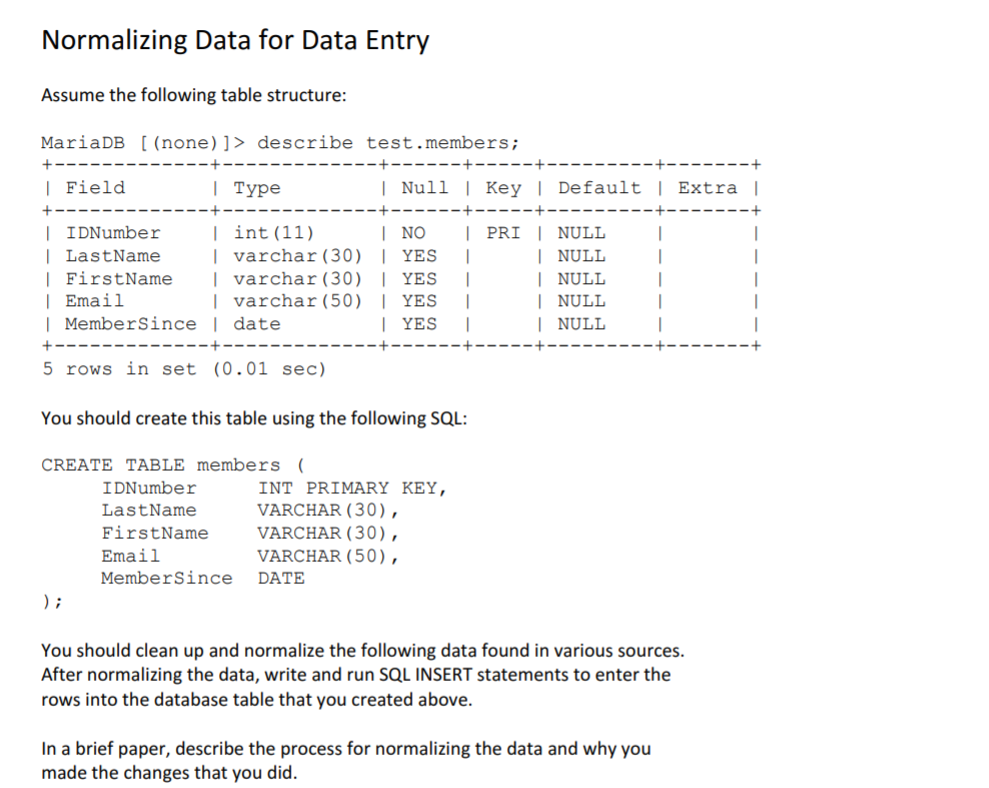
Normalizing Data for Data Entry Assume the following table structure MariaDB [ (none) ]> describe test.members; I Fielcd | Type | Null I Key I Default l Extra I I int (11) I varchar (30) I YESI IDNumber I NO I PRI | NULL LastName | FirstName Ivarchar (30) YES | Emai.1 | MemberSince date NULL NULL NULL NULL I varchar (50) IYES I YES I 5 r?ws in set (0.01 sec) You should create this table using the following SQL: CREATE TABLE members ( IDNumber LastName FirstName Email MemberSince DATE INT PRIMARY KEY VARCHAR (30), VARCHAR (30), VARCHAR (50), You should clean up and normalize the following data found in various sources. After normalizing the data, write and run SQL INSERT statements to enter the rows into the database table that you created above. In a brief paper, describe the process for normalizing the data and why you made the changes that you did
Step by Step Solution
There are 3 Steps involved in it

Get step-by-step solutions from verified subject matter experts
 Study Help