





Question: Creating Ul Macros and a Navigation Form Note: To complete this assignment, you will be required to use the Data Files. Please contact your instructor
Creating Ul Macros and a Navigation Form Note: To

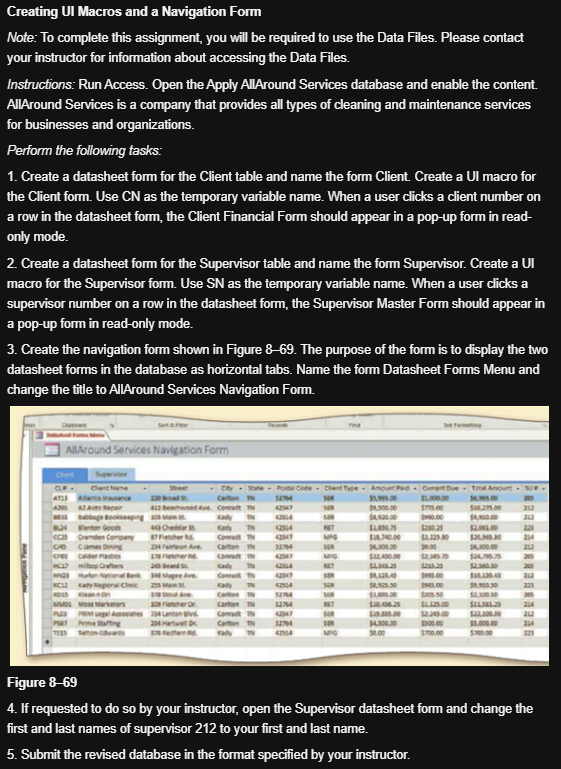
Creating Ul Macros and a Navigation Form Note: To complete this assignment, you will be required to use the Data Files. Please contact your instructor for information about accessing the Data Files. Instructions: Run Access. Open the Apply All Around Services database and enable the content AllAround Services is a company that provides all types of cleaning and maintenance services for businesses and organizations. Perform the following tasks: 1. Create a datasheet form for the Client table and name the form Client. Create a Ul macro for the Client form. Use CN as the temporary variable name. When a user clicks a client number on a row in the datasheet form, the Client Financial Form should appear in a pop-up form in read- only mode. 2. Create a datasheet form for the Supervisor table and name the form Supervisor. Create a UI macro for the Supervisor form. Use SN as the temporary variable name. When a user clicks a supervisor number on a row in the datasheet form, the Supervisor Master Form should appear in a pop-up form in read-only mode. 3. Create the navigation form shown in Figure 8-69. The purpose of the form is to display the two datasheet forms in the database as horizontal tabs. Name the form Datasheet Forms Menu and change the title to All Around Services Navigation Form. Allround Services Navigation Form Super . Che Postcode Grant Toe Amount P. Corte Tortor Cart 1.000.00 3.00 12. Bechde N 1.500.00 bagong at at com Chery TN54 3.7 2.23 $2,000 220 cca Onde Company Becher Rd Conad 57 MS 170.00 2.125.80.80 234 Came2 Are Cartoon N 274 0.00 2.300.00 e der Ca top 25 Bad Sady N 454 O Murton in agreed Born 25. SOS ar carton IN $10.06.23 $11.30.25 PS PM 7Hunton Blvd Com N 12.345.00 22.000.00 2 twell Carton NS2 SOM HOE 30 500.00 5.000.00 234 was afery 3304 Figure 8-69 4. If requested to do so by your instructor, open the Supervisor datasheet form and change the first and last names of supervisor 212 to your first and last name. 5. Submit the revised database in the format specified by your instructor. Creating Ul Macros and a Navigation Form Note: To complete this assignment, you will be required to use the Data Files. Please contact your instructor for information about accessing the Data Files. Instructions: Run Access. Open the Apply All Around Services database and enable the content AllAround Services is a company that provides all types of cleaning and maintenance services for businesses and organizations. Perform the following tasks: 1. Create a datasheet form for the Client table and name the form Client. Create a Ul macro for the Client form. Use CN as the temporary variable name. When a user clicks a client number on a row in the datasheet form, the Client Financial Form should appear in a pop-up form in read- only mode. 2. Create a datasheet form for the Supervisor table and name the form Supervisor. Create a UI macro for the Supervisor form. Use SN as the temporary variable name. When a user clicks a supervisor number on a row in the datasheet form, the Supervisor Master Form should appear in a pop-up form in read-only mode. 3. Create the navigation form shown in Figure 8-69. The purpose of the form is to display the two datasheet forms in the database as horizontal tabs. Name the form Datasheet Forms Menu and change the title to All Around Services Navigation Form. Allround Services Navigation Form Super . Che Postcode Grant Toe Amount P. Corte Tortor Cart 1.000.00 3.00 12. Bechde N 1.500.00 bagong at at com Chery TN54 3.7 2.23 $2,000 220 cca Onde Company Becher Rd Conad 57 MS 170.00 2.125.80.80 234 Came2 Are Cartoon N 274 0.00 2.300.00 e der Ca top 25 Bad Sady N 454 O Murton in agreed Born 25. SOS ar carton IN $10.06.23 $11.30.25 PS PM 7Hunton Blvd Com N 12.345.00 22.000.00 2 twell Carton NS2 SOM HOE 30 500.00 5.000.00 234 was afery 3304 Figure 8-69 4. If requested to do so by your instructor, open the Supervisor datasheet form and change the first and last names of supervisor 212 to your first and last name. 5. Submit the revised database in the format specified by your instructor

Step by Step Solution

There are 3 Steps involved in it

1 Expert Approved Answer
Step: 1 Unlock blur-text-image

Question Has Been Solved by an Expert!

Get step-by-step solutions from verified subject matter experts

Step: 2 Unlock
Step: 3 Unlock

Students Have Also Explored These Related General Management Questions!