



Question: Credit Card Billing - Make a project that allows the clients to be able to pay the credit card bill. This version will let you
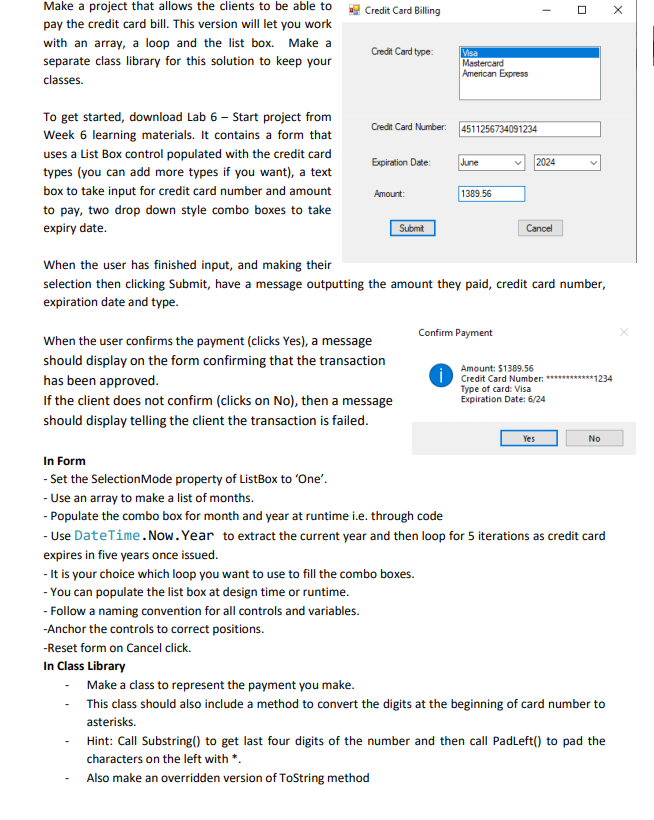
Credit Card Billing - Make a project that allows the clients to be able to pay the credit card bill. This version will let you work with an array, a loop and the list box. Make a separate class library for this solution to keep your classes. Credit Card type: Visa Mastercard American Express Credit Card Number: 4511256734091234 Expiration Date: June 2024 To get started, download Lab 6 - Start project from Week 6 learning materials. It contains a form that uses a List Box control populated with the credit card types (you can add more types if you want), a text box to take input for credit card number and amount to pay, two drop down style combo boxes to take expiry date. Amount: 1389.56 Submit Cancel When the user has finished input, and making their selection then clicking Submit, have a message outputting the amount they paid, credit card number, expiration date and type. Confirm Payment When the user confirms the payment (clicks Yes), a message should display on the form confirming that the transaction has been approved. If the client does not confirm (clicks on No), then a message should display telling the client the transaction is failed. iCredit Card Number : *******1234 Type of card: Visa Expiration Date: 6/24 Yes No In Form - Set the SelectionMode property of ListBox to 'One'. - Use an array to make a list of months. - Populate the combo box for month and year at runtime i.e. through code - Use DateTime.Now. Year to extract the current year and then loop for 5 iterations as credit card expires in five years once issued. - It is your choice which loop you want to use to fill the combo boxes. - You can populate the list box at design time or runtime. - Follow a naming convention for all controls and variables. -Anchor the controls to correct positions. -Reset form on Cancel click. In Class Library - Make a class to represent the payment you make. This class should also include a method to convert the digits at the beginning of card number to asterisks. Hint: Call Substring() to get last four digits of the number and then call Padleft() to pad the characters on the left with * Also make an overridden version of ToString method
Step by Step Solution
There are 3 Steps involved in it

Get step-by-step solutions from verified subject matter experts