



Question: CSC 1 1 0 Project - Cardstock Cube Decorated with Turtle Patterns The final product of this project will be a cardstock decorated cube. With
CSC Project Cardstock Cube Decorated with Turtle Patterns
The final product of this project will be a cardstock decorated cube. With the turtle module, you
will draw the skeleton for the cube and a pattern on each side a different pattern will be
assigned to each student I will print your turtle code image directly on an
sheet of cardstock using a color laser printer.
The projects will be broken down into multiple steps that will be made available and explained
over the course of the next weeks. See next page for an example of a possible final product.
First step: draw the skeleton. Submit in Runestone.
Write a helper function square that draws a square of side length with a turtle You
must use a for loop in the function. Add a "docstring" or a comment below the function header
to specify the starting point of the square eg topleft corner
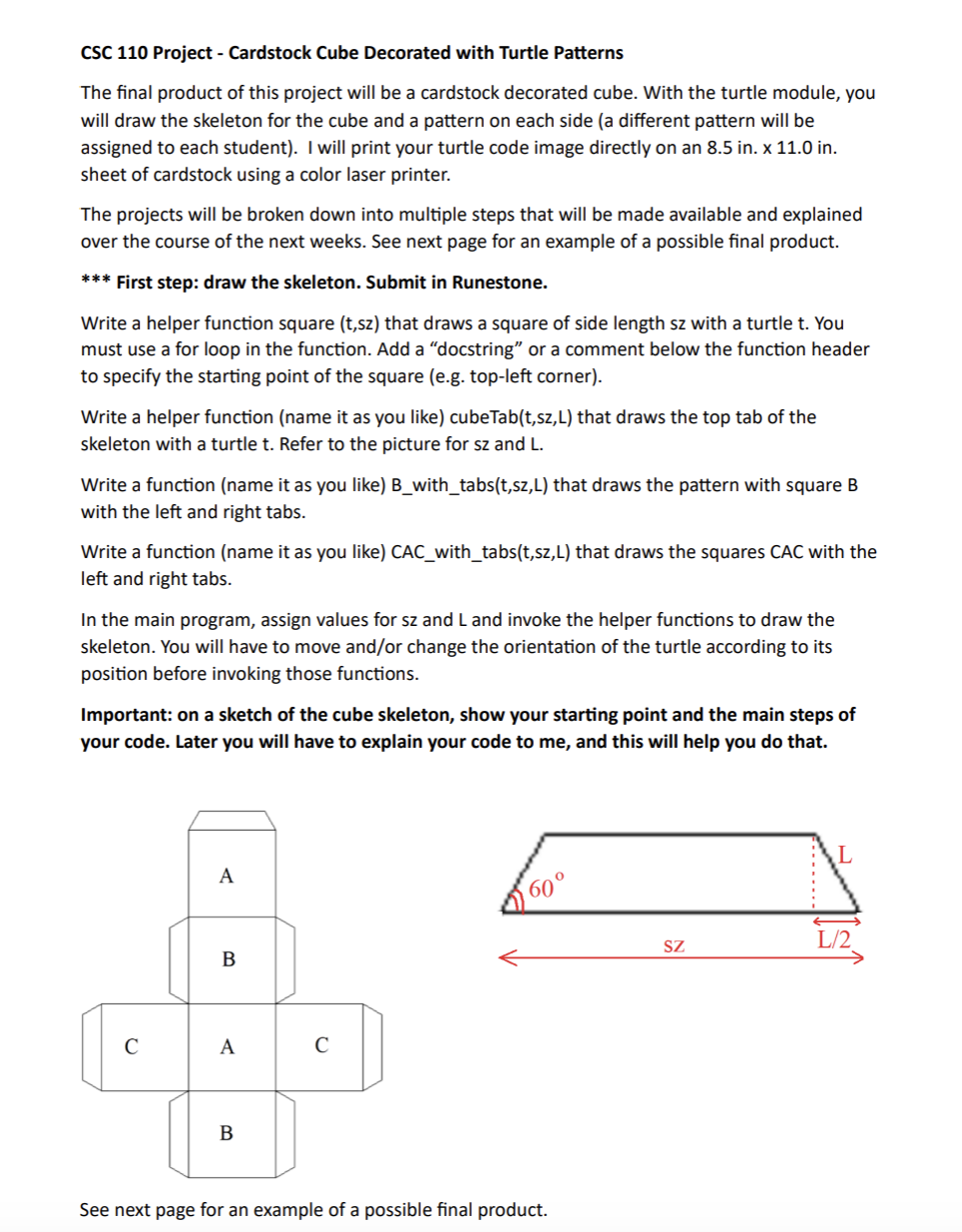
Write a helper function name it as you like cubeTabtszL that draws the top tab of the
skeleton with a turtle Refer to the picture for and
Write a function name it as you like Bwithtabs that draws the pattern with square B
with the left and right tabs
Write a function name it as you like CACwithtabs that draws the squares CAC with the
left and right tabs
In the main program, assign values for and and invoke the helper functions to draw the
skeleton. You will have to move andor change the orientation of the turtle according to its
position before invoking those functions.
Important: on a sketch of the cube skeleton, show your starting point and the main steps of
your code. Later you will have to explain your code to me and this will help you do that.
Step by Step Solution
There are 3 Steps involved in it
1 Expert Approved Answer
Step: 1 Unlock

Question Has Been Solved by an Expert!
Get step-by-step solutions from verified subject matter experts
Step: 2 Unlock
Step: 3 Unlock