Question: CSC 1101- Problem Solving and Programming Laboratory Lab 22- Iyour name] 25 points-Due April 16, 11pm 9-Exit Enter an option: Create function menuOption that presents
![CSC 1101- Problem Solving and Programming Laboratory Lab 22- Iyour name]](https://dsd5zvtm8ll6.cloudfront.net/si.experts.images/questions/2024/09/66f50fa931a32_36066f50fa889309.jpg)
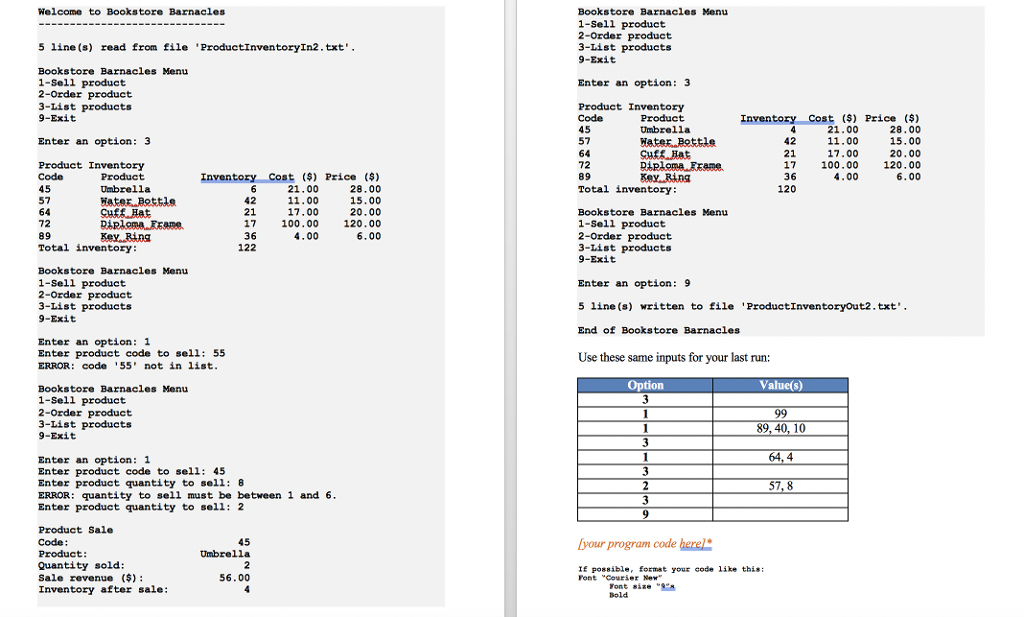
CSC 1101- Problem Solving and Programming Laboratory Lab 22- Iyour name] 25 points-Due April 16, 11pm 9-Exit Enter an option: Create function menuOption that presents the menu and returns the option selected as an integer. Continue to read an option, process it, and display the menu until the user enters the sentinel value of9. Here are the option descriptions a) Save this document with your name and the homework number somewhere in the file name. b) Type/paste your answers into the document. c) Submit this document and your cpp filc(s) to the Blackboard item where you downloaded this document. Do not submit a zip file but individually attach your files. Sell product-prompt for and get a product code. If the code is not in the codes array, print an error message. Use a linear search for this. If the code is in the codes array, use a validation loop to get a quantity to sell in the range 1 to the inventory level for that product. Update the inventory level and print the product code, product name, quantity sold, sale revenue (price *quantity), and new inventory level. Format the outputs in two columns with the first column containing a label and the second column containing the valuc. Show one output per line. You've been hired again by Bookstore Barnacles to update the C++ console application that manages product inventory. You may start with your own Lab 20 application, or start with the Lab 20 application key. Updates to the application are highlighted in yellow. Attempt to open input file ProductInventoryIn2.txt. If the file doesn't open, show an error message and end the application. Remember that input files are placcd (and output files appear) in folder . If the file opens, read the following inventory data: Order product- prompt for and get a product code. If the code is not in the codes array, print an error message. Use a lincar search for this. If the code is in the codes array, use a validation loop to get a quantity to order>- 1 for that product. Update the inventory level and print the product code, product name, quantity sold, amount of order (cost *quantity), and new inventory level. Format the outputs in two columns with the first column containing a label and the second column containing the value. Show one output per linc. 45 57 64 72 89 Umbrella Hater 42 21 17 36 21.00 11.00 17.00 100.00 4.00 28.00 15.00 20.00 120.00 6.00 Read the data into one array of structs of size 5. The struct has the following ficlds: List products- print the product inventory formatted in five columns, one for each struct field. Also, show the total inventory after the list. code (int) name (string) inventory (int) cost (double) price (double) Exit logic for this option is placed after the sentinel loop. Attempt to open output file ProductInventoryOut2.txt. If the file doesn't open, show an error message and end the application. If the file opens, write the updated data in the same layout as the input file. Note that each token within the file contains no spaces so you may use Here is a sample program run: to read each token into the appropriate array element. Present the following menu to the user: Bookstore Barnacles Menu 1-Sell product 2-Order product 3-List products CSC 1101- Problem Solving and Programming Laboratory Lab 22- Iyour name] 25 points-Due April 16, 11pm 9-Exit Enter an option: Create function menuOption that presents the menu and returns the option selected as an integer. Continue to read an option, process it, and display the menu until the user enters the sentinel value of9. Here are the option descriptions a) Save this document with your name and the homework number somewhere in the file name. b) Type/paste your answers into the document. c) Submit this document and your cpp filc(s) to the Blackboard item where you downloaded this document. Do not submit a zip file but individually attach your files. Sell product-prompt for and get a product code. If the code is not in the codes array, print an error message. Use a linear search for this. If the code is in the codes array, use a validation loop to get a quantity to sell in the range 1 to the inventory level for that product. Update the inventory level and print the product code, product name, quantity sold, sale revenue (price *quantity), and new inventory level. Format the outputs in two columns with the first column containing a label and the second column containing the valuc. Show one output per line. You've been hired again by Bookstore Barnacles to update the C++ console application that manages product inventory. You may start with your own Lab 20 application, or start with the Lab 20 application key. Updates to the application are highlighted in yellow. Attempt to open input file ProductInventoryIn2.txt. If the file doesn't open, show an error message and end the application. Remember that input files are placcd (and output files appear) in folder . If the file opens, read the following inventory data: Order product- prompt for and get a product code. If the code is not in the codes array, print an error message. Use a lincar search for this. If the code is in the codes array, use a validation loop to get a quantity to order>- 1 for that product. Update the inventory level and print the product code, product name, quantity sold, amount of order (cost *quantity), and new inventory level. Format the outputs in two columns with the first column containing a label and the second column containing the value. Show one output per linc. 45 57 64 72 89 Umbrella Hater 42 21 17 36 21.00 11.00 17.00 100.00 4.00 28.00 15.00 20.00 120.00 6.00 Read the data into one array of structs of size 5. The struct has the following ficlds: List products- print the product inventory formatted in five columns, one for each struct field. Also, show the total inventory after the list. code (int) name (string) inventory (int) cost (double) price (double) Exit logic for this option is placed after the sentinel loop. Attempt to open output file ProductInventoryOut2.txt. If the file doesn't open, show an error message and end the application. If the file opens, write the updated data in the same layout as the input file. Note that each token within the file contains no spaces so you may use Here is a sample program run: to read each token into the appropriate array element. Present the following menu to the user: Bookstore Barnacles Menu 1-Sell product 2-Order product 3-List products









 Study Help