





Question: C/shell programming Task 1: Printing File Names using Dirent Library: (50points) Here we want to access a Linux directory using C. To do so we
C/shell programming  C/shell programming Task 1: Printing File Names using Dirent Library: (50points)
Here we want to access a Linux directory using C. To do

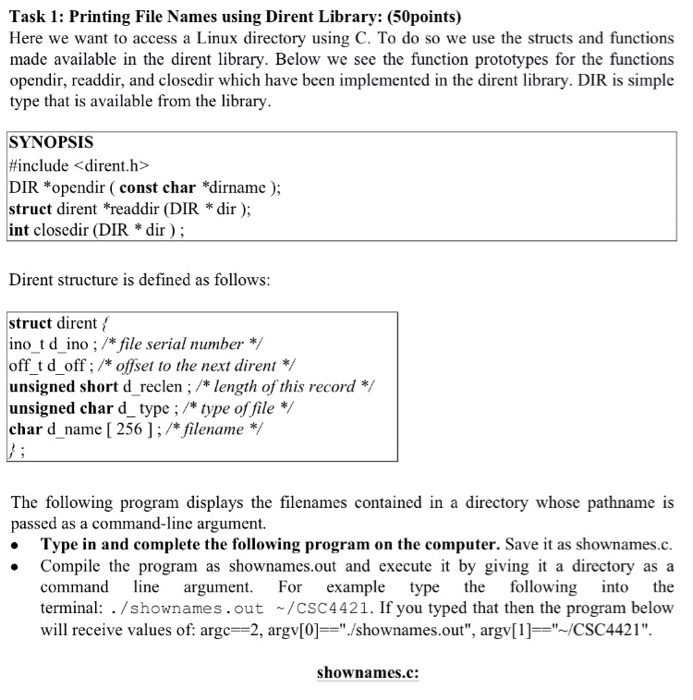
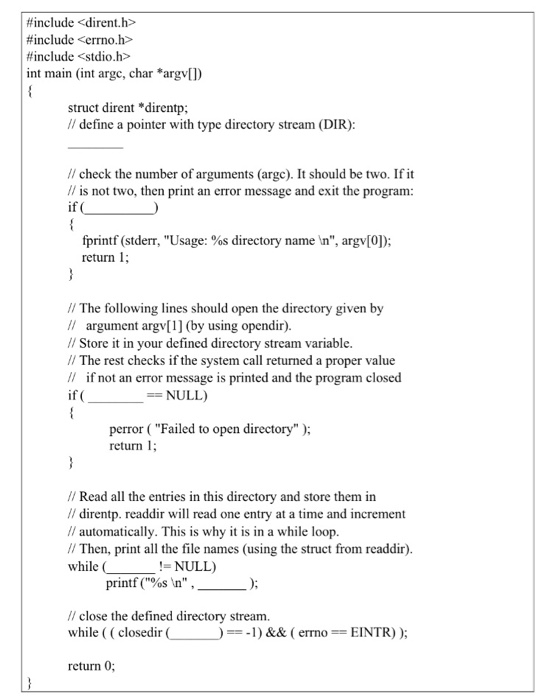
Task 1: Printing File Names using Dirent Library: (50points) Here we want to access a Linux directory using C. To do so we use the structs and functions made available in the dirent library. Below we see the function prototypes for the functions opendir, readdir, and closedir which have been implemented in the dirent library. DIR is simple type that is available from the library SYNOPSIS #include DIR *opendir ( const char *dirname ); struct dirent *readdir (DIR *dir); int closedir (DIR *dir); Dirent structure is defined as follows struct direntf ino t d ino ; /*file serial number*/ off td offoffset to the next dirent unsigned short d reclen ; /* length of this record */ unsigned char d_ type ; /* type of file */ char d_name [ 256 ] ; /*filename The following program displays the filenames contained in a directory whose pathname is passed as a command-line argument. Type in and complete the following program on the computer. Save it as shownames.c. . Compile the program as shownames.out and execute it by giving it a directory as a command ine argument. Fo example type the following nto the terminal: . /shownames.out ~/CSC4421. If you typed that then the program below will receive values of: argc-2, argv[0]"/shownames.out", argv[1]-"-/CSC4421". shownames.c

Step by Step Solution

There are 3 Steps involved in it

1 Expert Approved Answer
Step: 1 Unlock blur-text-image
Question Has Been Solved by an Expert!

Get step-by-step solutions from verified subject matter experts

Step: 2 Unlock
Step: 3 Unlock

Students Have Also Explored These Related Databases Questions!