







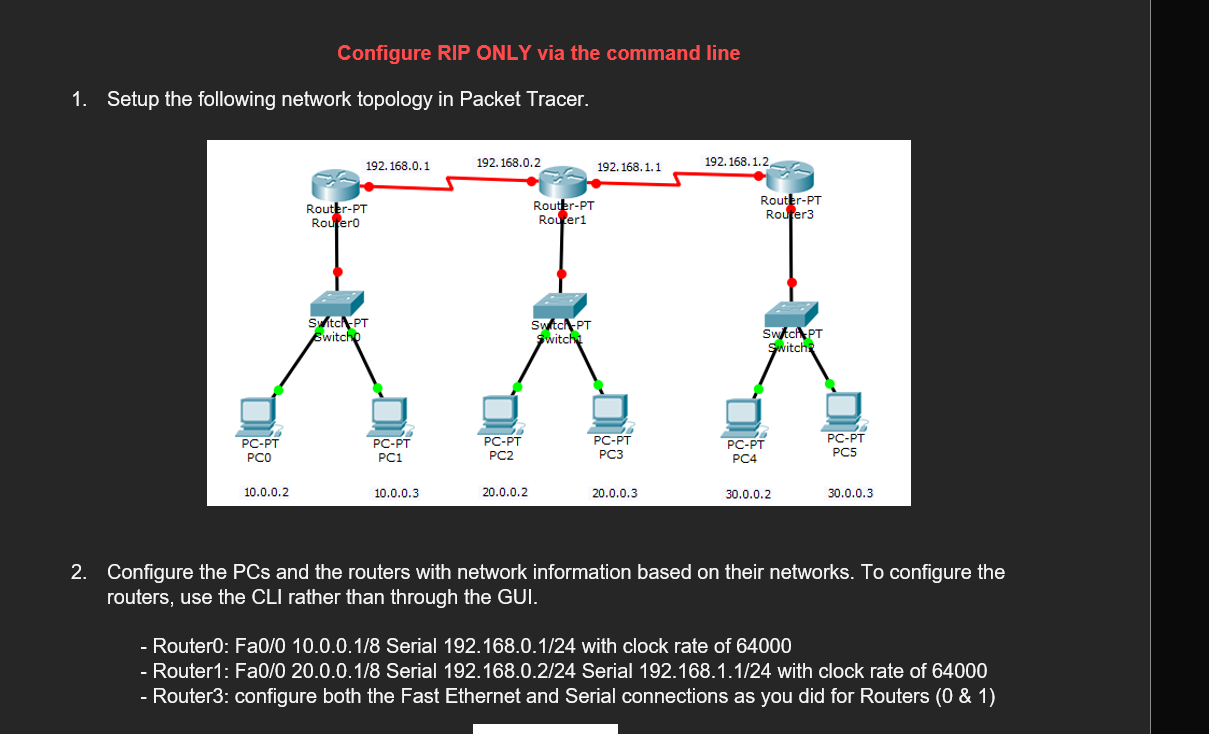
Question: CST 2 4 0 Routing Technologies Lab 2 1 Configure RIP Configure RIP ONLY via the command line 1 . Setup the following network topology
CST Routing Technologies
Lab
Configure RIP
Configure RIP ONLY via the command line
Setup the following network topology in Packet Tracer.
Configure the PCs and the routers with network information based on their networks. To configure the routers, use the CLI rather than through the GUI.
Router: Fa Serial with clock rate of
Router: Fa Serial Serial with clock rate of
Router: configure both the Fast Ethernet and Serial connections as you did for Routers &
All the configuration is complete, attempt to send a message from PC to PC It should not be successful as RIP has not been applied.
We will now apply RIP to Router via the command line.
Now repeat the same procedure for Router and Router
Now that RIP is enabled on all the routers, send a packet from PC to PC
Step by Step Solution
There are 3 Steps involved in it
1 Expert Approved Answer
Step: 1 Unlock

Question Has Been Solved by an Expert!
Get step-by-step solutions from verified subject matter experts
Step: 2 Unlock
Step: 3 Unlock
 Study Help