







Question: For this lab, we are evolving our Banking System of Lab4 so we can make it more robust and a bit richer in its
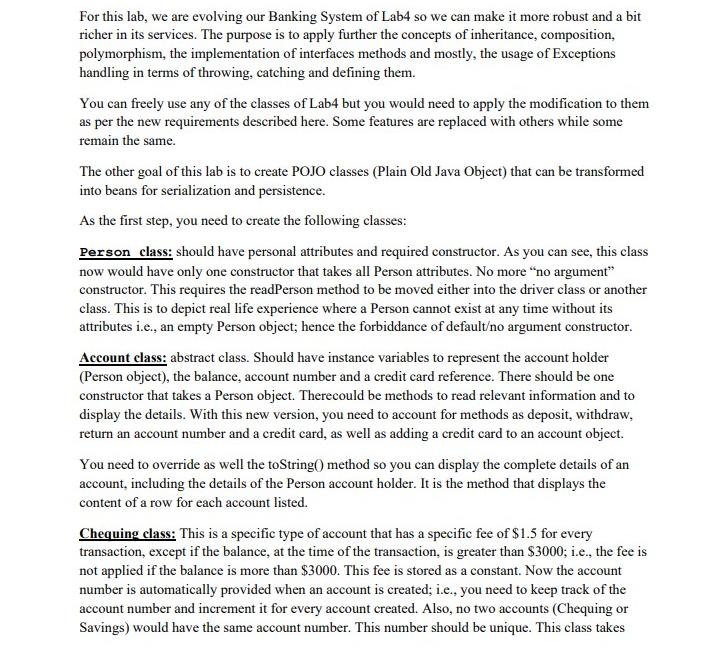
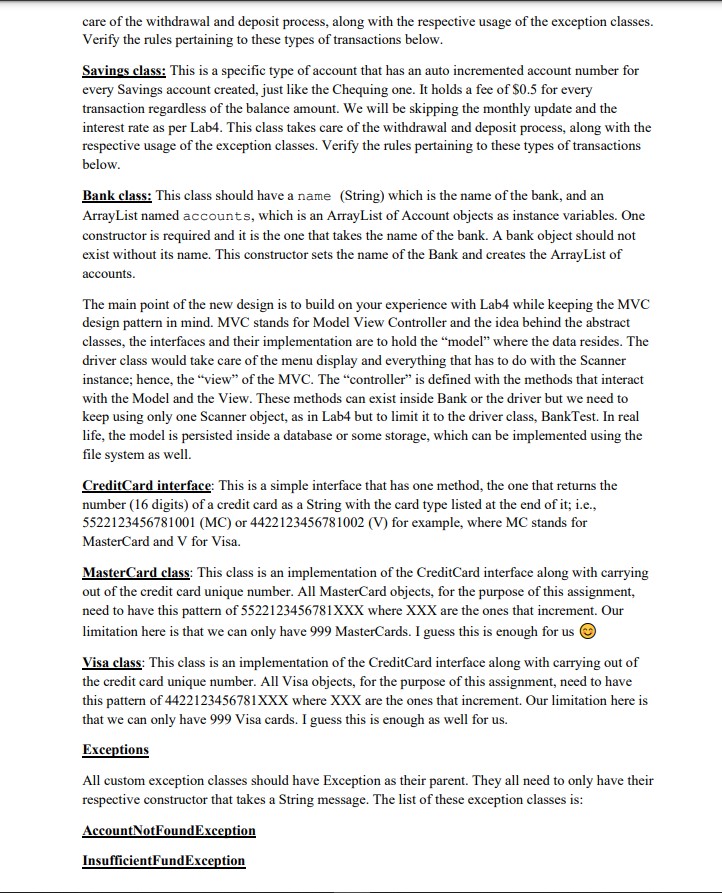
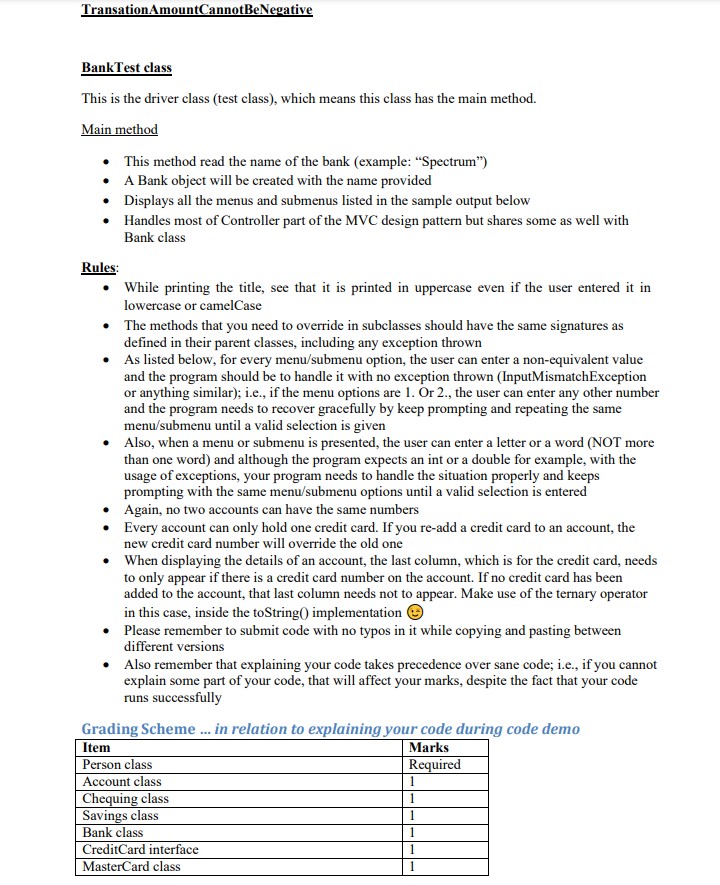
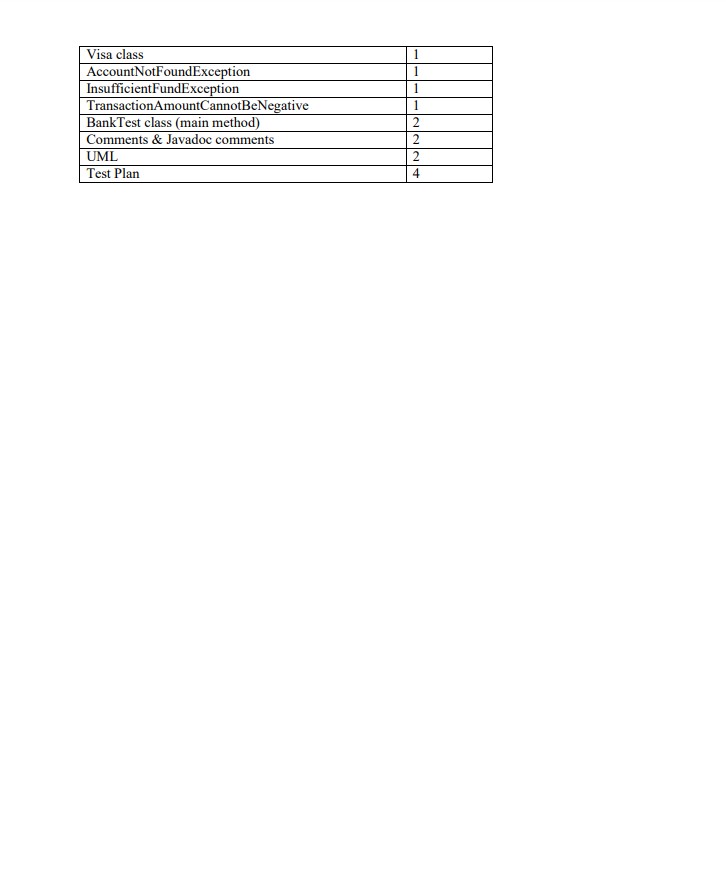
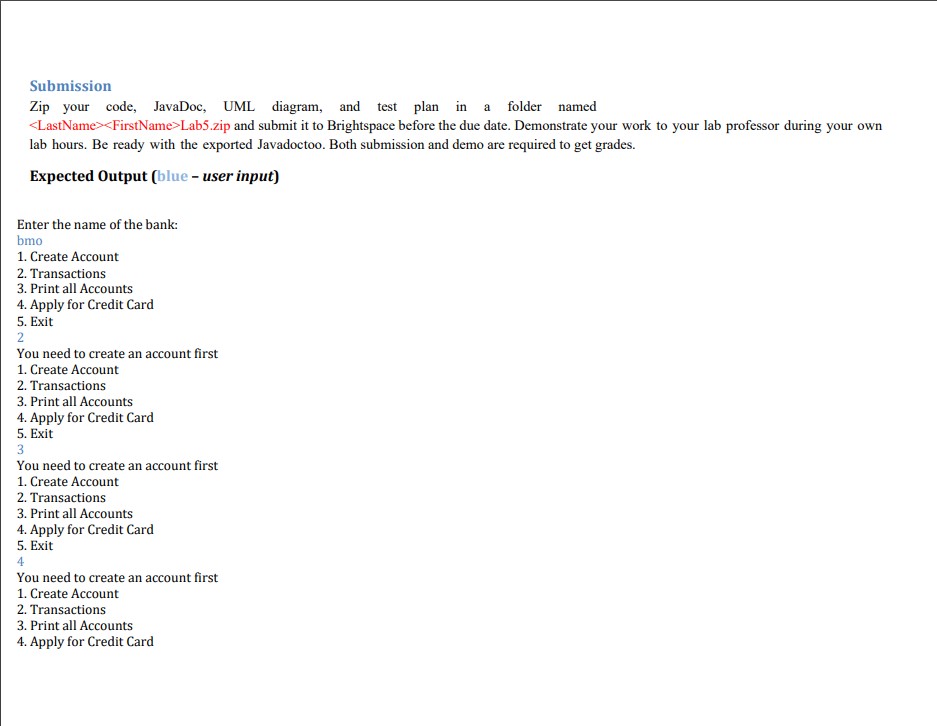
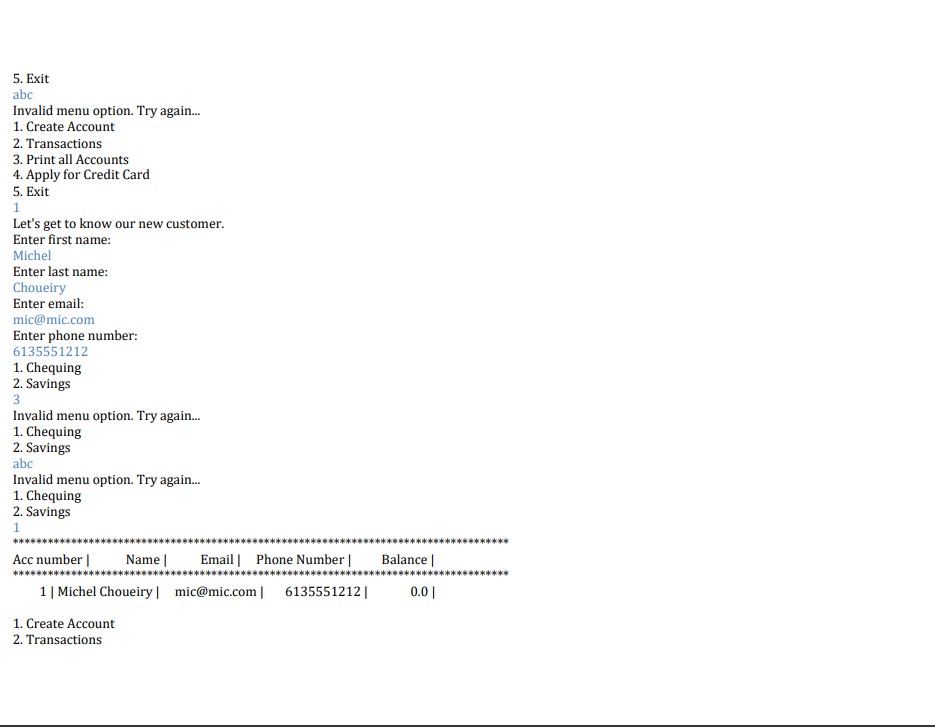
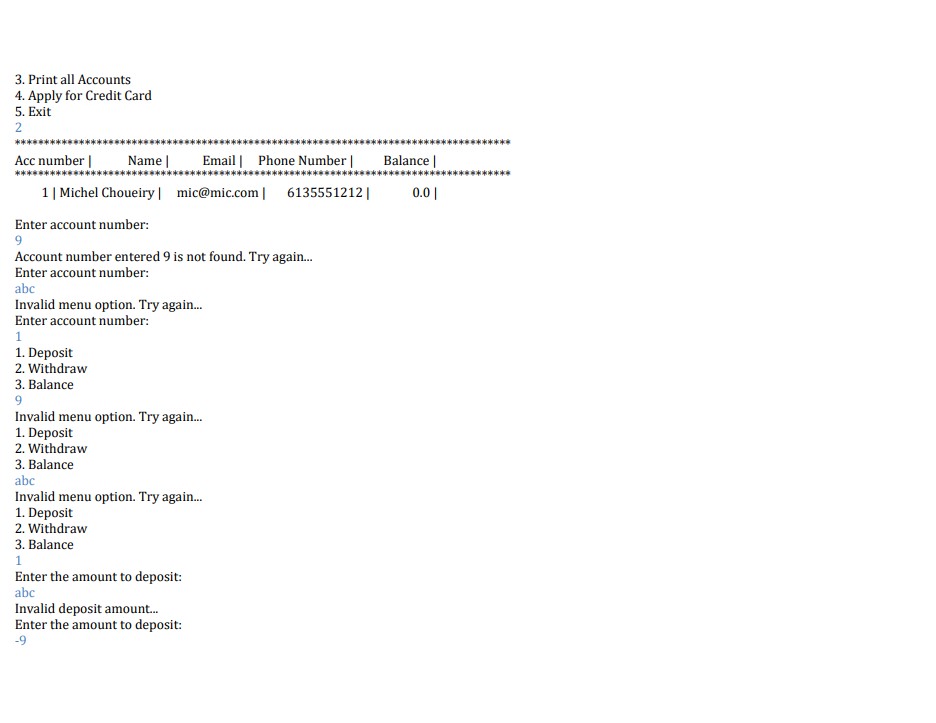
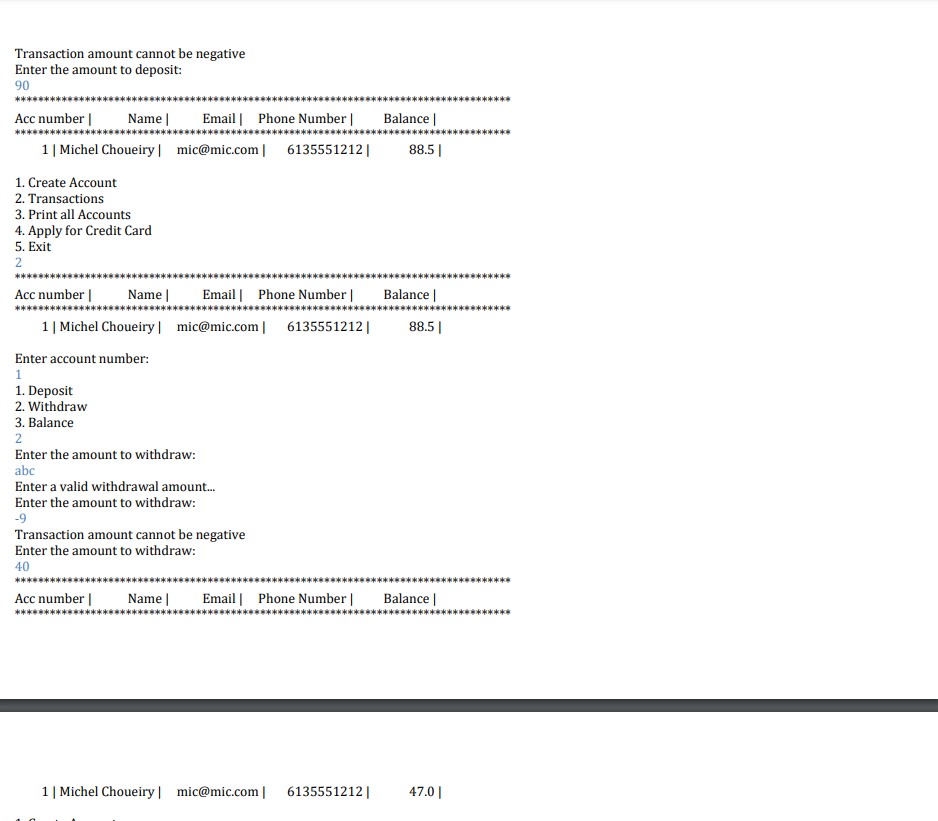
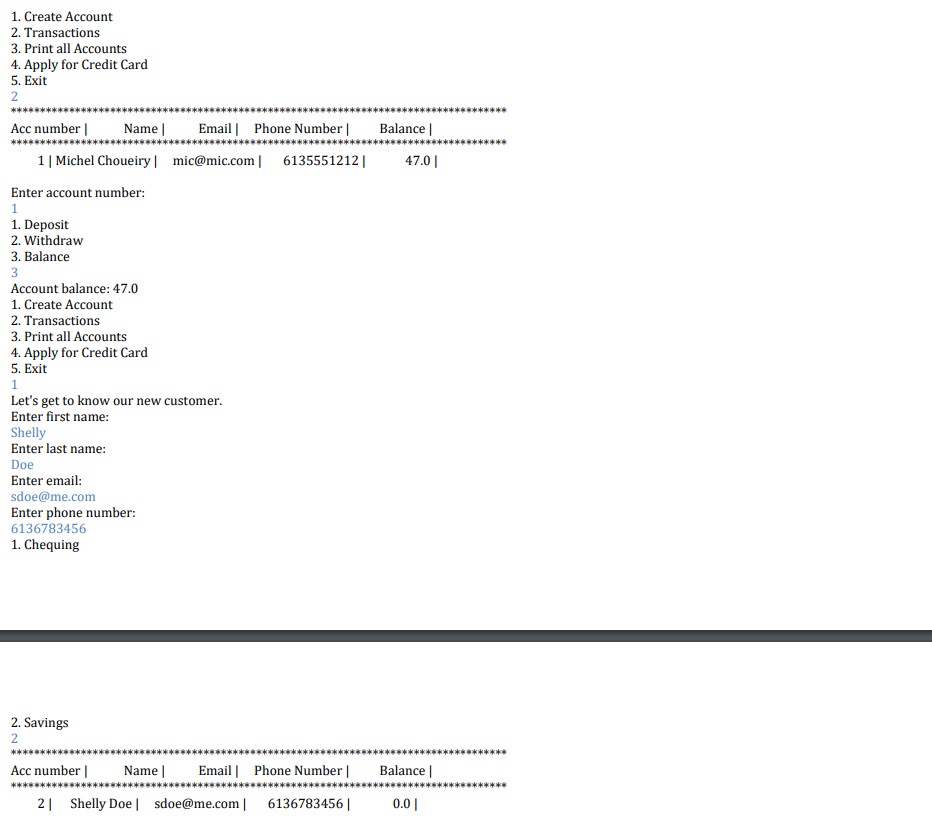
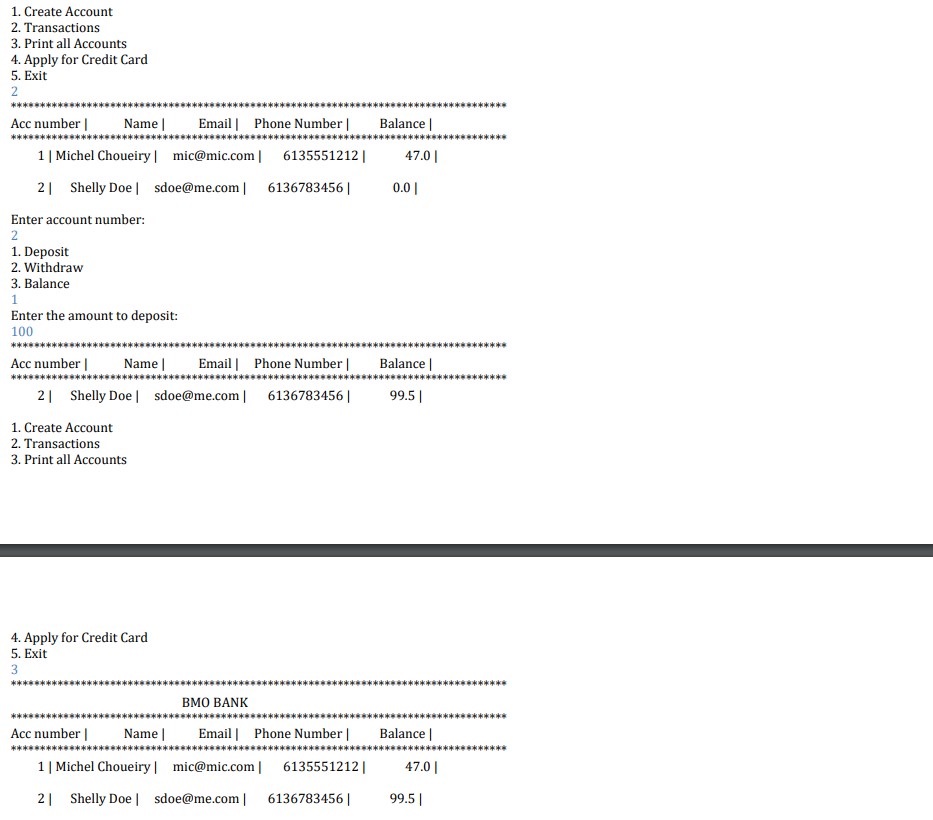
For this lab, we are evolving our Banking System of Lab4 so we can make it more robust and a bit richer in its services. The purpose is to apply further the concepts of inheritance, composition, polymorphism, the implementation of interfaces methods and mostly, the usage of Exceptions handling in terms of throwing, catching and defining them. You can freely use any of the classes of Lab4 but you would need to apply the modification to them as per the new requirements described here. Some features are replaced with others while some remain the same. The other goal of this lab is to create POJO classes (Plain Old Java Object) that can be transformed into beans for serialization and persistence. As the first step, you need to create the following classes: Person class: should have personal attributes and required constructor. As you can see, this class now would have only one constructor that takes all Person attributes. No more "no argument" constructor. This requires the readPerson method to be moved either into the driver class or another class. This is to depict real life experience where a Person cannot exist at any time without its attributes i.e., an empty Person object; hence the forbiddance of default/no argument constructor. Account class: abstract class. Should have instance variables to represent the account holder (Person object), the balance, account number and a credit card reference. There should be one constructor that takes a Person object. Therecould be methods to read relevant information and to display the details. With this new version, you need to account for methods as deposit, withdraw, return an account number and a credit card, as well as adding a credit card to an account object. You need to override as well the toString() method so you can display the complete details of an account, including the details of the Person account holder. It is the method that displays the content of a row for each account listed. Chequing class: This is a specific type of account that has a specific fee of $1.5 for every transaction, except if the balance, at the time of the transaction, is greater than $3000; i.e., the fee is not applied if the balance is more than $3000. This fee is stored as a constant. Now the account number is automatically provided when an account is created; i.e., you need to keep track of the account number and increment it for every account created. Also, no two accounts (Chequing or Savings) would have the same account number. This number should be unique. This class takes care of the withdrawal and deposit process, along with the respective usage of the exception classes. Verify the rules pertaining to these types of transactions below. Savings class: This is a specific type of account that has an auto incremented account number for every Savings account created, just like the Chequing one. It holds a fee of $0.5 for every transaction regardless of the balance amount. We will be skipping the monthly update and the interest rate as per Lab4. This class takes care of the withdrawal and deposit process, along with the respective usage of the exception classes. Verify the rules pertaining to these types of transactions below. Bank class: This class should have a name (String) which is the name of the bank, and an ArrayList named accounts, which is an ArrayList of Account objects as instance variables. One constructor is required and it is the one that takes the name of the bank. A bank object should not exist without its name. This constructor sets the name of the Bank and creates the ArrayList of accounts. The main point of the new design is to build on your experience with Lab4 while keeping the MVC design pattern in mind. MVC stands for Model View Controller and the idea behind the abstract classes, the interfaces and their implementation are to hold the "model" where the data resides. The driver class would take care of the menu display and everything that has to do with the Scanner instance; hence, the "view" of the MVC. The "controller" is defined with the methods that interact with the Model and the View. These methods can exist inside Bank or the driver but we need to keep using only one Scanner object, as in Lab4 but to limit it to the driver class, BankTest. In real life, the model is persisted inside a database or some storage, which can be implemented using the file system as well. CreditCard interface: This is a simple interface that has one method, the one that returns the number (16 digits) of a credit card as a String with the card type listed at the end of it; i.e., 5522123456781001 (MC) or 4422123456781002 (V) for example, where MC stands for MasterCard and V for Visa. MasterCard class: This class is an implementation of the CreditCard interface along with carrying out of the credit card unique number. All MasterCard objects, for the purpose of this assignment, need to have this pattern of 5522123456781XXX where XXX are the ones that increment. Our limitation here is that we can only have 999 MasterCards. I guess this is enough for us Visa class: This class is an implementation of the CreditCard interface along with carrying out of the credit card unique number. All Visa objects, for the purpose of this assignment, need to have this pattern of 4422123456781XXX where XXX are the ones that increment. Our limitation here is that we can only have 999 Visa cards. I guess this is enough as well for us. Exceptions All custom exception classes should have Exception as their parent. They all need to only have their respective constructor that takes a String message. The list of these exception classes is: AccountNotFoundException InsufficientFundException Transation Amount Cannot BeNegative Bank Test class This is the driver class (test class), which means this class has the main method. Main method This method read the name of the bank (example: "Spectrum") A Bank object will be created with the name provided Displays all the menus and submenus listed in the sample output below Handles most of Controller part of the MVC design pattern but shares some as well with Bank class Rules: While printing the title, see that it is printed in uppercase even if the user entered it in lowercase or camelCase The methods that you need to override in subclasses should have the same signatures as defined in their parent classes, including any exception thrown As listed below, for every menu/submenu option, the user can enter a non-equivalent value and the program should be to handle it with no exception thrown (InputMismatchException or anything similar); i.e., if the menu options are 1. Or 2., the user can enter any other number and the program needs to recover gracefully by keep prompting and repeating the same menu/submenu until a valid selection is given Also, when a menu or submenu is presented, the user can enter a letter or a word (NOT more than one word) and although the program expects an int or a double for example, with the usage of exceptions, your program needs to handle the situation properly and keeps prompting with the same menu/submenu options until a valid selection is entered Again, no two accounts can have the same numbers Every account can only hold one credit card. If you re-add a credit card to an account, the new credit card number will override the old one When displaying the details of an account, the last column, which is for the credit card, needs to only appear if there is a credit card number on the account. If no credit card has been added to the account, that last column needs not to appear. Make use of the ternary operator in this case, inside the toString() implementation Please remember to submit code with no typos in it while copying and pasting between different versions Also remember that explaining your code takes precedence over sane code; i.e., if you cannot explain some part of your code, that will affect your marks, despite the fact that your code runs successfully Grading Scheme... in relation to explaining your code during code demo Item Person class Marks Required 1 Account class Chequing class Savings class Bank class CreditCard interface MasterCard class 1 1 1 1 Visa class AccountNotFoundException Insufficient FundException TransactionAmount Cannot BeNegative BankTest class (main method) Comments & Javadoc comments UML Test Plan 1 1 1 1 2 2 2 4 Submission Zip your code, JavaDoc, UML diagram, and test plan in a folder named Lab5.zip and submit it to Brightspace before the due date. Demonstrate your work to your lab professor during your own lab hours. Be ready with the exported Javadoctoo. Both submission and demo are required to get grades. Expected Output (blue - user input) Enter the name of the bank: bmo 1. Create Account 2. Transactions 3. Print all Accounts 4. Apply for Credit Card 5. Exit 2 You need to create an account first 1. Create Account 2. Transactions 3. Print all Accounts 4. Apply for Credit Card 5. Exit 3 You need to create an account first 1. Create Account 2. Transactions 3. Print all Accounts 4. Apply for Credit Card 5. Exit 4 You need to create an account first 1. Create Account 2. Transactions 3. Print all Accounts 4. Apply for Credit Card 5. Exit abc Invalid menu option. Try again... 1. Create Account 2. Transactions 3. Print all Accounts 4. Apply for Credit Card 5. Exit 1 Let's get to know our new customer. Enter first name: Michel Enter last name: Choueiry Enter email: mic@mic.com Enter phone number: 6135551212 1. Chequing 2. Savings 3 Invalid menu option. Try again... 1. Chequing 2. Savings abc Invalid menu option. Try again... 1. Chequing 2. Savings 1 Acc number Name Email Phone Number | Balance | ********** 1 | Michel Choueiry | mic@mic.com | 6135551212| 1. Create Account 2. Transactions 0.0| 3. Print all Accounts 4. Apply for Credit Card 5. Exit 2 *** Acc number | Name | Email | Phone Number | Balance *** 1 | Michel Choueiry mic@mic.com 6135551212| 0.0 Enter account number: 9 Account number entered 9 is not found. Try again... Enter account number: abc Invalid menu option. Try again... Enter account number: 1 1. Deposit 2. Withdraw 3. Balance 9 Invalid menu option. Try again... 1. Deposit 2. Withdraw 3. Balance abc Invalid menu option. Try again... 1. Deposit 2. Withdraw 3. Balance 1 Enter the amount to deposit: abc Invalid deposit amount... Enter the amount to deposit: -9 ***** *** Transaction amount cannot be negative Enter the amount to deposit: 90 Acc number Name Email | Phone Number | Balance | ******* 1 | Michel Choueiry | mic@mic.com | 6135551212| 1. Create Account 2. Transactions 3. Print all Accounts 4. Apply for Credit Card 5. Exit 2 88.5 | Acc number Name Email | Phone Number | Balance | **** 1 | Michel Choueiry | mic@mic.com] 6135551212| Enter account number: 1 1. Deposit 2. Withdraw 3. Balance 2 Enter the amount to withdraw: abc Enter a valid withdrawal amount... Enter the amount to withdraw: -9 Transaction amount cannot be negative Enter the amount to withdraw: 40 88.5 | Acc number Name Email Phone Number | Balance | **** 1 | Michel Choueiry| mic@mic.com | 6135551212| 47.0| 1. Create Account 2. Transactions 3. Print all Accounts 4. Apply for Credit Card 5. Exit 2 Acc number Name | Email | Phone Number | Balance | 1 | Michel Choueiry mic@mic.com] 6135551212 Enter account number: 1 1. Deposit 2. Withdraw 3. Balance 3 Account balance: 47.0 1. Create Account 2. Transactions 3. Print all Accounts 4. Apply for Credit Card 5. Exit 1 Let's get to know our new customer. Enter first name: Shelly Enter last name: Doe Enter email: sdoe@me.com Enter phone number: 6136783456 1. Chequing 47.0 2. Savings 2 Acc number Name Email | Phone Number | Balance | *** 2 Shelly Doe sdoe@me.com | 6136783456| 0.0| **** 1. Create Account 2. Transactions 3. Print all Accounts 4. Apply for Credit Card 5. Exit 2 Acc number Name | Email | Phone Number | Balance | *** 1 | Michel Choueiry mic@mic.com | 6135551212 | 47.0 | 2 Shelly Doesdoe@me.com | 6136783456| 0.0 | Enter account number: 2 1. Deposit 2. Withdraw 3. Balance 1 Enter the amount to deposit: 100 Acc number Name | Email | Phone Number | Balance | 2 Shelly Doe sdoe@me.com| 6136783456| 1. Create Account 2. Transactions 3. Print all Accounts 99.5 | 4. Apply for Credit Card 5. Exit 3 BMO BANK Acc number Name Email Phone Number | Balance | **** 1 | Michel Choueiry | mic@mic.com | 6135551212| 2 Shelly Doe | sdoe@me.com | 6136783456| 47.0 | 99.5 |
Step by Step Solution
3.44 Rating (157 Votes )
There are 3 Steps involved in it
Based on the requirements provided here are the Java classes you need to implement import javautilArrayList Person class public class Person private String name private String address private String p... View full answer

Get step-by-step solutions from verified subject matter experts
 Study Help