







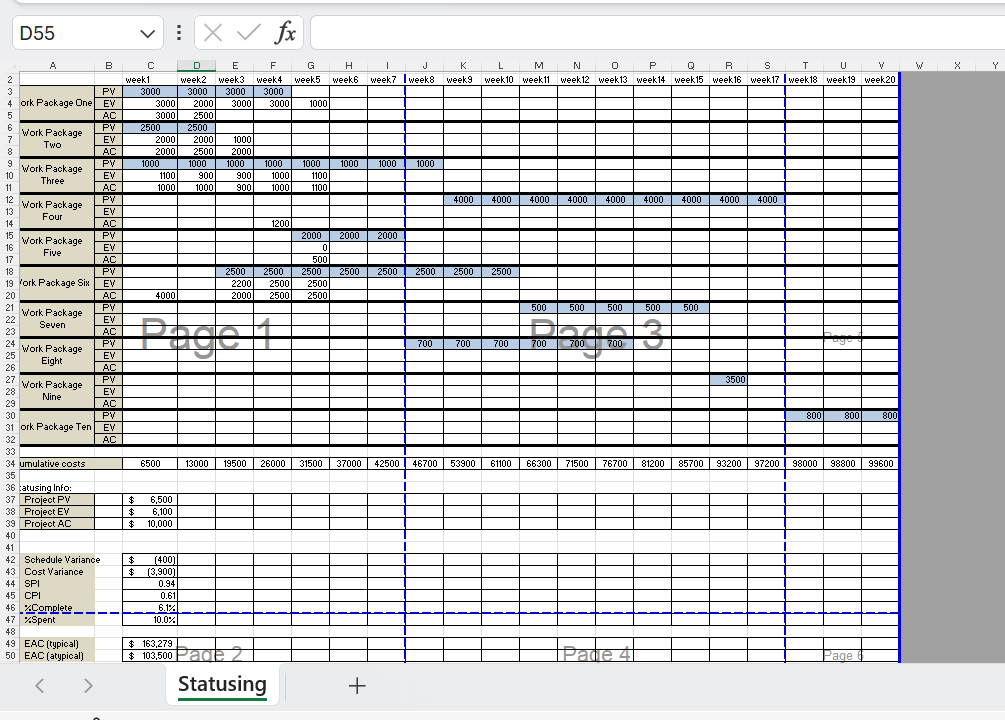
Question: D 5 5 Statusing + Status and Forecast Analysis Objective Calculate status and forecasting for a sample project using earned value management ( EVM )
D
Statusing
Status and Forecast Analysis
Objective
Calculate status and forecasting for a sample project using earned value management EVM formulas.
Instructions
Now it's time to practice statusing and forecasting a project. We've added status information for the first five weeks of the project. You'll calculate status using the earned value formulas. Remember to round to two decimal points only. Week one has been done for you as an example. Complete the calculations use Microsoft Excel functions to create your formulas; do not use a calculator for the cumulative status of the entire project for weeks in the spreadsheet provided. NOTE: Please verify your calculations and formulas, because an error in one week will create errors in all subsequent weeks. You must complete the following activities in the spreadsheet for this exercise:
Calculate PV EV and AC for weeks : Calculate the project or cumulative up to and including current week PV EV and AC for weeks The data for both planned and actuals has been populated in the spreadsheet. The steps to complete this step are as follows:
Total the PV for all Work Packages during week incremental value for current week
Add the total PV from week to the total PV from week cumulative "project" level value for current week
Place the cumulative total in the Project PV cell for week under the Statusing Info section.
Repeat these steps to calculate EV and AC for week
Repeat all steps for weeks
Calculate schedule variance SV: Calculate a costbased SV for the project by week. Enter your answer in the correct cell located at the end of the spreadsheet.
Calculate cost variance CV: Calculate CV for the project by week. Enter your answer in the correct cell located at the end of the spreadsheet.
Cost performance index CPI: Calculate CPI for the project by week. Enter your answer in the correct cell located at the end of the spreadsheet.
Schedule performance index SPI: Calculate SPI for the project by week. Enter your answer in the correct cell located at the end of the spreadsheet.
Percent complete Complete: Calculate percent complete for the project by week. Enter your answer in the correct cell located at the end of the spreadsheet.
Percent spent Spent: Calculate percent spent for the project by week. Enter your answer in the correct cell located at the end of the spreadsheet.
Estimate at Completion EAC: Calculate EAC typical for the project by week. Enter your answer in the correct cell located at the end of the spreadsheet.
Estimate at completion EAC: Calculate EAC atypical for the project by week. Enter your answer in the correct cell located at the end of the spreadsheet.
Template
Complete this exercise using the following template: Status and Forecast Analysis Template Excel
Step by Step Solution
There are 3 Steps involved in it
1 Expert Approved Answer
Step: 1 Unlock

Question Has Been Solved by an Expert!
Get step-by-step solutions from verified subject matter experts
Step: 2 Unlock
Step: 3 Unlock
 Study Help