







Question: Data from Exercise week 5: class Expense: def __init__(self, balance, n_weeks): self.n_weeks = n_weeks self.Totalbalance = balance self.Totalsales = 0 self.Totalexpenses = 0 def addSalesAndExpenses(self,
Data from Exercise week 5:
class Expense: def __init__(self, balance, n_weeks): self.n_weeks = n_weeks self.Totalbalance = balance self.Totalsales = 0 self.Totalexpenses = 0 def addSalesAndExpenses(self, sale, expense): self.Totalsales += sale self.Totalexpenses += expense def netBalance(self): return self.Totalsales - self.Totalexpenses def getKeleven(self): return 0 if self.netBalance() >= 0 else -1*(self.netBalance()) def main(): n_weeks = int(input("How many weeks this month: ")) expenseObj = Expense(0, n_weeks=n_weeks) for week in range(n_weeks): sale, expense = [int(x) for x in input(f"Sales & Expenditure for week {week+1}: ").split()] expenseObj.addSalesAndExpenses(sale=sale, expense=expense) print() print(f"Month Balance: ${format(expenseObj.netBalance(), '.2f')}") print(f"Total Sales: ${format(expenseObj.Totalsales, '.2f')}") print(f"Total Expenses: ${format(expenseObj.Totalexpenses, '.2f')}") print(f"Keleven: ${format(expenseObj.getKeleven(), '.2f')}") # Sample run: main() Screenshots:
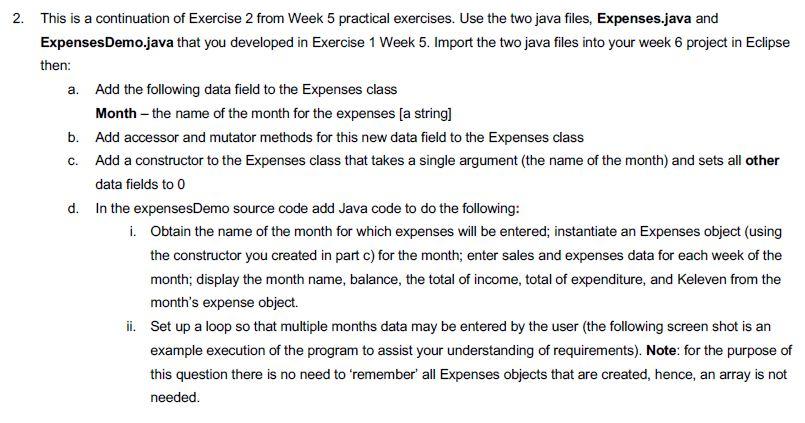
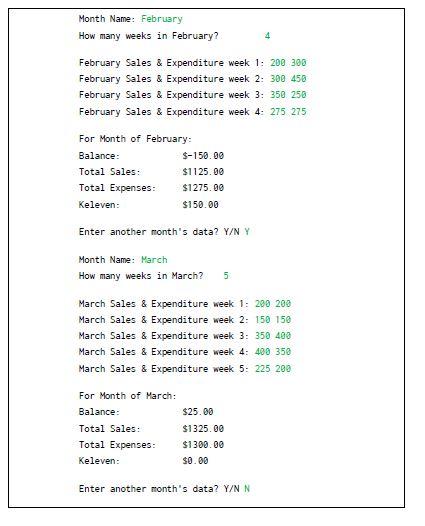
2. This is a continuation of Exercise 2 from Week 5 practical exercises. Use the two java files, Expenses.java and ExpensesDemo.java that you developed in Exercise 1 Week 5. Import the two java files into your week 6 project in Eclipse then: a. Add the following data field to the Expenses class Month - the name of the month for the expenses (a string] b. Add accessor and mutator methods for this new data field to the Expenses class C. Add a constructor to the Expenses class that takes a single argument (the name of the month) and sets all other data fields to 0 d. In the expensesDemo source code add Java code to do the following: i. Obtain the name of the month for which expenses will be entered, instantiate an Expenses object (using the constructor you created in part c) for the month; enter sales and expenses data for each week of the month; display the month name, balance, the total of income, total of expenditure, and Keleven from the month's expense object. ii. Set up a loop so that multiple months data may be entered by the user (the following screen shot is an example execution of the program to assist your understanding of requirements). Note: for the purpose of this question there is no need to remember' all Expenses objects that are created, hence, an array is not needed. Month Name: February How many weeks in February? 4 February Sales & Expenditure week 1: 200 300 February Sales & Expenditure week 2: 300 450 February Sales & Expenditure week 3: 350 258 February Sales & Expenditure week 4: 275 275 For Month of February: Balance: $-150.00 Total Sales: $1125.00 Total Expenses: $1275.90 Keleven: $150.00 Enter another month's data? Y/N Y Month Name: March How many weeks in March? 5 March Sales & Expenditure week 1: 200 200 March Sales & Expenditure week 2: 150 150 March Sales & Expenditure week 3: 350 400 March Sales & Expenditure week 4: 400 350 March Sales & Expenditure week 5: 225 290 For Month of March: Balance: Total Sales: Total Expenses: Keleven: $25.00 $1325.00 $1300.00 $0.00 Enter another month's data? Y/N N class Expense: def init (self, balance, n_weeks): self.n_weeks = n_weeks self. Totalbalance = balance self. Total sales = 0 self. Totalexpenses = 0 def addSalesAndExpenses (self, sale, expense): self. Totalsales += sale self. Totalexpenses += expense def netBalance(self): return self. Total sales - self.Totalexpenses def getkeleven (self): return 0 if self.netBalance() >= 0 else - 1*(self.netBalance()) def main(): n_weeks = int(input("How many weeks this month: ")) expenseObj = Expense(0, n_weeks=n_weeks) for week in range(n_weeks): sale, expense = [int(x) for x in input(f"Sales & Expenditure for week {week+1}: ").split()] expenseObj.addSalesAndExpenses (sale=sale, expense=expense) print() print(f"Month Balance: ${format(expenseObj.netBalance(), '.2f')}") print(f"Total Sales: ${format(expenseObj.Totalsales, '.2f')}") print(f"Total Expenses: ${format(expenseObj. Totalexpenses, '.2f')}") print(f"Keleven: ${format(expenseObj.getKeleven(), '.2f')}") 2. This is a continuation of Exercise 2 from Week 5 practical exercises. Use the two java files, Expenses.java and ExpensesDemo.java that you developed in Exercise 1 Week 5. Import the two java files into your week 6 project in Eclipse then: a. Add the following data field to the Expenses class Month - the name of the month for the expenses (a string] b. Add accessor and mutator methods for this new data field to the Expenses class C. Add a constructor to the Expenses class that takes a single argument (the name of the month) and sets all other data fields to 0 d. In the expensesDemo source code add Java code to do the following: i. Obtain the name of the month for which expenses will be entered, instantiate an Expenses object (using the constructor you created in part c) for the month; enter sales and expenses data for each week of the month; display the month name, balance, the total of income, total of expenditure, and Keleven from the month's expense object. ii. Set up a loop so that multiple months data may be entered by the user (the following screen shot is an example execution of the program to assist your understanding of requirements). Note: for the purpose of this question there is no need to remember' all Expenses objects that are created, hence, an array is not needed. Month Name: February How many weeks in February? 4 February Sales & Expenditure week 1: 200 300 February Sales & Expenditure week 2: 300 450 February Sales & Expenditure week 3: 350 258 February Sales & Expenditure week 4: 275 275 For Month of February: Balance: $-150.00 Total Sales: $1125.00 Total Expenses: $1275.90 Keleven: $150.00 Enter another month's data? Y/N Y Month Name: March How many weeks in March? 5 March Sales & Expenditure week 1: 200 200 March Sales & Expenditure week 2: 150 150 March Sales & Expenditure week 3: 350 400 March Sales & Expenditure week 4: 400 350 March Sales & Expenditure week 5: 225 290 For Month of March: Balance: Total Sales: Total Expenses: Keleven: $25.00 $1325.00 $1300.00 $0.00 Enter another month's data? Y/N N class Expense: def init (self, balance, n_weeks): self.n_weeks = n_weeks self. Totalbalance = balance self. Total sales = 0 self. Totalexpenses = 0 def addSalesAndExpenses (self, sale, expense): self. Totalsales += sale self. Totalexpenses += expense def netBalance(self): return self. Total sales - self.Totalexpenses def getkeleven (self): return 0 if self.netBalance() >= 0 else - 1*(self.netBalance()) def main(): n_weeks = int(input("How many weeks this month: ")) expenseObj = Expense(0, n_weeks=n_weeks) for week in range(n_weeks): sale, expense = [int(x) for x in input(f"Sales & Expenditure for week {week+1}: ").split()] expenseObj.addSalesAndExpenses (sale=sale, expense=expense) print() print(f"Month Balance: ${format(expenseObj.netBalance(), '.2f')}") print(f"Total Sales: ${format(expenseObj.Totalsales, '.2f')}") print(f"Total Expenses: ${format(expenseObj. Totalexpenses, '.2f')}") print(f"Keleven: ${format(expenseObj.getKeleven(), '.2f')}")
Step by Step Solution
There are 3 Steps involved in it
1 Expert Approved Answer
Step: 1 Unlock

Question Has Been Solved by an Expert!
Get step-by-step solutions from verified subject matter experts
Step: 2 Unlock
Step: 3 Unlock
 Study Help