







Question: Exercise Week 5 Trend analysis Please create an Excel file and copy the following table into the spreadsheet. Table1 2014 2015 2016 2017 2018 2019
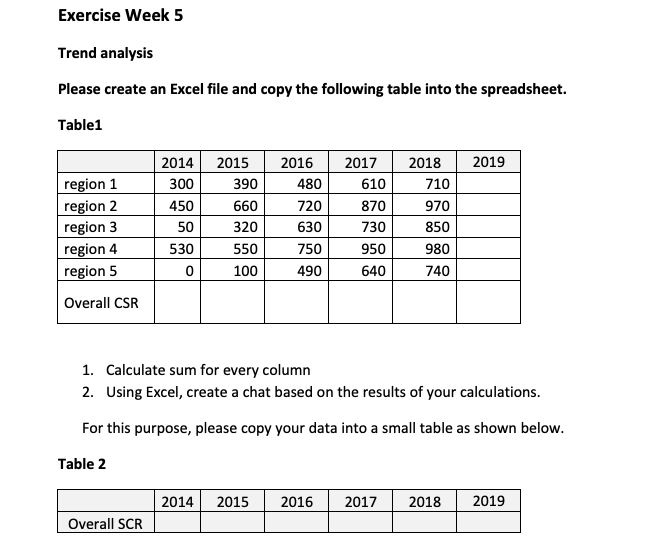
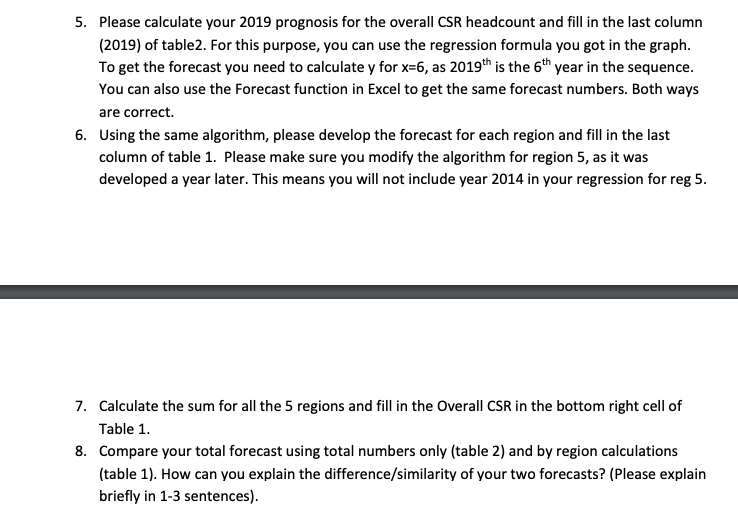
Exercise Week 5 Trend analysis Please create an Excel file and copy the following table into the spreadsheet. Table1 2014 2015 2016 2017 2018 2019 region 1 300 390 480 610 710 region 2 450 660 720 870 970 region 3 50 320 630 730 850 region 4 530 550 750 950 980 region 5 0 100 490 640 740 Overall CSR 1. Calculate sum for every column 2. Using Excel, create a chat based on the results of your calculations. For this purpose, please copy your data into a small table as shown below. Table 2 2014 2015 2016 2017 2018 2019 Overall SCR5. Please calculate your 2019 prognosis for the overall CSR headcount and fill in the last column (2019) of table2. For this purpose, you can use the regression formula you got in the graph. To get the forecast you need to calculate y for x=6, as 2019" is the 6" year in the sequence. You can also use the Forecast function in Excel to get the same forecast numbers. Both ways are correct. 6. Using the same algorithm, please develop the forecast for each region and fill in the last column of table 1. Please make sure you modify the algorithm for region 5, as it was developed a year later. This means you will not include year 2014 in your regression for reg 5. 7. Calculate the sum for all the 5 regions and fill in the Overall CSR in the bottom right cell of Table 1. 8. Compare your total forecast using total numbers only (table 2) and by region calculations (table 1). How can you explain the difference/similarity of your two forecasts? (Please explain briefly in 1-3 sentences)
Step by Step Solution
There are 3 Steps involved in it

Get step-by-step solutions from verified subject matter experts
 Study Help