







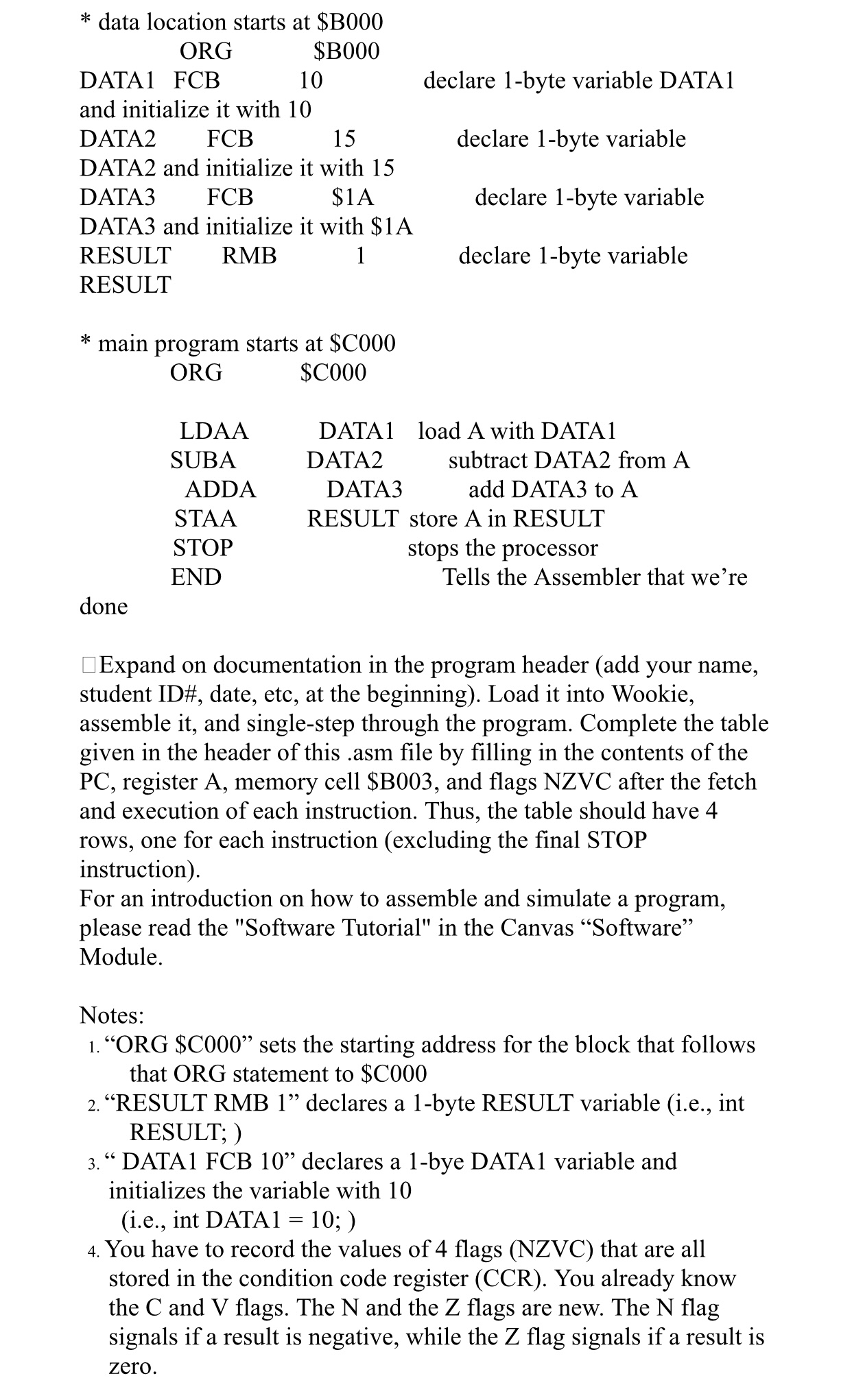
Question: data location starts at $ B 0 0 0 ORG , $ B 0 0 0 DATA 1 FCB 1 0 declare 1 - byte
data location starts at $
ORG $
DATA FCB declare byte variable DATA
and initialize it with
DATA FCB declare byte variable
DATA and initialize it with
DATA FCB $A declare byte variable
DATA and initialize it with $
RESULT RMB declare byte variable
RESULT
main program starts at $
ORG $
LDAA DATA load A with DATA
SUBA DATA subtract DATA from A
ADDA DATA add DATA to A
STAA RESULT store A in RESULT
STOP stops the processor
END Tells the Assembler that we're
done
Expand on documentation in the program header add your name, student ID# date, etc, at the beginning Load it into Wookie, assemble it and singlestep through the program. Complete the table given in the header of this asm file by filling in the contents of the PC register A memory cell $B and flags NZVC after the fetch and execution of each instruction. Thus, the table should have rows, one for each instruction excluding the final STOP instruction
For an introduction on how to assemble and simulate a program, please read the "Software Tutorial" in the Canvas "Software" Module.
Notes:
"ORG $C sets the starting address for the block that follows that ORG statement to $
"RESULT RMB declares a byte RESULT variable ie int RESULT;
DATA FCB declares a bye DATA variable and initializes the variable with ie int DATA;
You have to record the values of flags NZVC that are all stored in the condition code register CCR You already know the C and V flags. The N and the Z flags are new. The N flag signals if a result is negative, while the Z flag signals if a result is zero. I have the values, but need to confirm if my aswer is correct
Step by Step Solution
There are 3 Steps involved in it
1 Expert Approved Answer
Step: 1 Unlock

Question Has Been Solved by an Expert!
Get step-by-step solutions from verified subject matter experts
Step: 2 Unlock
Step: 3 Unlock
 Study Help