







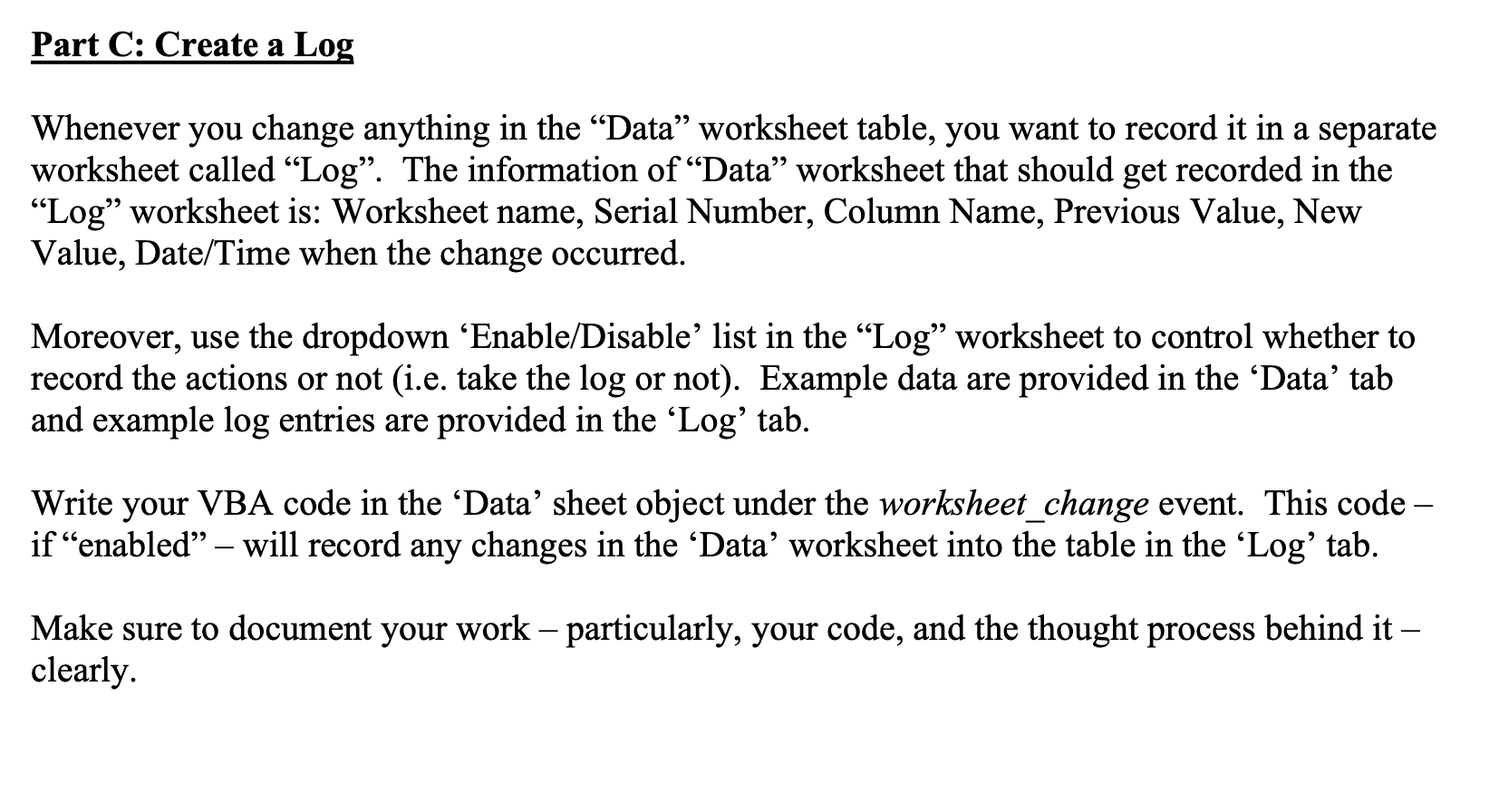
Question: Data! Log worksheet! Part C: Create a Log Whenever you change anything in the Data worksheet table, you want to record it in a separate
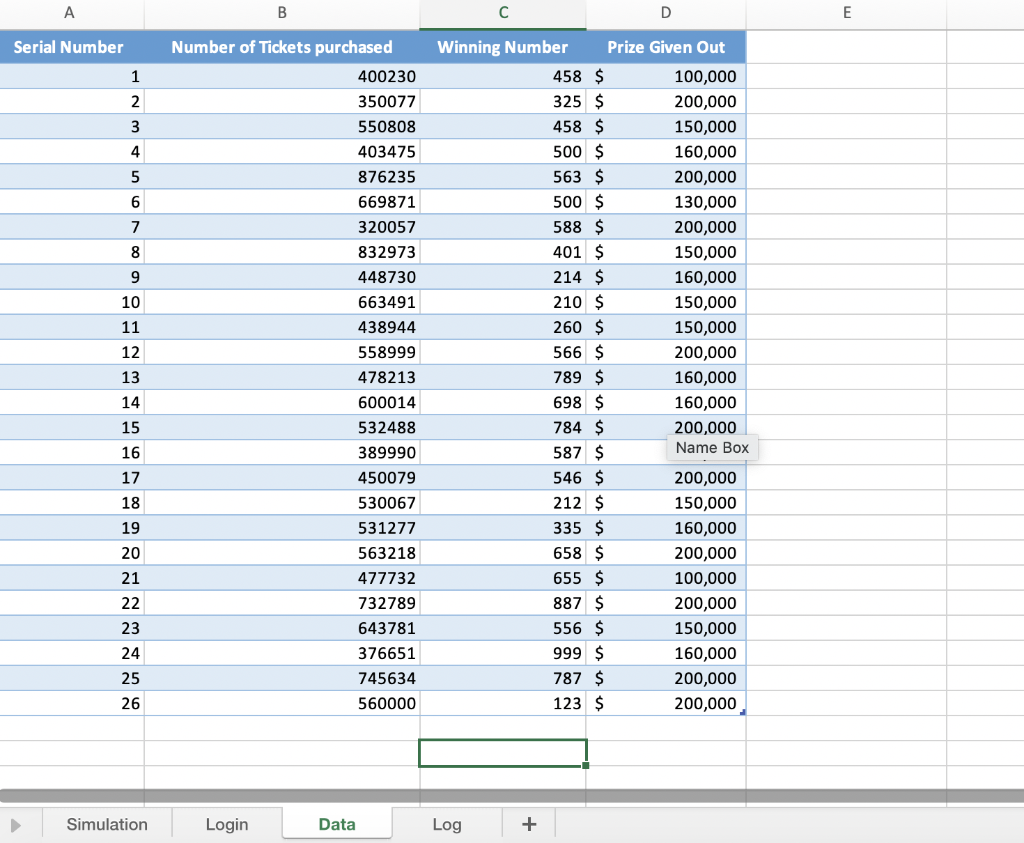
 Data!
Data!
Log worksheet!
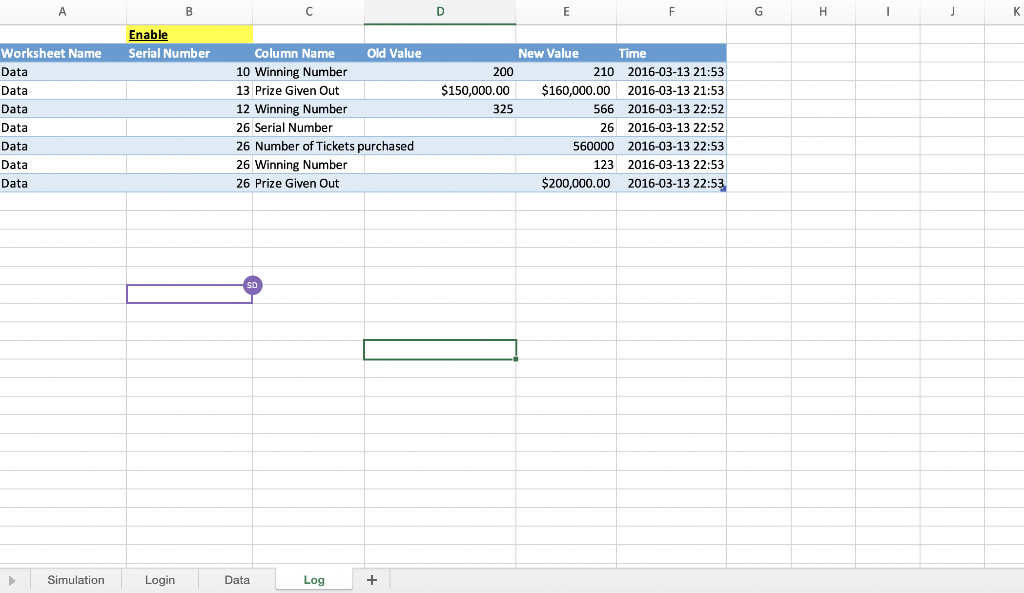
Part C: Create a Log Whenever you change anything in the Data worksheet table, you want to record it in a separate worksheet called Log. The information of Data worksheet that should get recorded in the Log worksheet is: Worksheet name, Serial Number, Column Name, Previous Value, New Value, Date/Time when the change occurred. Moreover, use the dropdown Enable/Disable list in the Log worksheet to control whether to record the actions or not (i.e. take the log or not). Example data are provided in the Data' tab and example log entries are provided in the Log' tab. Write your VBA code in the Data sheet object under the worksheet_change event. This code if enabled will record any changes in the Data' worksheet into the table in the Log' tab. Make sure to document your work particularly, your code, and the thought process behind it clearly A B D E Serial Number 1 2 3 4 5 6 7 8 9 10 11 12 13 14 Number of Tickets purchased 400230 350077 550808 403475 876235 669871 320057 832973 448730 663491 438944 558999 478213 600014 532488 389990 450079 530067 531277 563218 477732 732789 643781 376651 745634 Winning Number Prize Given Out 458 $ 100,000 325 $ 200,000 458 $ 150,000 500 $ 160,000 563 $ 200,000 500 $ 130,000 588 $ 200,000 401 $ 150,000 214 $ 160,000 210 $ 150,000 260 $ 150,000 566 $ 200,000 789 $ 160,000 698 $ 160,000 784 $ 200,000 587 $ Name Box 546 $ 200,000 212 $ 150,000 335 $ 160,000 658 $ 200,000 655 $ 100,000 887 $ 200,000 556 $ 150,000 999 $ 160,000 787 $ 200,000 123 $ 200,000 15 16 17 18 19 20 21 22 23 24 25 26 560000 Simulation Login Data Log + A B F G H 1 Enable Serial Number Worksheet Name Data Data Data Data Data Data Data Column Name Old Value 10 Winning Number 13 Prize Given Out 12 Winning Number 26 Serial Number 26 Number of Tickets purchased 26 Winning Number 26 Prize Given Out New Value Time 200 210 2016-03-13 21:53 $150,000.00 $160,000.00 2016-03-13 21:53 325 566 2016-03-13 22:52 26 2016-03-13 22:52 560000 2016-03-13 22:53 123 2016-03-13 22:53 $200,000.00 2016-03-13 22:53 Simulation Login Data Log + Part C: Create a Log Whenever you change anything in the Data worksheet table, you want to record it in a separate worksheet called Log. The information of Data worksheet that should get recorded in the Log worksheet is: Worksheet name, Serial Number, Column Name, Previous Value, New Value, Date/Time when the change occurred. Moreover, use the dropdown Enable/Disable list in the Log worksheet to control whether to record the actions or not (i.e. take the log or not). Example data are provided in the Data' tab and example log entries are provided in the Log' tab. Write your VBA code in the Data sheet object under the worksheet_change event. This code if enabled will record any changes in the Data' worksheet into the table in the Log' tab. Make sure to document your work particularly, your code, and the thought process behind it clearly A B D E Serial Number 1 2 3 4 5 6 7 8 9 10 11 12 13 14 Number of Tickets purchased 400230 350077 550808 403475 876235 669871 320057 832973 448730 663491 438944 558999 478213 600014 532488 389990 450079 530067 531277 563218 477732 732789 643781 376651 745634 Winning Number Prize Given Out 458 $ 100,000 325 $ 200,000 458 $ 150,000 500 $ 160,000 563 $ 200,000 500 $ 130,000 588 $ 200,000 401 $ 150,000 214 $ 160,000 210 $ 150,000 260 $ 150,000 566 $ 200,000 789 $ 160,000 698 $ 160,000 784 $ 200,000 587 $ Name Box 546 $ 200,000 212 $ 150,000 335 $ 160,000 658 $ 200,000 655 $ 100,000 887 $ 200,000 556 $ 150,000 999 $ 160,000 787 $ 200,000 123 $ 200,000 15 16 17 18 19 20 21 22 23 24 25 26 560000 Simulation Login Data Log + A B F G H 1 Enable Serial Number Worksheet Name Data Data Data Data Data Data Data Column Name Old Value 10 Winning Number 13 Prize Given Out 12 Winning Number 26 Serial Number 26 Number of Tickets purchased 26 Winning Number 26 Prize Given Out New Value Time 200 210 2016-03-13 21:53 $150,000.00 $160,000.00 2016-03-13 21:53 325 566 2016-03-13 22:52 26 2016-03-13 22:52 560000 2016-03-13 22:53 123 2016-03-13 22:53 $200,000.00 2016-03-13 22:53 Simulation Login Data Log +
Step by Step Solution
There are 3 Steps involved in it

Get step-by-step solutions from verified subject matter experts
 Study Help