



Question: Data Store Data Dictionary Description (Database) Label ---------------- Name --------------- Entry Type ------------------ Alias--------------- Description/Comments/ Notes Add any relevant information regarding security (who can add,
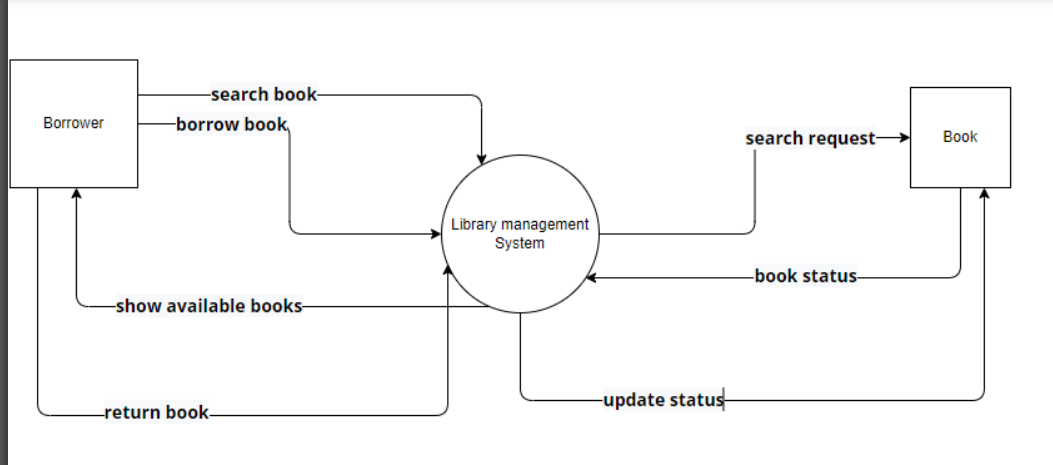
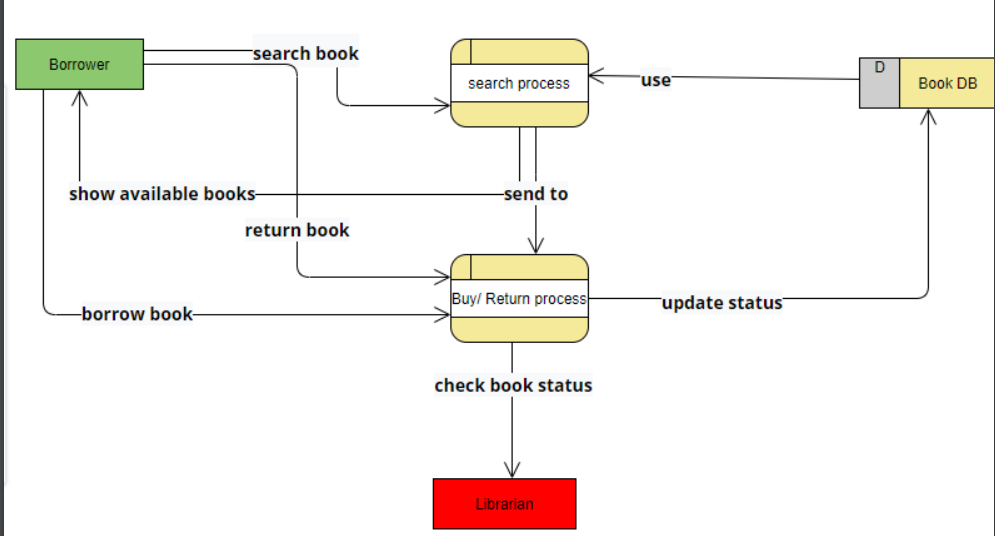
- Data Store Data Dictionary Description (Database)
Label ----------------
Name ---------------
Entry Type ------------------
Alias---------------
Description/Comments/ Notes
Add any relevant information regarding security (who can add, delete, update), how long you store the data, if it is used by any other systems.
Record Data Dictionary Description (Database Table)
Name ---------------
Alias ----------------------
Contents -----------------
Description/Comments/ Notes:
Add any relevant information regarding security (who can add, delete, update), how long you store the data, if it is used by any other systems, key field, other table(s) it links to, etc..
Data Element Data Dictionary Description (Key Field)
System: ---------------------
Alias --------------------
Name ---------------------------
Type/Length --------------------------
Output Format --------------------- Example: SS# 999-99-9999
Source ----------------------------- (system generated, user creates it as in a logonID)
Description/Comments/ Notes:
Add any relevant information regarding security (who can add, delete, update), does it link other tables, etc.
Data Flow Data Dictionary Description
Name --------------------------
Alias ---------------------
Origin --------------------------
Destination ------------------------
Record --------------------------
Volume/FrequencyHow much data and how many times per day will the data flow in the system?
Description/Comments/ Notes:
Add any relevant information regarding security (who can add, delete, update), is the data encrypted when it flows through the system, etc..
External Entity Data Dictionary Description (Interface)
Name -----------------
Alias -----------------------------
Description/Comments/ Notes:
Add any relevant information about the interface. What they do, what data they have access to, anything that can help identify the entity (department numbers, names).
Process Data Dictionary Description
ID --------------------/ ID# of the process (this is in the diagram)
Name -------------------------
Purpose -----------------------------------
Input Data Flow(s) ---------------------------
Output Data Flow(s) -----------------------------
Description/Comments/ Notes:
PSEUDOCODE Example:
If the UserID and Password are not in the database THEN
Display Invalid UserID and Password message
ELSE
Allow user to access the system.
-search book borrow book Borrower search request Book Library management System -book status -show available books- -update status -return book- search book Borrower D search process "use Book DB show available books- -send to return book Buy/ Return process -borrow book- update status check book status Librarian -search book borrow book Borrower search request Book Library management System -book status -show available books- -update status -return book- search book Borrower D search process "use Book DB show available books- -send to return book Buy/ Return process -borrow book- update status check book status LibrarianStep by Step Solution
There are 3 Steps involved in it

Get step-by-step solutions from verified subject matter experts