



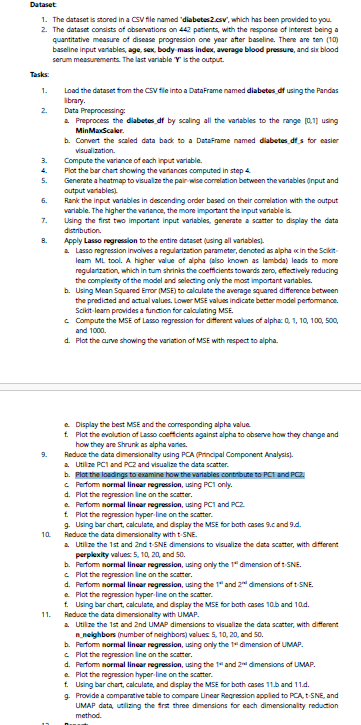
Question: Dataset The dataset is stored in a CSV file named 'diabetes 2 . CSV ' , which has been provided to you. The dataset consists
Dataset
The dataset is stored in a CSV file named 'diabetes CSV which has been provided to you.
The dataset consists of observations on patients, with the mesponse of interest being a
quantitative measure of disesse progression one year after baseline. There are ten
baseline input variables, age, sex, body mass index, average blood pressure, and sir blood
serum mescurments. The last variable is the output.
Task:
Lood the dataset fom the CSV file into a Dataframe named diabetes of using the Pandas
ibrary.
Data Preproceseing:
a Preproces the diabetes of by scaling all the variables to the range using
MinMaxscaler.
b Convert the scaled data back to a Dataframe named diabetes df s for easier
visualization.
Compute the variance of each input variable.
Plot the bar chart showing the varianoes computed in step
Generate a heatmap to visual ze the pair wise correlation between the variables input and
output variables
Rank the input variables in descending order based on their correlation with the output
variable. The higher the variance, the more important the input variable is
Uaing the first two important input variables, generate a scatter to display the data
distribution.
Apply Lasso rogression to the entire dataset uaing all variables
a Lasso regression involves a regularization parameter, dencted as alpha prop in the Scilat.
iesm ML tool. A higher value of aphs also known as lambda lesds to more
regulartaztion, which in tum shrinis the coefficients towards zero, effoctively reducing
the complenty of the model and selecting only the moet important variabies.
b Using Mean Squared ETror MSE to calculate the average squared difference between
the predicted and actual values. Lower MSE values indicate better model pertormanoe.
Scikitleam provides a function for calaulating MSE.
c Compute the MSE of Laseo regression for different values of alphac:
and
d Plat the curve showing the variation of MSE with respect to alpha.
e Display the best MSE and the corresponding alphe value
f Plat the evolution of Lasso coefficents against alpha to observe how they change and
how they are Shrunk as alpha varies.
Reduce the data dimensionality using PCA Principal Component Analysis
a Utilise and and visualize the data scatter.
b Plot the losdings to examine how the variables contribute to PCI and PC
c Perform normal linear regression, uing PCI only.
d Plat the regression line on the scatter.
e Perform normal linear regression, using PCI and PC
t Plat the regression hyperline on the scarter.
Using bar chart, calculate, and dsplay the ME for both cases c and d
Reduce the data dimensionality with SNE.
a Utilise the st and nd t SNE dimensions to visualize the data scatter, with different
porplexity values and
b Perform normal linear regression, using only the dimencion of :SNE.
c Plot the regression line on the scatter.
d Pertomn normal linear regression, wing the and dimensions of NE
e Plat the regression hyperline on the scarter.
t Using bar chart, calculate, and display the MSE for both cases b and d
Reduce the data dimersionality with UMAP.
a Utiline the st and nd UMAP dimensions to visualize the data scatter, with different
nneighbors number of neighbors values and
b Perform normal linear regression, ueing only the dimencion of UMAP.
c Plat the regression line on the scatter.
d Portomn normal linear regression, uing the and dimensions of UMAP.
e Plat the regression hyperline on the scarter.
t Using bar chart, calculate, and display the MSE for both cases b and d
Provide a comparative table to compare Linear Recression appled to RCA, tSNE, and
UMAP data, usilizing the frst three dimensions for each dimeneionality reduction
method.
Step by Step Solution
There are 3 Steps involved in it
1 Expert Approved Answer
Step: 1 Unlock

Question Has Been Solved by an Expert!
Get step-by-step solutions from verified subject matter experts
Step: 2 Unlock
Step: 3 Unlock