







Question: Deadline: 2 2 December 2 0 2 4 , 2 3 : 5 9 PM 1 . Introduction In this lab, you will build a
Deadline: December : PM
Introduction
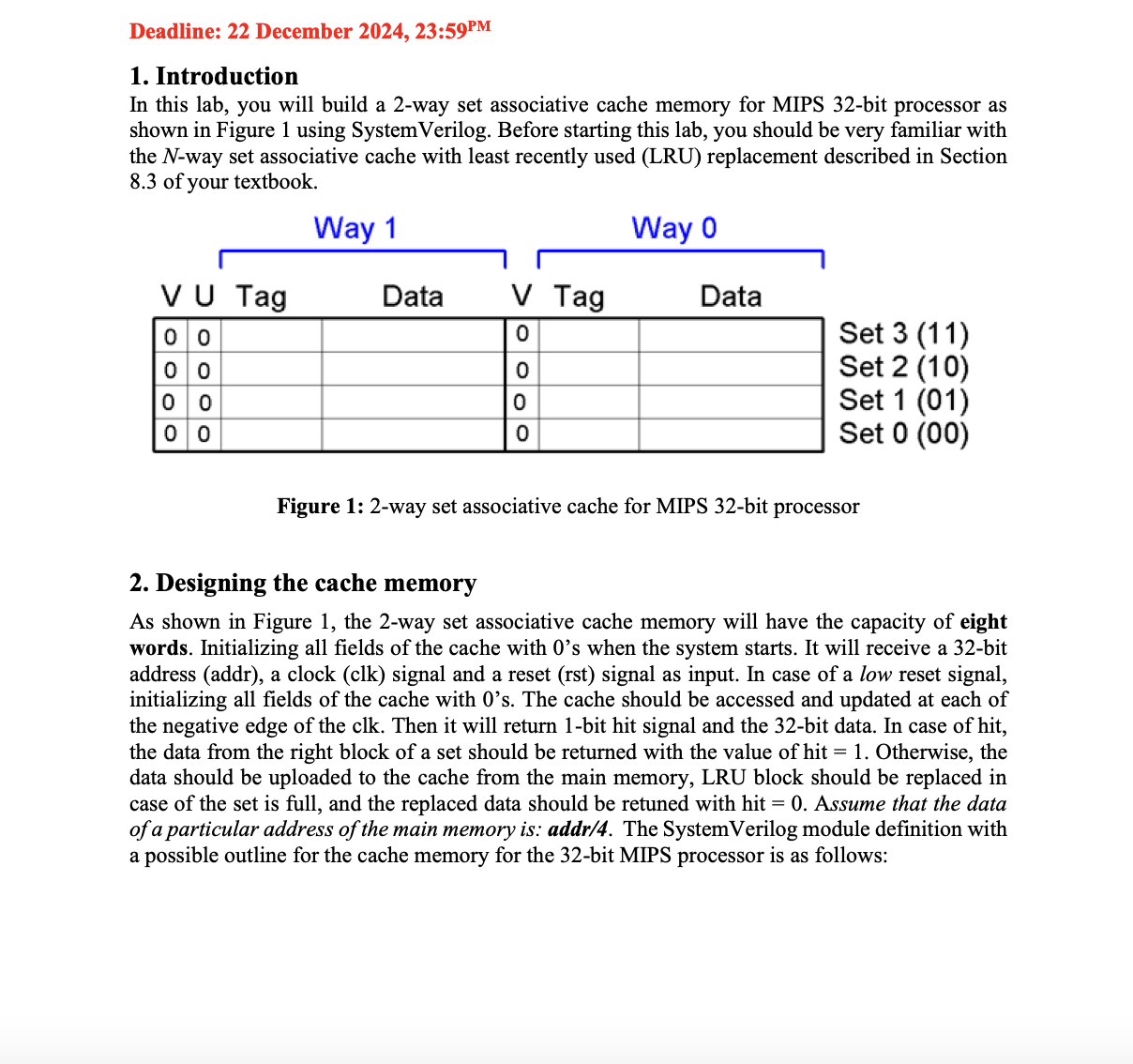
In this lab, you will build a way set associative cache memory for MIPS bit processor as shown in Figure using SystemVerilog. Before starting this lab, you should be very familiar with the N way set associative cache with least recently used LRU replacement described in Section of your textbook.
Set Set Set Set
Figure : way set associative cache for MIPS bit processor
Designing the cache memory
As shown in Figure the way set associative cache memory will have the capacity of eight words. Initializing all fields of the cache with s when the system starts. It will receive a bit address addr a clock clk signal and a reset rst signal as input. In case of a low reset signal, initializing all fields of the cache with s The cache should be accessed and updated at each of the negative edge of the clk Then it will return bit hit signal and the bit data. In case of hit, the data from the right block of a set should be returned with the value of hit Otherwise, the data should be uploaded to the cache from the main memory, LRU block should be replaced in case of the set is full, and the replaced data should be retuned with hit Assume that the data of a particular address of the main memory is: addr The SystemVerilog module definition with a possible outline for the cache memory for the bit MIPS processor is as follows:
module cache input logic : addr, input logic clk rst output logic : out, output logic hit ;
Define necessary logics here
Initializing all fields of the cache with s when the system starts
initial
begin
write your code here
end
Initializing all fields of the cache with s in case of a low reset signal
always @
begin
if rst b
begin
write your code here
end
end
The cache should be accessed and updated at each of the negative edge of the clk
always @negedge clk
begin
ifrst b
begin
write your code here
end
end
endmodule
Testing the cache memory
Simulate your cache with EDA Playground. Be sure to add all of the sv files. Now run the test bench as given below also uploaded on LMS as testBenchpStudent.sv:
Testbench for Way set Associate cache for MIPS processor
saiful.islam@tedu.edu.tr Dec
timescale nsps
module tb;
logic clk rst;
logic: addr;
logic: out;
logic hit;
int tests errors ;
cache dutaddraddr
clkclk
rstrst
outout
hithit
;
always # clk ~clk;
initial
begin
clk b;
rst b;
addr h; #
tests tests;
$strobeResult: hit b data xx hit, out;
if hit & out
$strobeTest Successfull...;
else
begin
$strobeTest failed: Expected hit b data xx;
errors errors;
end #
addr h; #
tests tests;
$strobeResult: hit b data xx hit, out;
if hit & out
$strobeTest Successfull...;
else
begin
$strobeTest failed: Expected hit b data xx;
errors errors;
end #
addr h; #
tests tests;
$strobeResult: hit b data xx hit, out;
if hit & out
$strobeTest Successfull... ;
else
begin
$strobeTest failed: Expected hit b data xx;
errors errors;
end #
addr h; #
tests tests;
$strobeResult: hit b data xx hit, out;
if hit & out h
$strobeTest Successfull... ;
else
begin
$strobeTest failed: Expected hit b data xxh;
errors errors;
end #
Reset the cache
rst b;
#
rst b;
addr h; #
tests tests;
$strobeResult: hit b data xx hit, out;
if hit & out
$strobeTest Successfull...;
else
begin
$strobeTest failed: Expected hit b data xx;
errors errors;
end #
$displayt Total tests: d
tests;
$displayt Total errors: d
errors;
$display;
$finish;
end
endmodule
Step by Step Solution
There are 3 Steps involved in it
1 Expert Approved Answer
Step: 1 Unlock

Question Has Been Solved by an Expert!
Get step-by-step solutions from verified subject matter experts
Step: 2 Unlock
Step: 3 Unlock
 Study Help