







Question: Deciding Which Interface to Use You Do it Working with the Visual Studio IDE In the next steps, you use the IDE to create a
Deciding Which Interface to Use
You Do it
Working with the Visual Studio IDE
In the next steps, you use the IDE to create a Form with a Button and a Labe Your first console application in Chapter s "You Do It section displayed "Hello, world!" at the command prompt. This application displays "Hello, Visual World!" on a Form.
Open Microsoft Visual Studio. You might have a desktop shortcut you can doubleclick, or in Windows you can type the first few letters of Visual Studio in the "Ask me anything" search box, and then select it from the list of choices. Your steps might differ slightly from the ones listed here if you are using a different version of Visual Studio or a different operating system. If you are using a computing from the school's computing menu.
Within Visual Studio, select File from the main menu, then New and Project. Then, in the New Project window, select Visual C# and Windows Forms App. Refer to Figure Instead of using the default project name, use HelloVisualWorld, and select a location to store the project. Then click OK
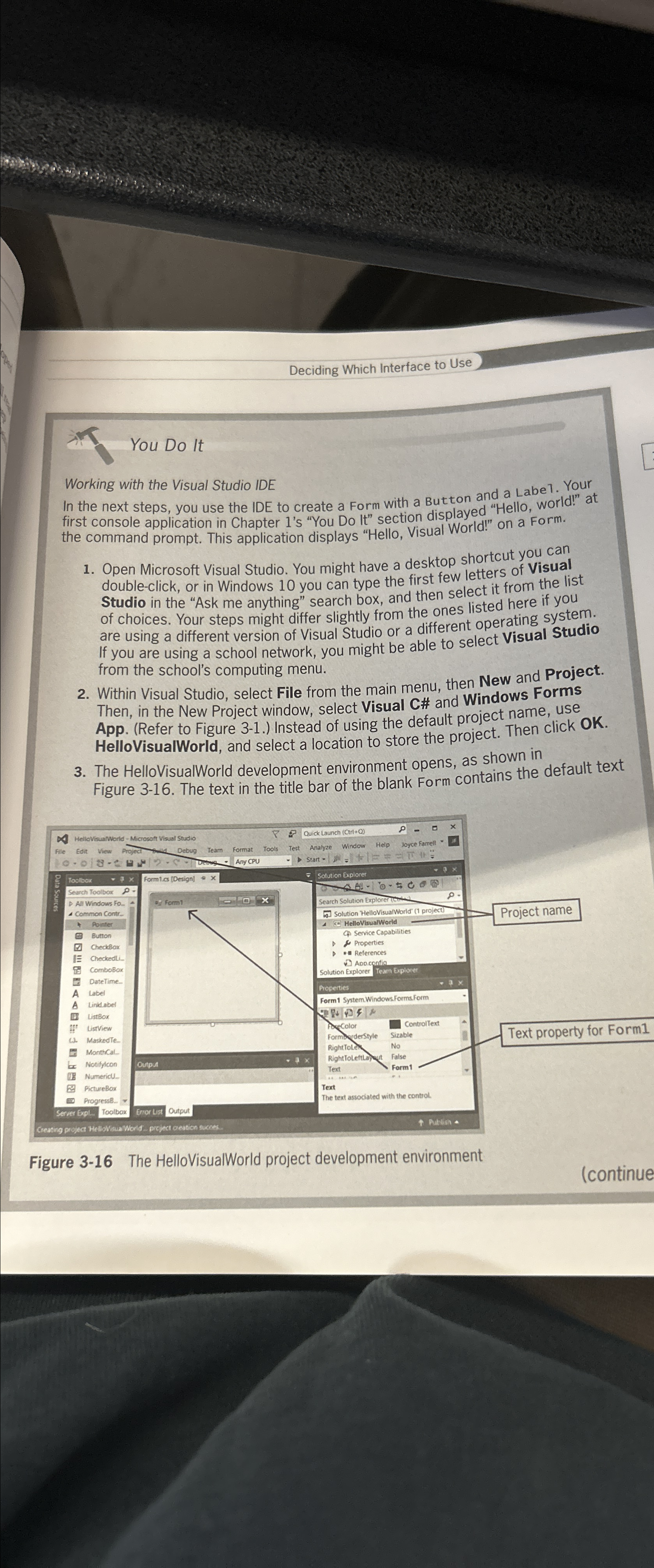
The HelloVisualWorld development environment opens, as shown in Figure The text in the title bar of the blank Form contains the default text
Figure The HelloVisualWorld project development environment
continue
Step by Step Solution
There are 3 Steps involved in it
1 Expert Approved Answer
Step: 1 Unlock

Question Has Been Solved by an Expert!
Get step-by-step solutions from verified subject matter experts
Step: 2 Unlock
Step: 3 Unlock
 Study Help