







Question: Decision-Making Issues in Gul Programs |Making Decisions You Do It t. Double click specialButton to create a specialButton ClickC shell Above the method, add an
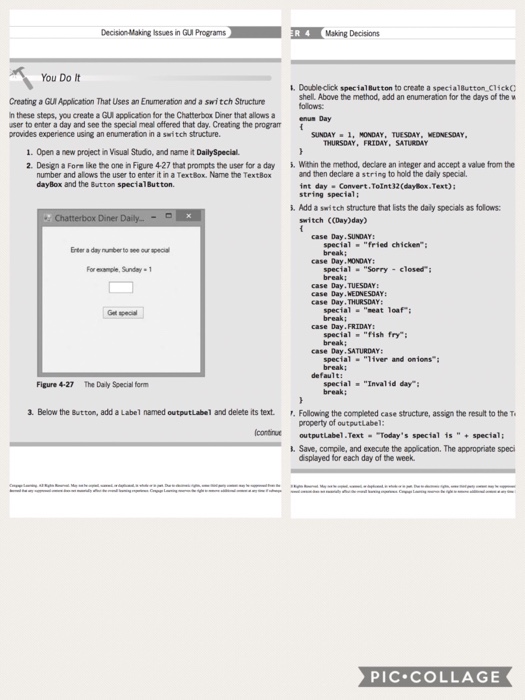
Decision-Making Issues in Gul Programs |Making Decisions You Do It t. Double click specialButton to create a specialButton ClickC shell Above the method, add an enumeration for the days of the w olows Creating a GUl Application That Uses an Enumeration and a switch Structure n these steps, you create a GUI application for the Chatterbox Diner that allows a user to enter a day and see the special meal offered that day. Creating the program provides experience using an enumeration in a switch structure. SUNDAY . 1 MONDAY, TUESDAY. MEINESDAY THURSDAY, FRIDAY, SATURDAY 1. Open a new project in Visual Studo, and name it DailySpecial 2. Design a Fore like the one in Figure 4-27 that prompts the user for a day Within the method, declare an integer and accept a value from the number and alows the user to enter it in a TextBox. Name the TextBox dayBox and the Button specialButton. and then declar astring to hold the daly specal. int day Convert.Toint32 (daylox.Text)i string special: . Add a switch structure that ists the daly specials as follows Diner switch CCDay)day) case Day.SUNDAY: special"fried chicken Erter a day nunber to see our special break; case Day.MONDAY: For example, Sunday special "Sorry closed case Day.TUESDAY case Day.WEDNESDAY: case Day. THURSDAY special"eat loaf break: case Day.FRIDAY: special"fish fry break; case Day.SATURDAY special "iver and onions special "Invalid day break: Figure 4-27 The Daly Special form 3. Below the Button, add a Label named outputLabel and delete its text. Following the completed case structure, assign the result to the T property of outputLabel outputLabel.Text Today's special is"special; continut . Save, compile, and execute the application, The appropriate speci displayed for each day of the week PIC.COLLAGE
Step by Step Solution
There are 3 Steps involved in it

Get step-by-step solutions from verified subject matter experts
 Study Help