







Question: def getKeys(formatString): '''formatString is a format string with embedded dictionary keys. Return a set containing all the keys from the format string.''' keyList = list()
def getKeys(formatString): '''formatString is a format string with embedded dictionary keys. Return a set containing all the keys from the format string.'''
keyList = list() end = 0 repetitions = formatString.count('{') for i in range(repetitions): start = formatString.find('{', end) + 1 # pass the '{' end = formatString.find('}', start) key = formatString[start : end] keyList.append(key) # may add duplicates
return set(keyList) # removes duplicates: no duplicates in a set
def addPick(cue, dictionary): # from madlibDict.py '''Prompt for a user response using the cue string, and place the cue-response pair in the dictionary. ''' promptFormat = "Enter a specific example for {name}: " prompt = promptFormat.format(name=cue) response = input(prompt) dictionary[cue] = response
def getUserPicks(cues): '''Loop through the collection of cue keys and get user choices. Return the resulting dictionary. ''' userPicks = dict() for cue in cues: addPick(cue, userPicks) return userPicks
def tellStory(storyFormat): '''storyFormat is a string with Python dictionary references embedded, in the form {cue}. Prompt the user for the mad lib substitutions and then print the resulting story with the substitutions. ''' cues = getKeys(storyFormat) userPicks = getUserPicks(cues) story = storyFormat.format(**userPicks) print(story)
def main(): originalStoryFormat = ''' Once upon a time, deep in an ancient jungle, there lived a {animal}. This {animal} liked to eat {food}, but the jungle had very little {food} to offer. One day, an explorer found the {animal} and discovered it liked {food}. The explorer took the {animal} back to {city}, where it could eat as much {food} as it wanted. However, the {animal} became homesick, so the explorer brought it back to the jungle, leaving a large supply of {food}.
The End ''' tellStory(originalStoryFormat) input("Press Enter to end the program.")
main()
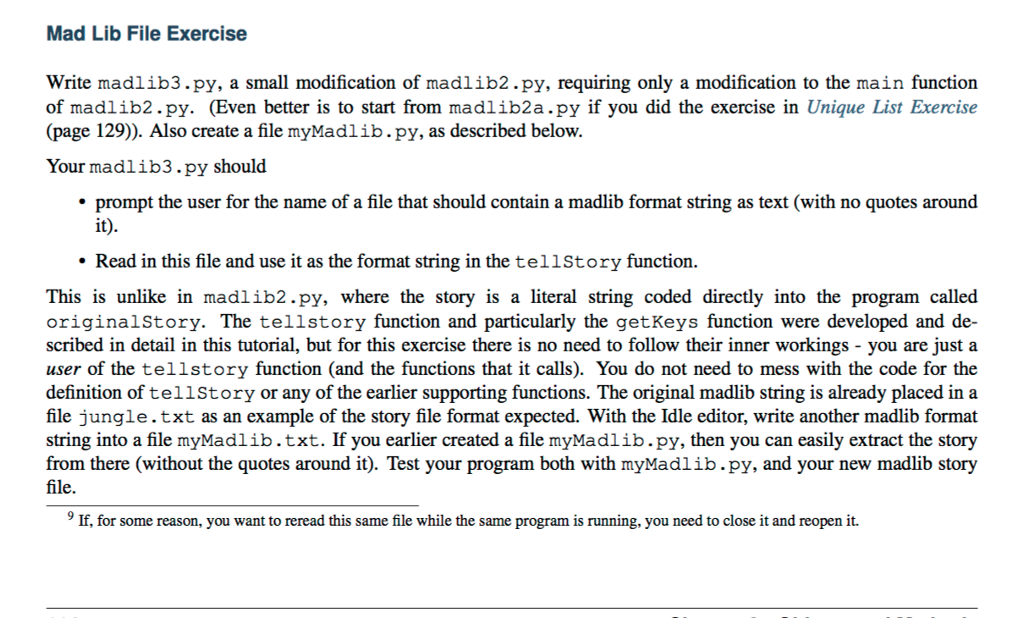
Mad Lib File Exercise Write madlib3.py, a small modification of madlib2.py, requiring only a modification to the main function of madlib2.??. (Even better is to start from madlib2a.py if you did the exercise in Unique List Exercise (page 129)). Also create a file myMadlib.py, as described below. Your madlib3.py should * prompt the user for the name of a file that should contain a madlib format string as text (with no quotes around it) Read in this file and use it as the format string in the tellStory function. This is unlike in madlib2.py, where the story is a literal string coded directly into the program called originalStory. The tellstory function and particularly the getKeys function were developed and de- scribed in detail in this tutorial, but for this exercise there is no need to follow their inner workings - you are just a user of the tellstory function (and the functions that it calls). You do not need to mess with the code for the definition of tellStory or any of the earlier supporting functions. The original madlib string is already placed in a file jungle.txt as an example of the story file format expected. With the Idle editor, write another madlib format string into a file myMadlib.txt. If you earlier created a file myMadlib.py, then you can easily extract the story from there (without the quotes around it). Test your program both with myMadlib.py, and your new madlib story 9 If, for some reason, you want to reread this same file while the same program is running, you need to close it and reopen it. Mad Lib File Exercise Write madlib3.py, a small modification of madlib2.py, requiring only a modification to the main function of madlib2.??. (Even better is to start from madlib2a.py if you did the exercise in Unique List Exercise (page 129)). Also create a file myMadlib.py, as described below. Your madlib3.py should * prompt the user for the name of a file that should contain a madlib format string as text (with no quotes around it) Read in this file and use it as the format string in the tellStory function. This is unlike in madlib2.py, where the story is a literal string coded directly into the program called originalStory. The tellstory function and particularly the getKeys function were developed and de- scribed in detail in this tutorial, but for this exercise there is no need to follow their inner workings - you are just a user of the tellstory function (and the functions that it calls). You do not need to mess with the code for the definition of tellStory or any of the earlier supporting functions. The original madlib string is already placed in a file jungle.txt as an example of the story file format expected. With the Idle editor, write another madlib format string into a file myMadlib.txt. If you earlier created a file myMadlib.py, then you can easily extract the story from there (without the quotes around it). Test your program both with myMadlib.py, and your new madlib story 9 If, for some reason, you want to reread this same file while the same program is running, you need to close it and reopen it
Step by Step Solution
There are 3 Steps involved in it

Get step-by-step solutions from verified subject matter experts
 Study Help