







Question: Default.aspx.cs: using System; using System.Collections.Generic; using System.Linq; using System.Web; using System.Web.UI; using System.Web.UI.WebControls; namespace XEx04Quotation { public partial class Default : System.Web.UI.Page { protected void
Default.aspx.cs:
using System; using System.Collections.Generic; using System.Linq; using System.Web; using System.Web.UI; using System.Web.UI.WebControls;
namespace XEx04Quotation { public partial class Default : System.Web.UI.Page { protected void Page_Load(object sender, EventArgs e) { UnobtrusiveValidationMode = UnobtrusiveValidationMode.None; }
protected void btnCalculate_Click(object sender, EventArgs e) { if (IsValid) { decimal salesPrice = Convert.ToDecimal(txtSalesPrice.Text); decimal discountPercent = Convert.ToDecimal(txtDiscountPercent.Text) / 100;
decimal discountAmount = salesPrice * discountPercent; decimal totalPrice = salesPrice - discountAmount;
lblDiscountAmount.Text = discountAmount.ToString("c"); lblTotalPrice.Text = totalPrice.ToString("c");
{ Session["Price"] = txtSalesPrice.Text; Session["Discount"] = lblDiscountAmount.Text; Session["Total"] = lblTotalPrice.Text; } } }
protected void confirmButton_Click(object sender, EventArgs e) {
Response.Redirect("~/Confirm.aspx"); }
} }
Confirm.aspx.cs:
using System; using System.Collections.Generic; using System.Linq; using System.Web; using System.Web.UI; using System.Web.UI.WebControls;
namespace XEx04Quotation { public partial class Confirm : System.Web.UI.Page { protected void Page_Load(object sender, EventArgs e) { UnobtrusiveValidationMode = UnobtrusiveValidationMode.None; {
lblSalesPrice.Text = Convert.ToDecimal(Session["Price"]).ToString("c"); lblDiscountAmount.Text = Session["Discount"].ToString(); lblTotalPrice.Text = Session["Total"].ToString();
} }
protected void sendbutton_Click(object sender, EventArgs e) { string name; string email;
name = txtName.Text.ToString(); email = txtEmail.Text.ToString();
if (txtName != null && txtName != null) { lblMessage.Text = "Quotation sent to "+ name + " at " + email + ".";
} else lblMessage.Text = "Click the Send Quotation button to send the quotation email";
} } }
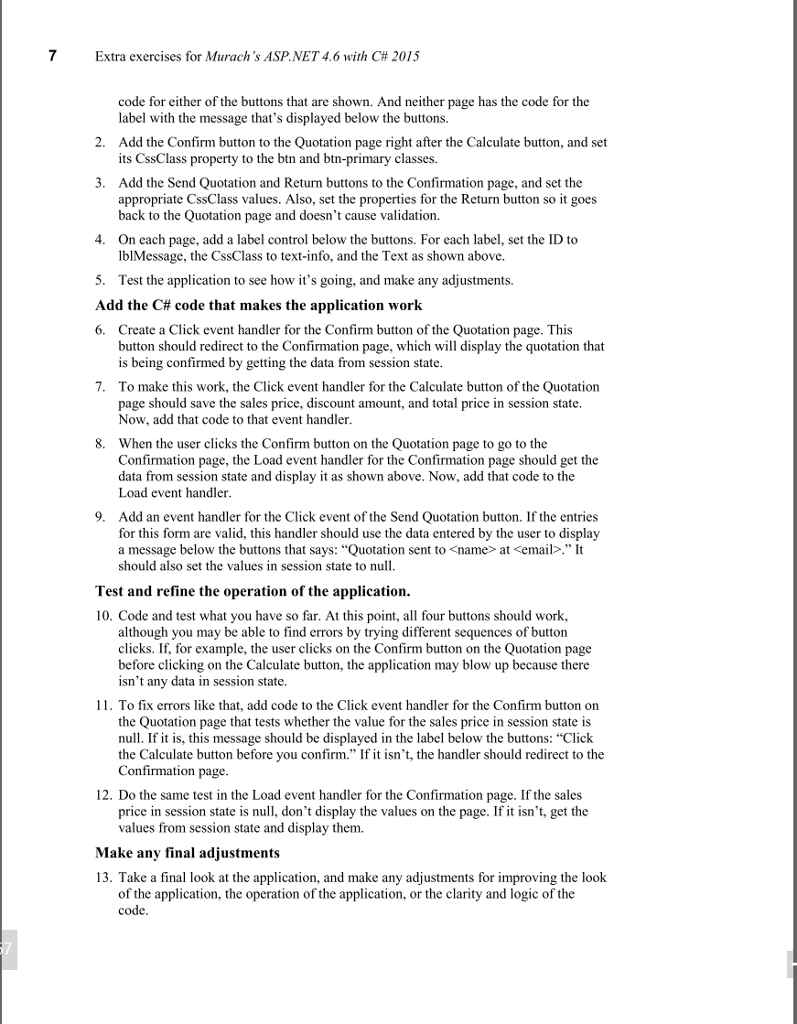
I am having trouble doing problems 10-13, I try to add the code but keep getting errors for the states.
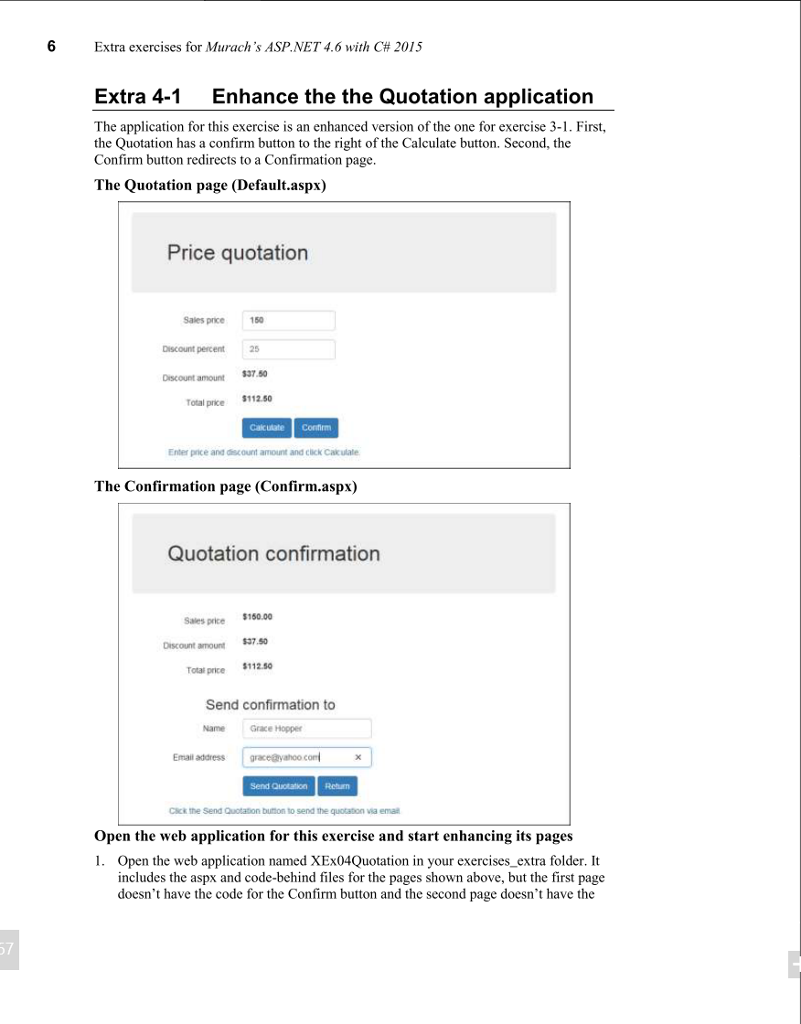
6 Extra exercises for Murach's ASP.NET 4.6 with C# 2015 Extra 4-1 Enhance the the Quotation application The application for this exercise is an enhanced version of the one for exercise 3-1. First, the Quotation has a confirm button to the right of the Calculate button. Second, the Confirm button redirects to a Confirmation page The Quotation page (Default.aspx) Price quotation Sales price 150 Discount percent25 Discount amount $7.50 Total price Calcuiate Confrm Enter price and aunt amour and Click Catulale The Confirmation page (Confirm.aspx) Quotation confirmation Sales price $150.00 Discount amount $37.5 Total price $112.0 Send confirmation to Name Grace Hopper Email address e@yahoo com Send Quctaton Return Click the Send Quotation burton to send the quotation via ema Open the web application for this exercise and start enhancing its pages 1. Open the web application named XEx04Quotation in your exercises_extra folder. It includes the aspx and code-behind files for the pages shown above, but the first page doesn't have the code for the Confirm button and the second page doesn't have the 7
Step by Step Solution
There are 3 Steps involved in it

Get step-by-step solutions from verified subject matter experts
 Study Help