







Question: define snakeLength $00 define snakeHeadL $10 define snakeHeadH $11 define snakeBodyStart $12 init - Initialize all values and set up loop - - Main game
 define snakeLength $00
define snakeHeadL $10
define snakeHeadH $11
define snakeBodyStart $12
init
- Initialize all values and set up
loop - - Main game loop
- updateSnake- Updates the snake values
- shiftValues - Shift values down the queue line
- updateHead - Update head pixel (this is where we add #$20)
- incHead - Increment snake head pixel if carry flag set
- gameCheck - Check to see if snake head hiByte is 06 or not
- drawSnake - Draws the snake based on the updated values
Here is the 6502 js
http://creativetechguy.com/utilityprograms/6502js/6502simulator
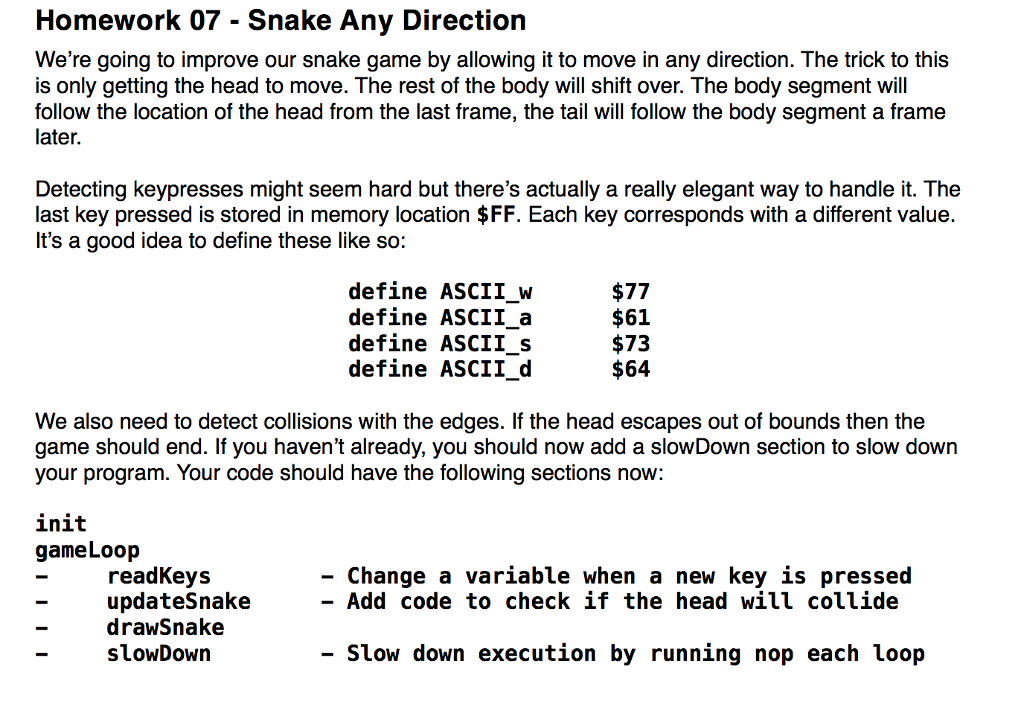
Homework 07 Snake Any Direction We're going to improve our snake game by allowing it to move in any direction. The trick to this is only getting the head to move. The rest of the body will shift over. The body segment will follow the location of the head from the last frame, the tail will follow the body segment a frame later. Detecting keypresses might seem hard but there's actually a really elegant way to handle it. The last key pressed is stored in memory location $FF. Each key corresponds with a different value It's a good idea to define these like so: define ASCII w $77 define ASCII a $61 define ASCII s $73 define ASCII d $64 We also need to detect collisions with the edges. If the head escapes out of bounds then the game should end. If you haven't already, you should now add a slowDown section to slow down your program. Your code should have the following sections now: init game Loop Change a variable when a new key is pressed readKeys updatesnake Add code to check if the head will collide drawSnake slowDown Slow down execution by running nop each loop Homework 07 Snake Any Direction We're going to improve our snake game by allowing it to move in any direction. The trick to this is only getting the head to move. The rest of the body will shift over. The body segment will follow the location of the head from the last frame, the tail will follow the body segment a frame later. Detecting keypresses might seem hard but there's actually a really elegant way to handle it. The last key pressed is stored in memory location $FF. Each key corresponds with a different value It's a good idea to define these like so: define ASCII w $77 define ASCII a $61 define ASCII s $73 define ASCII d $64 We also need to detect collisions with the edges. If the head escapes out of bounds then the game should end. If you haven't already, you should now add a slowDown section to slow down your program. Your code should have the following sections now: init game Loop Change a variable when a new key is pressed readKeys updatesnake Add code to check if the head will collide drawSnake slowDown Slow down execution by running nop each loop
Step by Step Solution
There are 3 Steps involved in it

Get step-by-step solutions from verified subject matter experts
 Study Help