







Question: #define _win32_WINT 0x0500 #include windows.h //#include Wingdi.h #include #include #include using namespace std; #define PI 3.14 #define NMAX 1000 int main() { ////////////////////////////////////////////////////////////////////////////////////// double G
#define _win32_WINT 0x0500 #include "windows.h" //#include "Wingdi.h" #include
using namespace std; #define PI 3.14 #define NMAX 1000 int main() {
////////////////////////////////////////////////////////////////////////////////////// double G = 9.81, ang = 53, v0 = 10, v0x, v0y; //Inicializar el angulo y la velocidad inicial v0x = v0 * cos(ang * PI / 180); //Velocidad inicial horizontal v0y = v0 * sin(ang * PI / 180); //Velocidad inicial vertical printf("Initial speed v0: %.2f. Angle : %.2f ", v0, ang); printf("v0x: %.2 ", v0x); printf("v0y: %2f ", v0y); double tFinal = 2 * v0y / G; //tiempo de la bala en el aire double yMax = v0y * tFinal / 2 - 0.5 * G * tFinal / 2 * tFinal / 2; printf("tFinal: %.2f ", tFinal); double Ts = 0.1; int N = (int)(tFinal / Ts); printf("Number of measures: %d ", (N + 1)); double x[NMAX + 2], y[NMAX + 2], t[NMAX + 2]; printf("t: secs. xpos. ypos. vx. vy "); for (int n = 0; n
///////////////////////////////////////////////////////////////////////////////
//////////////////////////////////////////////////////////////////////////////
cout
for (int i = 0; i
//Plot the(0,0) coordinate with 5 pixels to paint a bold point SetPixel(mydc, xmiddle, ymiddle, WHITE); //Plot 0,0 SetPixel(mydc, xmiddle - 1, ymiddle, WHITE); //Plot 0,0 SetPixel(mydc, xmiddle + 1, WHITE); //Plot 0,0 SetPixel(mydc, xmiddle, ymiddle - 1, WHITE); //Plot 0,0 SetPixel(mydc, xmiddle, ymiddle + 1, WHITE; //Plot 0,0
int pixel = 0, multip = 50; double xcur, ycur; for (int n = 0; n
// Plot 5 pixels per coordinate so it is bold on the screen SetPixel(mydc, (int)xcur, (int)ycur, WHITE); SetPixel(mydc, (int)xcur - 1, (int)ycur, WHITE); SetPixel(mydc, (int)xcur + 1, (int)ycur, WHITE); SetPixel(mydc, (int)xcur, (int)ycur - 1, WHITE); SetPixel(mydc, (int)xcur, (int)ycur + 1, WHITE);
//Plot each x unit in blue SetPixel(mydc, xmiddle + multip * n, ymiddle, BLUE); SetPixel(mydc, xmiddle + multip * n - 1, ymiddle, BLUE); SetPixel(mydc, xmiddle + multip * n + 1, ymiddle, BLUE); SetPixel(mydc, xmiddle + multip * n, ymiddle - 1, BLUE); SetPixel(mydc, xmiddle + multip * n, ymiddle + 1, BLUE);
//Plot eachy unit in blue if less than ymiddle if (rect.top + multip * n
//SetPixel (mydc,xmiddle,(int)ycur, BLUE); pixel += 10; }
ReleaseDC(myconsole, mydc); cin.ignore(); return 0; }
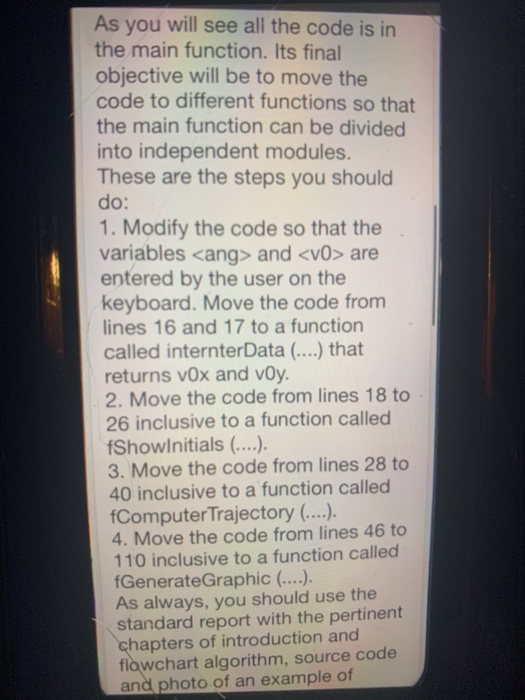
As you will see all the code is in the main function. Its final objective will be to move the code to different functions so that the main function can be divided into independent modules. These are the steps you should do: 1. Modify the code so that the variables
Step by Step Solution
There are 3 Steps involved in it

Get step-by-step solutions from verified subject matter experts
 Study Help