







Question: Deliverable A zipped NetBeans project with 2 classes app ZipCode Address Person Player Classes App - Creates a Player object po using the no-parameter constructor.
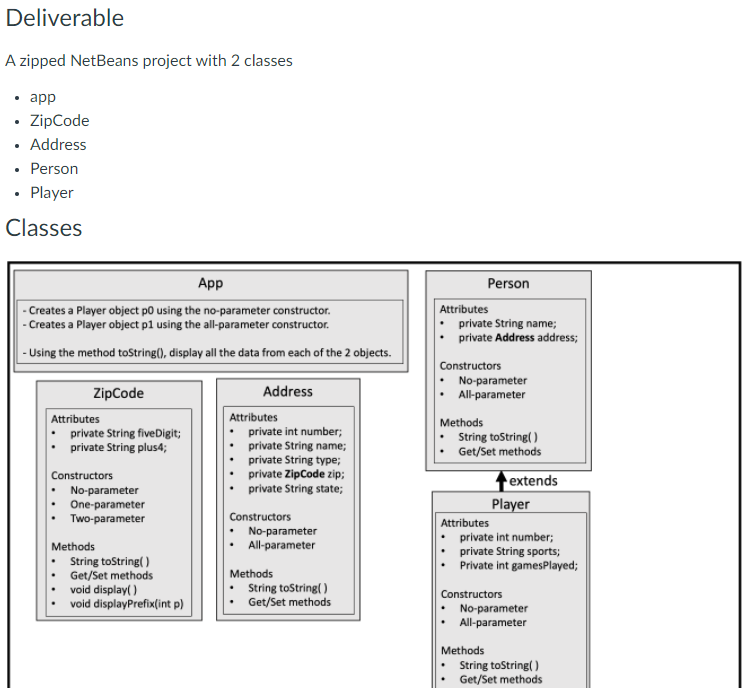
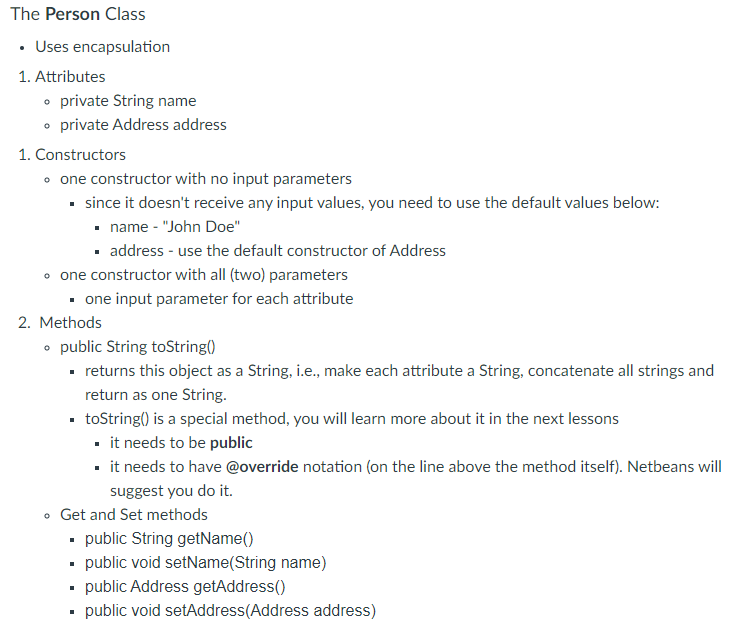
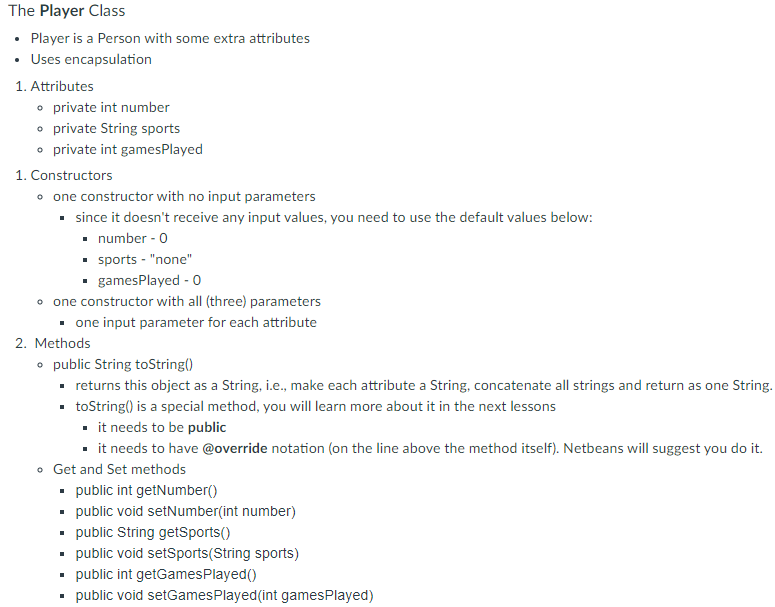
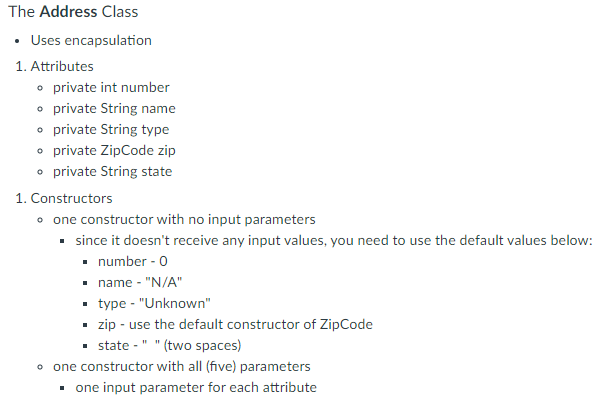
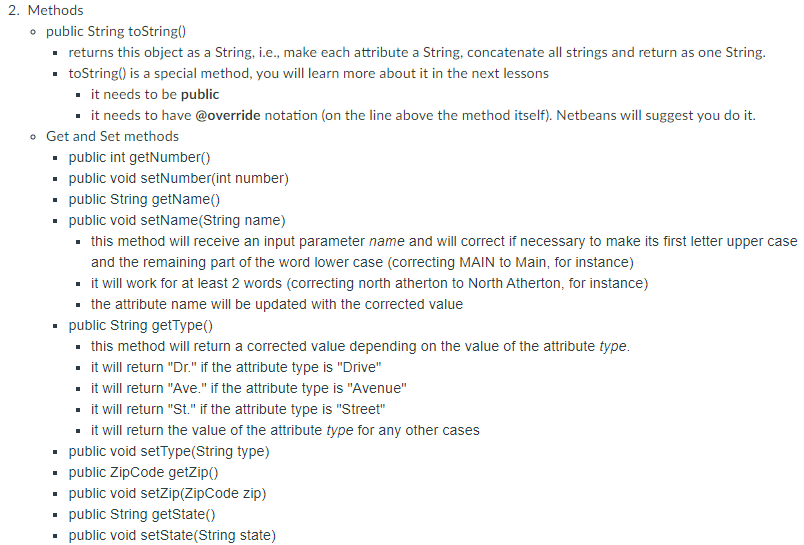
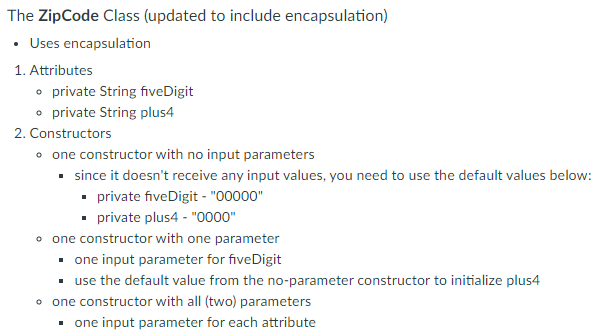
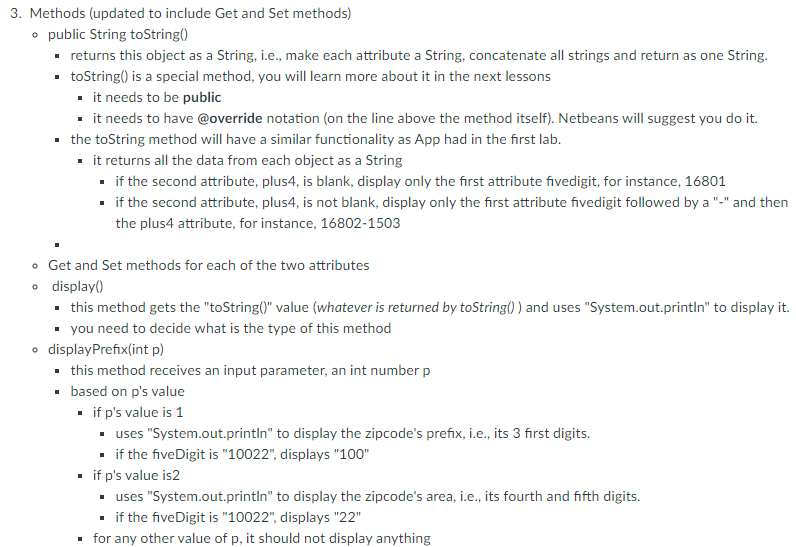
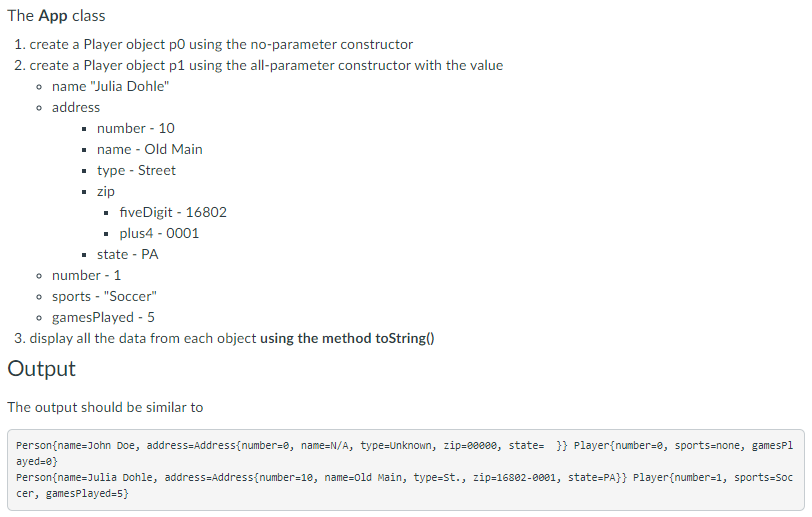
Deliverable A zipped NetBeans project with 2 classes app ZipCode Address Person Player Classes App - Creates a Player object po using the no-parameter constructor. - Creates a Player object pl using the all-parameter constructor - Using the method toString(), display all the data from each of the 2 objects. Address ZipCode Attributes private String fiveDigit; private String plus4; Constructors No-parameter One-parameter Two-parameter Methods String toString() Get/Set methods void display() void displayPrefix(int p) Attributes private int number; private String name; private String type; private Zip Code zip; private String state; Constructors No-parameter All-parameter Person Attributes private String name; private Address address; Constructors No-parameter All-parameter Methods String toString() Get/Set methods extends Player Attributes private int number; private String sports; Private int gamesPlayed; Methods String toString() Get/Set methods Constructors No-parameter All-parameter Methods String toString() Get/Set methods The Person Class Uses encapsulation 1. Attributes o private String name o private Address address 1. Constructors one constructor with no input parameters since it doesn't receive any input values, you need to use the default values below: name - "John Doe" address - use the default constructor of Address o one constructor with all (two) parameters one input parameter for each attribute 2. Methods o public String toString() returns this object as a String, i.e., make each attribute a String, concatenate all strings and return as one String. toString() is a special method, you will learn more about it in the next lessons . it needs to be public it needs to have @override notation (on the line above the method itself). Netbeans will suggest you do it. Get and Set methods public String getName() public void setName(String name) public Address getAddress() public void setAddress(Address address) The Player Class Player is a person with some extra attributes Uses encapsulation 1. Attributes private int number private String sports o private int gamesPlayed 1. Constructors one constructor with no input parameters since it doesn't receive any input values, you need to use the default values below: number - 0 sports - "none" gamesPlayed - 0 o one constructor with all three) parameters one input parameter for each attribute 2. Methods public String toString() returns this object as a String, i.e., make each attribute a String, concatenate all strings and return as one String. .toString() is a special method, you will learn more about it in the next lessons it needs to be public it needs to have @override notation (on the line above the method itself). Netbeans will suggest you do it. Get and Set methods public int getNumber() public void setNumber(int number) public String getSports() public void setSports(String sports) public int getGamesPlayed public void setGamesPlayed (int gamesPlayed) The Address Class Uses encapsulation 1. Attributes private int number private String name private String type o private ZipCode zip private String state 1. Constructors one constructor with no input parameters since it doesn't receive any input values, you need to use the default values below: number - 0 name - "N/A" type - "Unknown" zip - use the default constructor of Zip Code state -" "(two spaces) one constructor with all (five) parameters one input parameter for each attribute 2. Methods . public String toString() returns this object as a String, i.e., make each attribute a String, concatenate all strings and return as one String. toString() is a special method, you will learn more about it in the next lessons it needs to be public it needs to have @override notation (on the line above the method itself). Netbeans will suggest you do it. . Get and Set methods public int getNumber() public void setNumber(int number) public String getName() public void setName(String name) this method will receive an input parameter name and will correct if necessary to make its first letter upper case and the remaining part of the word lower case (correcting MAIN to Main, for instance) it will work for at least 2 words (correcting north atherton to North Atherton, for instance) the attribute name will be updated with the corrected value public String getType() this method will return a corrected value depending on the value of the attribute type. it will return "Dr." if the attribute type is "Drive" it will return "Ave." if the attribute type is "Avenue" it will return "St." if the attribute type is "Street" - it will return the value of the attribute type for any other cases public void setType(String type) public ZipCode getZip public void setZip(ZipCode zip) public String getState() public void setState(String state) The Zip Code Class (updated to include encapsulation) Uses encapsulation 1. Attributes o private String fiveDigit private String plus4 2. Constructors o one constructor with no input parameters since it doesn't receive any input values, you need to use the default values below: private fiveDigit - "00000" private plus4 - "0000" o one constructor with one parameter . one input parameter for five Digit use the default value from the no-parameter constructor to initialize plus4 one constructor with all (two) parameters one input parameter for each attribute 3. Methods (updated to include Get and Set methods) public String toString() returns this object as a String, i.e., make each attribute a String, concatenate all strings and return as one String. .toString() is a special method, you will learn more about it in the next lessons it needs to be public . it needs to have moverride notation (on the line above the method itself). Netbeans will suggest you do it. the toString method will have a similar functionality as App had in the first lab. - it returns all the data from each object as a String if the second attribute, plus4, is blank, display only the first attribute fivedigit, for instance, 16801 if the second attribute, plus4, is not blank, display only the first attribute fivedigit followed by a "-" and then the plus4 attribute, for instance, 16802-1503 o Get and Set methods for each of the two attributes o display this method gets the "toString()" value (whatever is returned by toString()) and uses "System.out.println" to display it. you need to decide what is the type of this method displayPrefix(int p) this method receives an input parameter, an int number p based on p's value . if p's value is 1 uses "System.out.println" to display the zipcode's prefix, i.e., its 3 first digits. if the five Digit is "10022", displays "100" if p's value is2 uses "System.out.println" to display the zipcode's area, i.e., its fourth and fifth digits. - if the five Digit is "10022", displays "22" for any other value of p, it should not display anything The App class 1. create a Player object po using the no-parameter constructor 2. create a Player object p1 using the all-parameter constructor with the value o name "Julia Dohle" o address number - 10 name - Old Main type - Street zip fiveDigit - 16802 plus4 - 0001 state - PA o number - 1 sports - "Soccer" o gamesPlayed - 5 3. display all the data from each object using the method toString() Output The output should be similar to Person{name=John Doe, address=Address{number=e, name=N/A, type=Unknown, zip=880ce, state= }} Player(number=e, sports=none, gamespl ayed=0) Person{name=Julia Dohle, address Address(number=1e, name=old Main, type=St., zip=16802-6001, state=PA}} Player{number=1, sports-Soc cer, gamesPlayed=5}
Step by Step Solution
There are 3 Steps involved in it

Get step-by-step solutions from verified subject matter experts
 Study Help