







Question: Using Methods In this lab you will create and use methods in the ZipCode class. Deliverable A zipped NetBeans project with 2 classes app ZipCode
Using Methods
In this lab you will create and use methods in the ZipCode class.
Deliverable
A zipped NetBeans project with 2 classes
- app
- ZipCode
Classes
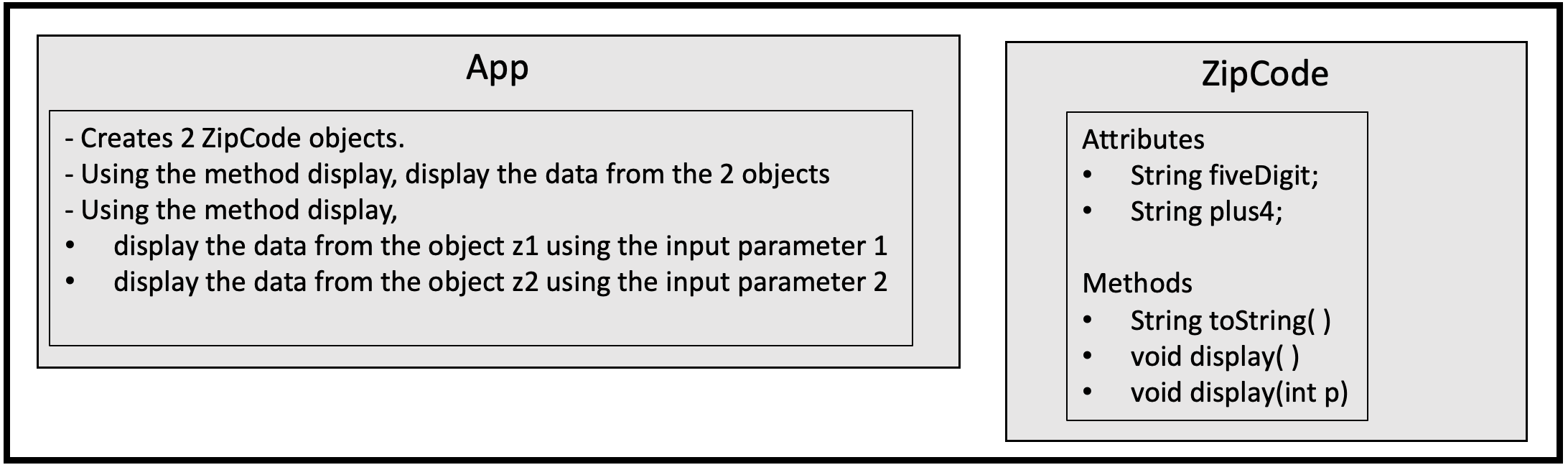
Suggestion:
- Use Netbeans to copy your last lab (Lab 01) to a new project called Lab02.
- Close Lab01.
- Work on the new Netbeans project Lab02 then.
The ZipCode Class
- Attributes
- String fiveDigit
- String plus4
- Methods
- public String toString()
- returns this object as a String, i.e., make each attribute a String, concatenate all strings and return as one String.
- toString() is a special method, you will learn more about it in the next lessons
- it needs to be public
- it needs to have @override notation (on the line above the method itself). Netbeans will suggest you do it.
- the toString method will have a similar functionality as App had in the first lab.
- it returns all the data from each object as a String
- if the second attribute, plus4, is blank, display only the first attribute fivedigit, for instance, 16801
- if the second attribute, plus4, is not blank, display only the first attribute fivedigit followed by a "-" and then the plus4 attribute, for instance, 16802-1503
- it returns all the data from each object as a String
- public ______ display()
- this method gets the "toString()" value (whatever is returned by toString() ) and uses "System.out.println" to display it.
- you need to decide what is the type of this method
- public _______ display(int p)
- display(int p) is overloading display() (see readings in Chapter 7)
- this method receives an input parameter, an int number p
- based on p's value
- if p's value is 1
- uses "System.out.println" to display the zipcode's prefix, i.e., its 3 first digits.
- if the fiveDigit is "10022", displays "100"
- if p's value is2
- uses "System.out.println" to display the zipcode's area, i.e., its fourth and fifth digits.
- if the fiveDigit is "10022", displays "22"
- for any other value of p, it should not display anything
- if p's value is 1
- public String toString()
The App class
- create 2 ZipCode objects called z1 and z2.
- z1 data
- fiveDigit - "90210"
- plus4 - "" (blank, no spaces)
- z2 data
- fiveDigit - 16802
- plus4 - 1503
- z1 data
- display all the data from each object using the method display() in ZipCode
- display the prefix of z1 (using input parameter value 1) using the method display(int p)
- display the area of z2 (using input parameter value 2) using the method display(int p)
Output
The output should be similar to
90210 16802-1503 Prefix = 902 Area = 02
App Zip Code - Creates 2 ZipCode objects. - Using the method display, display the data from the 2 objects - Using the method display, display the data from the object z1 using the input parameter 1 display the data from the object z2 using the input parameter 2 Attributes String five Digit; String plus4; Methods String toString() void display(). void display(int p)
Step by Step Solution
There are 3 Steps involved in it
1 Expert Approved Answer
Step: 1 Unlock

Question Has Been Solved by an Expert!
Get step-by-step solutions from verified subject matter experts
Step: 2 Unlock
Step: 3 Unlock
 Study Help