







Question: Demonstrate your ability to properly use the conditional instructions in MASM. Lab # 6 Assignment: Upload your . asm file that meets the requirements outlined
Demonstrate your ability to properly use the conditional instructions in MASM.
Lab # Assignment:
Upload your asm file that meets the requirements outlined below
For example, my asm file would be DPierceCSCILabasm
Lab # Requirements:
Use any trusted asm as a starting point to setup your MASM environment to write and debug your code.
If your submitted code DOES NOT build and RUN in MY debugger, your lab WILL NOT be scored.
Write an assembly language code that will see the video below :
Display a console window with a blue background and white text points
Prompt the user to enter an integer score between and points
Give the user an option to enter a zero to quit the application points
The number of correct entries should be accurately recorded points
If the user enters an integer outside of the acceptable range, alert the user of this error, but continue to receive more integers points
The number of incorrect entries should be accurately recorded points
Convert the integer to the proper grade based on the Syllabus scale below
Syllabus Grade Table
Once the user quits the integer entry mode enters zero the following records should be reported:
Display a message indicating the number of valid scores entered points
Display the correct number of valid scores entered by the user points
Display a message indicating the number of invalid scores points
Display the correct number of invalid scores entered by the user points
Proper space between console line entries through user interaction points
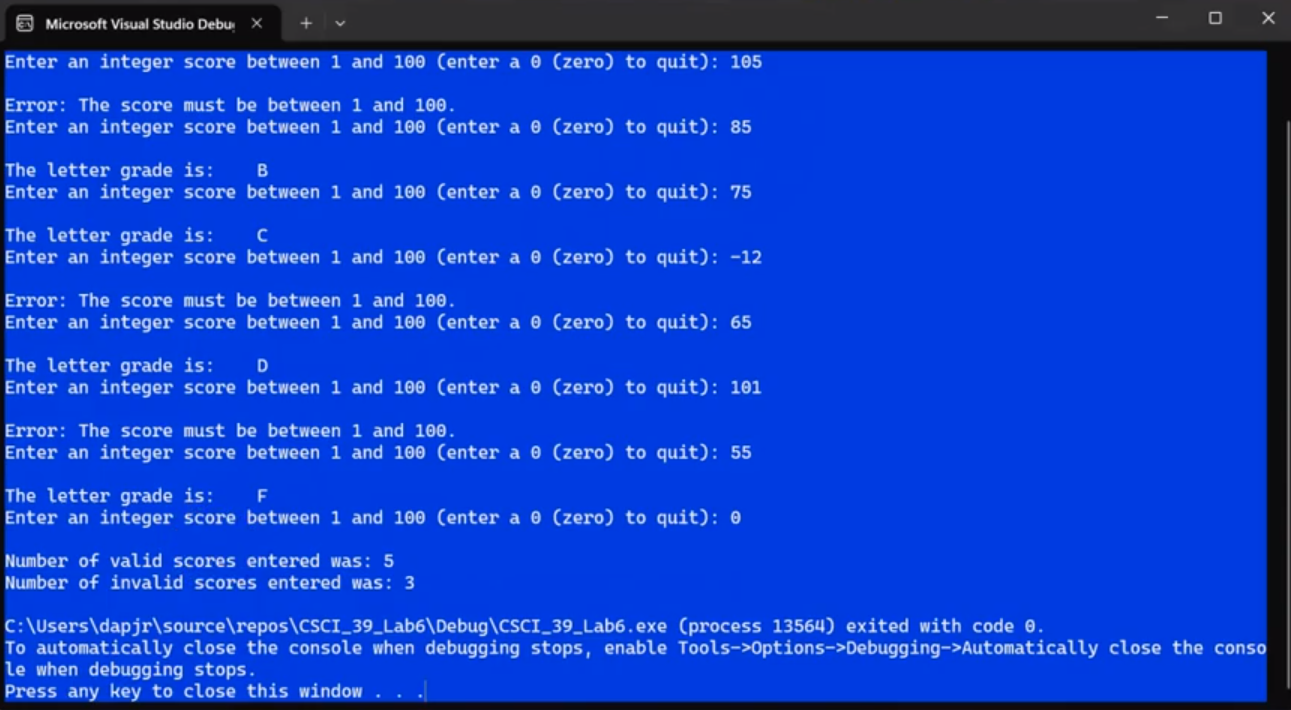
attached is the outcome picture
Enter an integer score between and enter a zero to quit:
Error: The score must be between and
Enter an integer score between and enter a zero to quit:
The letter grade is:
Enter an integer score between and enter a zero to quit:
The letter grade is:
Enter an integer score between and enter a zero to quit:
Error: The score must be between and
Enter an integer score between and enter a zero to quit:
The letter grade is:
Enter an integer score between and enter a zero to quit:
Error: The score must be between and
Enter an integer score between and enter a zero to quit:
The letter grade is:
Enter an integer score between and enter a zero to quit:
Number of valid scores entered was:
Number of invalid scores entered was:
C: UsersdapjrsourcereposCSCILabDebugCSCILabexe process exited with code
To automatically close the console when debugging stops, enable ToolsptionsDebuggingAutomatically close the conso
le when debugging stops.
Press any key to close this window
Step by Step Solution
There are 3 Steps involved in it
1 Expert Approved Answer
Step: 1 Unlock

Question Has Been Solved by an Expert!
Get step-by-step solutions from verified subject matter experts
Step: 2 Unlock
Step: 3 Unlock
 Study Help