







Question: Description: At the machine level, programs are sequences of bits that are interpreted by the computer to perform some computation. In this Machine Problem (
Description:
At the machine level, programs are sequences of bits that are interpreted by the computer to
perform some computation. In this Machine Problem MP you will construct a LC program at
the machine level to determine some characteristics of a value stored in memory.
Procedure:
Part Memory readwrite operation
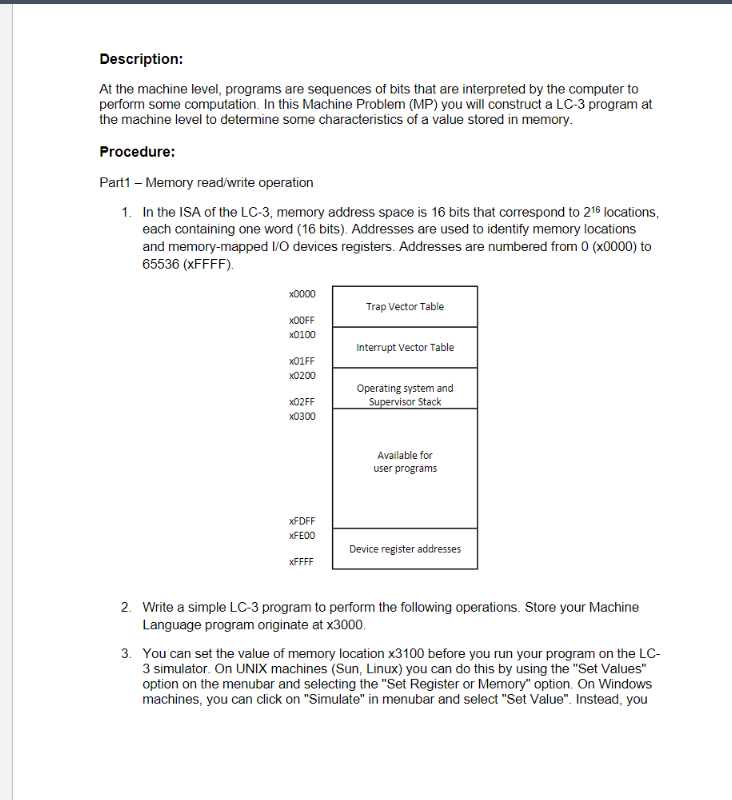
In the ISA of the LC memory address space is bits that correspond to locations,
each containing one word bits Addresses are used to identify memory locations
and memorymapped IO devices registers. Addresses are numbered from x to
xFFFF
x
Trap Vector Table
xFF
x
Interrupt Vector Table
xFF
x
Operating system and
xFF Supervisor Stack
x
Available for
user programs
xFDFF
xFE
Device register addresses
xFFFF
Write a simple LC program to perform the following operations. Store your Machine
Language program originate at x
You can set the value of memory location x before you run your program on the LC
simulator. On UNIX machines Sun Linux you can do this by using the "Set Values"
option on the menubar and selecting the "Set Register or Memory" option. On Windows
machines, you can click on "Simulate" in menubar and select "Set Value". Instead, you
can just press F and the "Set Value" dialog box will pop up Do not overwrite the
original value in x in any following steps unless otherwise mentioned.
First, determine if the content of memory location x is even or odd Store x in
memory location x if it is odd, or x if it is even.
Next, count the number of s in memory location x and store the count in x
Notes and Suggestions:
The first line of your programs must specify the memory address of the first instruction of
your program. LC simulator will place your program starting at that address. For this
assignment, you should place your program starting at xthe first line of your
program should contain the bit pattern
If you are using a Windows machine, use the LCEdit program to type in your programs.
On Sun and Linux workstations, pico, emacs, and vi are several of the text editors you
can use. Your program file needs to be in plain text format. Description:
At the machine level, programs are sequences of bits that are interpreted by the computer to
perform some computation. In this Machine Problem MP you will construct a LC program at
the machine level to determine some characteristics of a value stored in memory.
Procedure:
Part Memory readwrite operation
In the ISA of the LC memory address space is bits that correspond to locations,
each containing one word bits Addresses are used to identify memory locations
and memorymapped IO devices registers. Addresses are numbered from x to
xFFFF
Write a simple LC program to perform the following operations. Store your Machine
Language program originate at
You can set the value of memory location before you run your program on the LC
simulator. On UNIX machines Sun Linux you can do this by using the "Set Values"
option on the menubar and selecting the "Set Register or Memory" option. On Windows
machines, you can click on "Simulate" in menubar and select "Set Value". Instead, you can just press F and the "Set Value" dialog box will pop up Do not overwrite the
original value in in any following steps unless otherwise mentioned.
First, determine if the content of memory location is even or odd Store in
memory location if it is odd, or if it is even.
Next, count the number of s in memory location and store the count in
Notes and Suggestions:
The first line of your programs must specify the memory address of the first instruction of
your program. LC simulator will place your program starting at that address. For this
assignment, you should place your program starting at the first line of your
program should contain the bit pattern
If you are using a Windows machine, use the LCEdit program to type in your programs.
On Sun and Linux workstations, pico, emacs, and vi are several of the text editors you
can use. Your program file needs to be in plain text format.
Step by Step Solution
There are 3 Steps involved in it
1 Expert Approved Answer
Step: 1 Unlock

Question Has Been Solved by an Expert!
Get step-by-step solutions from verified subject matter experts
Step: 2 Unlock
Step: 3 Unlock
 Study Help